Words disappear in website after hyperlinked
-
Hello,
I have an issue with my hyperlinks. When I select a word in my article to link to another website, then it disappears in my website just like if the word didn't exist at all.
Example : If write "My neighbor is beautiful" and I decide to put a hyperlink on "neighbor", then on my website it becomes "My is beautiful". It just vanishes.
If someone has an idea.
Thank you very much.
-
Dear @Masepape1
can you post a link to your website?Do you maybe have the same background colour for the link-hover – so you do not see it anymore?
Best!
Marius -
Dear @Masepape1
can you post a link to your website?Do you maybe have the same background colour for the link-hover – so you do not see it anymore?
Best!
MariusHello @mariusjopen
Thanks for your response.
Unfortunately I haven't put my website online yet.
But no, my background is black and my text is white. I put 2 screenshots of a page of my website, one without hyperlinks and the other one with some names hyperlinked. They just disappear just like if they never existed. You can see the word "photography" going in the middle, centered just like if "Mateo Picard" was erased.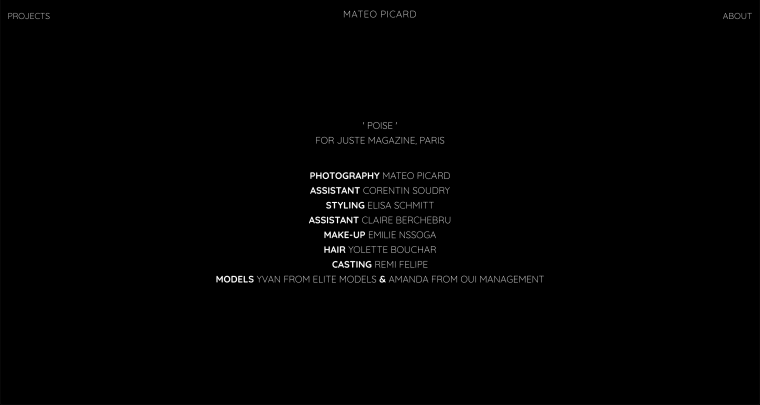
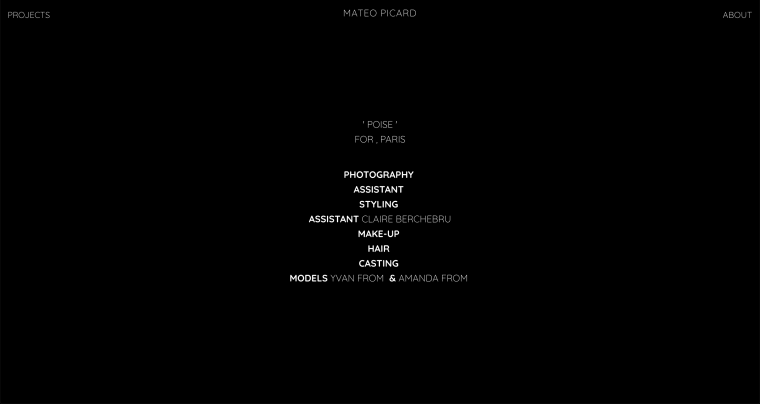
Thanks !
Matéo Picard.
-
Dear @Masepape1
maybe you can upload the website to a subdomain?Can you try to deactivate all your plugins and CUSTOM CSS code?
Best!
Marius

Hello! It looks like you're interested in this conversation, but you don't have an account yet.
Getting fed up of having to scroll through the same posts each visit? When you register for an account, you'll always come back to exactly where you were before, and choose to be notified of new replies (either via email, or push notification). You'll also be able to save bookmarks and upvote posts to show your appreciation to other community members.
With your input, this post could be even better 💗
Register Login