Hide/show-Button code not working anymore with update
-
Hi there
I'm using this code :<script>
jQuery(document).on("click", ".button-show", function(event) {
jQuery(".button-hide").toggleClass("button-show");
});
</script>With the new update I can still click & hide the button, but in the admin area, I can't see and edit my text anymore.
What can I do? Thank you
Best
Alessia -
Dear @alessia-pennetta
which text do you mean in the admin area?Best!
Marius
-
Dear Marius,
The text which is hidden and just pop up when you click on the I Button in the top in the front-end area. But this text isn't visible in the backend area/admin area.
In the Screenshot below you can see that there must be a text but unfortunately it's "invisble". (I just highlighted everything, so you can see) You can check the link of this project and I hope you can understand what I mean. The link of this project is: http://www.alessiapennetta.com/book-design/
Thank you
Best!
Alessia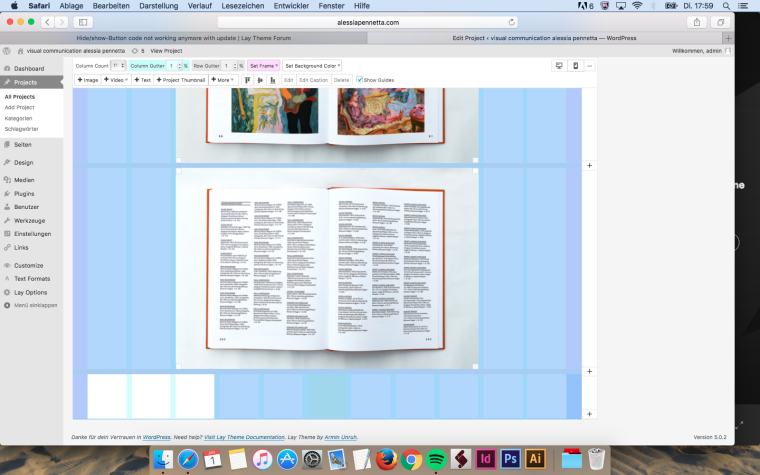
-
Dear @alessia-pennetta
so in the admin are you cannot see the textbox which you would see in the front-end when you click on more about?Just to be clear :-)
Best!
Marius
-
Dear Marius,
exactly. But i just found out the problem.
Because I had to put -100 or more on the y-axis the text disappears in the backend, but then it's on the right spot in the front end:) To bring it back I have to add some columns vertically, change the text and delete the columns again so that in the front-end it looks still the same.
Thanks anyway for your help :)
Best!
Alessia -
Dear @alessia-pennetta
I see. Maybe for this specific case you can use the CUSTOM CSS to change the positioning.Best!
Marius

Hello! It looks like you're interested in this conversation, but you don't have an account yet.
Getting fed up of having to scroll through the same posts each visit? When you register for an account, you'll always come back to exactly where you were before, and choose to be notified of new replies (either via email, or push notification). You'll also be able to save bookmarks and upvote posts to show your appreciation to other community members.
With your input, this post could be even better 💗
Register Login