Skip to content
  • Recent
  • Tags
  • Popular
  • Users
  • Search
Skins
  • Light
  • Brite
  • Cerulean
  • Cosmo
  • Flatly
  • Journal
  • Litera
  • Lumen
  • Lux
  • Materia
  • Minty
  • Morph
  • Pulse
  • Sandstone
  • Simplex
  • Sketchy
  • Spacelab
  • United
  • Yeti
  • Zephyr
  • Dark
  • Cyborg
  • Darkly
  • Quartz
  • Slate
  • Solar
  • Superhero
  • Vapor

  • Default (No Skin)
  • No Skin
Collapse

Lay Theme Forum

  1. Home
  2. Addons
  3. Carousel: making it not clickable?

Carousel: making it not clickable?

Scheduled Pinned Locked Moved Addons
19 Posts 5 Posters 3.4k Views 2 Watching
  • Oldest to Newest
  • Newest to Oldest
  • Most Votes
Reply
  • Reply as topic
Log in to reply
This topic has been deleted. Only users with topic management privileges can see it.
  • T
    T
    Theodoros
    wrote on last edited by
    #1

    Is it possible to have autoplay only in a simple way?

    1 Reply Last reply
    0
    • mariusjopenM
      mariusjopenM
      mariusjopen
      Global Moderator
      wrote on last edited by
      #2

      Dear @Theodoros
      have a look here:

      0_1554503631851_Bildschirmfoto 2019-04-06 um 00.33.34.png

      Best!

      Marius

      www.mariusjopen.world

      1 Reply Last reply
      0
      • T
        T
        Theodoros
        wrote on last edited by
        #3

        Dear @mariusjopen
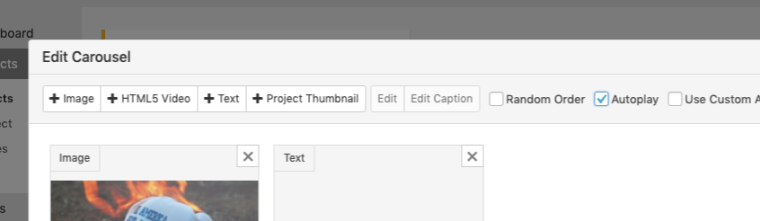
        I don't understand your answer. It's already autoplaying, but I want it exclusively autoplaying, ergo, deactivating the left and right clicking buttons. This is what I meant in the title by "not clickable". I don't see any option for it in the "Edit Carousel" menu that you screenshot.

        Thanks for your answers anyway!

        1 Reply Last reply
        0
        • mariusjopenM
          mariusjopenM
          mariusjopen
          Global Moderator
          wrote on last edited by
          #4

          Dear @Theodoros
          Ah ok! Now I get it.

          You can always add the CSS class with CUSTOM CSS:
          pointer events: none;

          Then the whole carousel is not clickable anymore.

          Hope that helps!

          Best!

          Marius

          www.mariusjopen.world

          1 Reply Last reply
          0
          • T
            T
            Theodoros
            wrote on last edited by
            #5

            Thanks @mariusjopen for your answer!

            I tried to give it a class, and added custom CSS like:

            .no-click-carousel {
            pointer-events: none;
            }

            (to be honest I'd need it in all the carousels, so I even tried to give this propriety to .carousel-full .lay-carousel-wrap).
            But it doesn't work, as you can see here http://www.gibellinaphotoroad.it/la-citta
            that css line is strikethrough-ed in the inspector (not active).
            Do you know where should I intervene?

            Thanks again

            1 Reply Last reply
            0
            • mariusjopenM
              mariusjopenM
              mariusjopen
              Global Moderator
              wrote on last edited by
              #6

              Dear @Theodoros
              That should do:

              .lay-carousel-slide {
              pointer-events: none !important;
              }
              

              Best!

              Marius

              www.mariusjopen.world

              1 Reply Last reply
              0
              • T
                T
                Theodoros
                wrote on last edited by
                #7

                @mariusjopen
                thanks again for the suggestion, but it doesn't really fix it.

                It does something: removes the cursor.
                Still, the carousel is clickable.

                All the best

                1 Reply Last reply
                0
                • mariusjopenM
                  mariusjopenM
                  mariusjopen
                  Global Moderator
                  wrote on last edited by
                  #8

                  Dear @Theodoros
                  have a look at the carousel update.

                  0_1555273729868_Bildschirmfoto 2019-04-14 um 22.25.32.png

                  See if you can manage now. Otherwise let me know!

                  Best!

                  Marius

                  www.mariusjopen.world

                  1 Reply Last reply
                  0
                  • F
                    F
                    fabianschewe
                    wrote on last edited by
                    #9

                    Hi @mariusjopen

                    i have some struggle with the same issue here.
                    I want a autoplay slideshow with "show multiple slides" on to be not clickable.
                    but none of the suggested solutions worked for me.

                    another problem is, that the autoplay doesn't work anymore if i once click into the slideshow. so if i click on the next or previous arrow it stops autoplaying but doesn't start autoplaying again after i leave the slideshow with the cursor. ("Pause Autoplay on Mouseover" is not active)

                    i hope you can help.

                    Thank you!

                    1 Reply Last reply
                    0
                    • mariusjopenM
                      mariusjopenM
                      mariusjopen
                      Global Moderator
                      wrote on last edited by
                      #10

                      Dear @Theodoros
                      can you post a link?

                      Best!
                      Marius

                      www.mariusjopen.world

                      1 Reply Last reply
                      0
                      • F
                        F
                        fabianschewe
                        wrote on last edited by
                        #11

                        hi @mariusjopen
                        not sure if you meat @Theodoros or me, but here a link to the page anyways :)

                        http://matterof.online

                        1 Reply Last reply
                        0
                        • mariusjopenM
                          mariusjopenM
                          mariusjopen
                          Global Moderator
                          wrote on last edited by
                          #12

                          Dear @fabianschewe
                          ok. I can see the problem.
                          We will check if this is a common problem.

                          Love your work!

                          Best!

                          Marius

                          www.mariusjopen.world

                          F 1 Reply Last reply
                          0
                          • edgrbnzE
                            edgrbnzE
                            edgrbnz
                            wrote on last edited by edgrbnz
                            #13

                            @fabianschewe YES! Great work!! 😍
                            (offtopic: which plugin did you use for the cookie message?)

                            A colleague of mine has a similar issue. The Carousels are set to stop autoplay on hover but as soon as the pointer has hovered the carousel once it doesn’t start again → http://felixwichert.com/

                            Seems to be a bug, to me.

                            ✦ ✦ ✦

                            F 1 Reply Last reply
                            0
                            • mariusjopenM mariusjopen

                              Dear @fabianschewe
                              ok. I can see the problem.
                              We will check if this is a common problem.

                              Love your work!

                              Best!

                              Marius

                              F
                              F
                              fabianschewe
                              wrote on last edited by
                              #14

                              @mariusjopen THX,

                              perfect!

                              Note: the problem is only occurring with the multiple slides carousel.

                              my best,

                              Fabian

                              1 Reply Last reply
                              0
                              • edgrbnzE edgrbnz

                                @fabianschewe YES! Great work!! 😍
                                (offtopic: which plugin did you use for the cookie message?)

                                A colleague of mine has a similar issue. The Carousels are set to stop autoplay on hover but as soon as the pointer has hovered the carousel once it doesn’t start again → http://felixwichert.com/

                                Seems to be a bug, to me.

                                F
                                F
                                fabianschewe
                                wrote on last edited by
                                #15

                                @edgrbnz Thank you!

                                (the cookie plugin is GDPR Cookie Consent: https://de.wordpress.org/plugins/cookie-law-info/)

                                the carousel problem ist not exactly the same. I have "stop on mouseover" disabled. and i don't have the problem with the "normal" carousel slideshows. it only occurs with the carousels with the option multiple slides. And also only if you click into the slideshow

                                my best,
                                Fabian

                                1 Reply Last reply
                                0
                                • mariusjopenM
                                  mariusjopenM
                                  mariusjopen
                                  Global Moderator
                                  wrote on last edited by
                                  #16

                                  Dear @Theodoros & @fabianschewe & @edgrbnz
                                  we are looking into this!

                                  Best!

                                  Marius

                                  www.mariusjopen.world

                                  1 Reply Last reply
                                  0
                                  • arminunruhA
                                    arminunruhA
                                    arminunruh
                                    Global Moderator
                                    wrote on last edited by arminunruh
                                    #17
                                    .nichtklicken {
                                        pointer-events: none;
                                    }
                                    

                                    should be

                                    .nichtklicken {
                                        pointer-events: none!important;
                                    }
                                    

                                    and yea theres a bug right now where the autoplay does not resume on pausing the autoplay, i will need to fix that

                                    if you need the carousels to be not clickable for every carousel, this should work:

                                    .lay-carousel-wrap{
                                    pointer-events: none!important;
                                    }
                                    
                                    F 1 Reply Last reply
                                    0
                                    • arminunruhA arminunruh
                                      .nichtklicken {
                                          pointer-events: none;
                                      }
                                      

                                      should be

                                      .nichtklicken {
                                          pointer-events: none!important;
                                      }
                                      

                                      and yea theres a bug right now where the autoplay does not resume on pausing the autoplay, i will need to fix that

                                      if you need the carousels to be not clickable for every carousel, this should work:

                                      .lay-carousel-wrap{
                                      pointer-events: none!important;
                                      }
                                      
                                      F
                                      F
                                      fabianschewe
                                      wrote on last edited by
                                      #18

                                      @arminunruh hi, thanks for your answer,

                                      .lay-carousel-wrap{
                                      pointer-events: none!important;
                                      }

                                      works for the carousel with multiple slides! but not for the "normal" carousels.
                                      but that works for me now.

                                      the "nichtklicken" class has no effect in my case..

                                      thanks

                                      1 Reply Last reply
                                      0
                                      • mariusjopenM
                                        mariusjopenM
                                        mariusjopen
                                        Global Moderator
                                        wrote on last edited by
                                        #19

                                        Dear @fabianschewe
                                        I will send this over to Armin.

                                        Best!

                                        Marius

                                        www.mariusjopen.world

                                        1 Reply Last reply
                                        0

                                        Hello! It looks like you're interested in this conversation, but you don't have an account yet.

                                        Getting fed up of having to scroll through the same posts each visit? When you register for an account, you'll always come back to exactly where you were before, and choose to be notified of new replies (either via email, or push notification). You'll also be able to save bookmarks and upvote posts to show your appreciation to other community members.

                                        With your input, this post could be even better 💗

                                        Register Login
                                        Reply
                                        • Reply as topic
                                        Log in to reply
                                        • Oldest to Newest
                                        • Newest to Oldest
                                        • Most Votes


                                        Online Users
                                        D
                                        Dawid
                                        L
                                        lstark
                                        Forgot your key, lost your files, need a previous Lay Theme or Addon version? Go to www.laykeymanager.com
                                        laytheme.com
                                        • Login

                                        • Don't have an account? Register

                                        • Login or register to search.
                                        • First post
                                          Last post
                                        0
                                        • Recent
                                        • Tags
                                        • Popular
                                        • Users
                                        • Search