Sub menu spacing
-
Hello everybody
can someone help me with my sub-menu? I would like to widen the gap between "Preise" and "Beispiele". Probably just a small line of code but I'm still not good with CSS.I have already found the following code here in the forum
/submenu/
nav.primary .sub-menu li{
display: block;
position: relative;
}
.sub-menu{
padding-top: 12px!important;
opacity: 0;
transition: opacity 200ms ease;
-webkit-transition: opacity 200ms ease;
pointer-events: none;
position: absolute;
}
nav.primary li:hover .sub-menu{
opacity: 1;
pointer-events: auto;
}
/**/Beispiel:

-
Dear @dexter
can you post a link to your website?But probably:
.sub-menu li {
padding-bottom: 10px;
}
Best!
Marius
-
-
Dear @dexter
it would help to see the website to come up with a solution.
Is it possible to upload it?Best!
Marius
-
Dear @dexter
it would help to see the website to come up with a solution.
Is it possible to upload it?Best!
Marius
@mariusjopen said in Sub menu spacing:
Dear @dexter
it would help to see the website to come up with a solution.
Is it possible to upload it?Best!
Marius
Hey,
you got the website and username by chat.
Thank you Marius! -
Dear @dexter
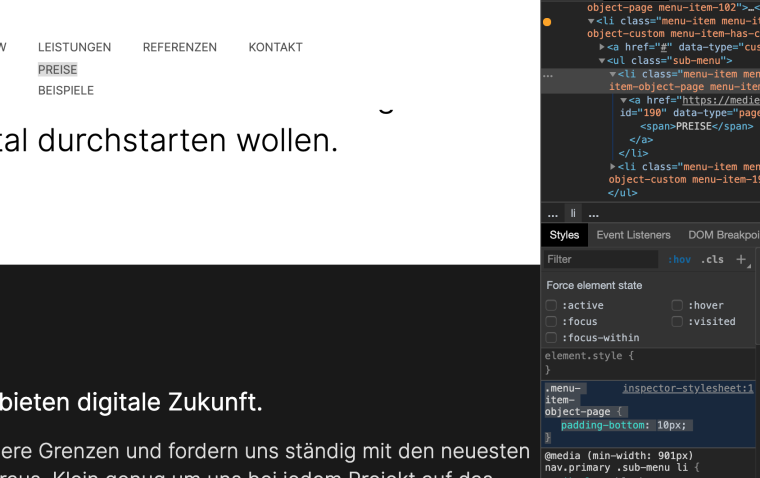
try this then :.menu-item-object-page { padding-bottom: 10px; }I think that works.
Best!
Marius
-
-
Cool! Great to hear!

Hello! It looks like you're interested in this conversation, but you don't have an account yet.
Getting fed up of having to scroll through the same posts each visit? When you register for an account, you'll always come back to exactly where you were before, and choose to be notified of new replies (either via email, or push notification). You'll also be able to save bookmarks and upvote posts to show your appreciation to other community members.
With your input, this post could be even better 💗
Register Login