Sub-Menu points horizontally aligned after update
-
helloo! after doing some research and not finding similar problems, i'm asking for help concerning the order of the nav menu points in the sub-menu bar.
-> to have them stacked on top of each other (vertically) i've once copied a custom css from here actually (can't remember the thread tho). now, after the update, it doesn't seem to work anymore tho (also, i'm not even able to see if theres any info concerning the alignment in the css at all im so sorry lol). am i missing some info in the css? or is there any other way to t e l l the submenu how it should align? so sorry for the dumb question
enclosed, you'll see my problem (sub-menu points horizontally besides each other instead of below each other) and the custom css i've added
thanks in advance for reading this!


btw the website is this one: https://christinejaksch.de/
-
hm seems to work again right?
nav.primary .sub-menu li {
display: block !important;
margin-bottom: 0.3em;
}the display: block!important;
must have done the tricknice website
-
thank!!
i got the tip to use the "important" command/tag(?) and now it works again perfectly :)the snippet looks like this now:
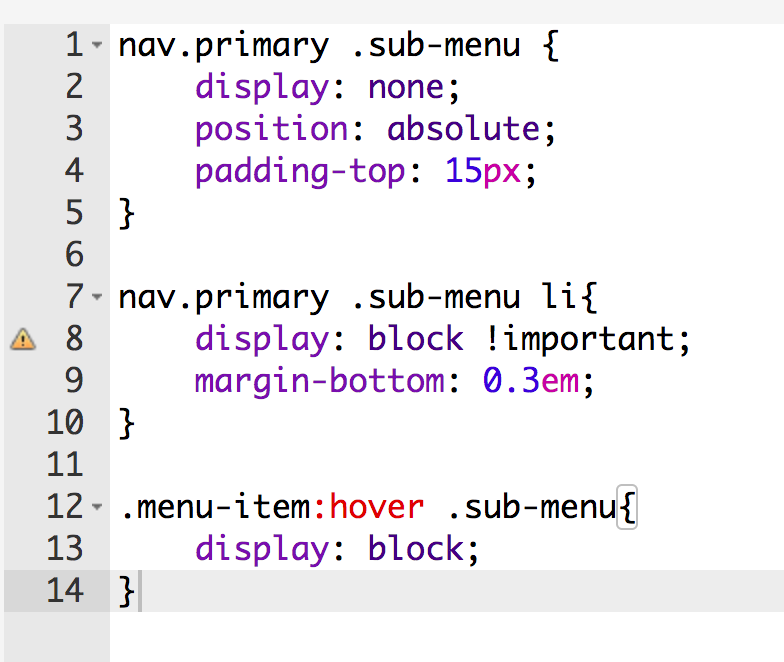
hope that helps others too

Hello! It looks like you're interested in this conversation, but you don't have an account yet.
Getting fed up of having to scroll through the same posts each visit? When you register for an account, you'll always come back to exactly where you were before, and choose to be notified of new replies (either via email, or push notification). You'll also be able to save bookmarks and upvote posts to show your appreciation to other community members.
With your input, this post could be even better 💗
Register Login