Skip to content
  • Recent
  • Tags
  • Popular
  • Users
  • Search
Skins
  • Light
  • Brite
  • Cerulean
  • Cosmo
  • Flatly
  • Journal
  • Litera
  • Lumen
  • Lux
  • Materia
  • Minty
  • Morph
  • Pulse
  • Sandstone
  • Simplex
  • Sketchy
  • Spacelab
  • United
  • Yeti
  • Zephyr
  • Dark
  • Cyborg
  • Darkly
  • Quartz
  • Slate
  • Solar
  • Superhero
  • Vapor

  • Default (No Skin)
  • No Skin
Collapse

Lay Theme Forum

  1. Home
  2. Bug Reports
  3. Scroll to anchors doesn't work after update

Scroll to anchors doesn't work after update

Scheduled Pinned Locked Moved Bug Reports
mobile titlesanchorsbroken-anchorsmenubroken-menu
23 Posts 4 Posters 4.3k Views 3 Watching
  • Oldest to Newest
  • Newest to Oldest
  • Most Votes
Reply
  • Reply as topic
Log in to reply
This topic has been deleted. Only users with topic management privileges can see it.
  • ArneRobotA
    ArneRobotA
    ArneRobot
    wrote on last edited by
    #4

    Still doesn't work after the current update. :-(

    1 Reply Last reply
    0
    • arminunruhA
      arminunruhA
      arminunruh
      Global Moderator
      wrote on last edited by
      #5

      @bbbfg
      ok when u clear ur cache try again

      @ArneRobot
      i see u have a scrolltop button in your mobile menu and u use an anchor and some custom js

      i think my code tries to find a div that has the anchor as an id
      my scrolling code is triggered on click and your code is triggered too i think

      Arne you could remove your js code and not use the class
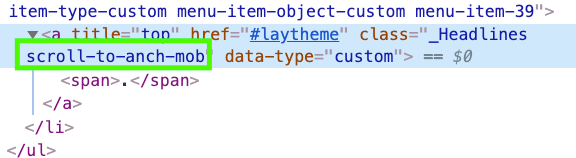
      Screenshot 2020-04-21 at 18.26.26.png
      "scroll-to-anch-mob"

      and instead use the class "scrolltotop"

      that is the class that lay theme uses and that should work without extra js

      B ArneRobotA 2 Replies Last reply
      0
      • arminunruhA arminunruh

        @bbbfg
        ok when u clear ur cache try again

        @ArneRobot
        i see u have a scrolltop button in your mobile menu and u use an anchor and some custom js

        i think my code tries to find a div that has the anchor as an id
        my scrolling code is triggered on click and your code is triggered too i think

        Arne you could remove your js code and not use the class
        Screenshot 2020-04-21 at 18.26.26.png
        "scroll-to-anch-mob"

        and instead use the class "scrolltotop"

        that is the class that lay theme uses and that should work without extra js

        B
        B
        bbbfg
        wrote on last edited by
        #6
        This post is deleted!
        1 Reply Last reply
        0
        • arminunruhA arminunruh

          @bbbfg
          ok when u clear ur cache try again

          @ArneRobot
          i see u have a scrolltop button in your mobile menu and u use an anchor and some custom js

          i think my code tries to find a div that has the anchor as an id
          my scrolling code is triggered on click and your code is triggered too i think

          Arne you could remove your js code and not use the class
          Screenshot 2020-04-21 at 18.26.26.png
          "scroll-to-anch-mob"

          and instead use the class "scrolltotop"

          that is the class that lay theme uses and that should work without extra js

          ArneRobotA
          ArneRobotA
          ArneRobot
          wrote on last edited by ArneRobot
          #7

          @arminunruh I don't really understand where I should remove and put which code? Can you explain it again? And my main menu is disfunctional as well. It scrolls to the right position once and then it adds the #exhibition etc. to the page-URL and the page is broken.

          Oh and the mobile site-title/text-logo is still gone even after the update.

          Can you please get into that again?
          Thank you!

          1 Reply Last reply
          0
          • arminunruhA
            arminunruhA
            arminunruh
            Global Moderator
            wrote on last edited by
            #8

            Ok there was a bug that I just fixed, now anchorscroll should work again if you update. But please still make sure you do the things below:

            Oh and the mobile site-title/text-logo is still gone even after the update.

            you need to set the mobile title in customizer -> mobile -> mobile site title

            @arminunruh I don't really understand where I should remove and put which code? Can you explain it again?

            you need to change the class in appearance -> menus
            make sure css classes are shown and then change the css class in the textfield that is marked green at the bottom of this screenshot
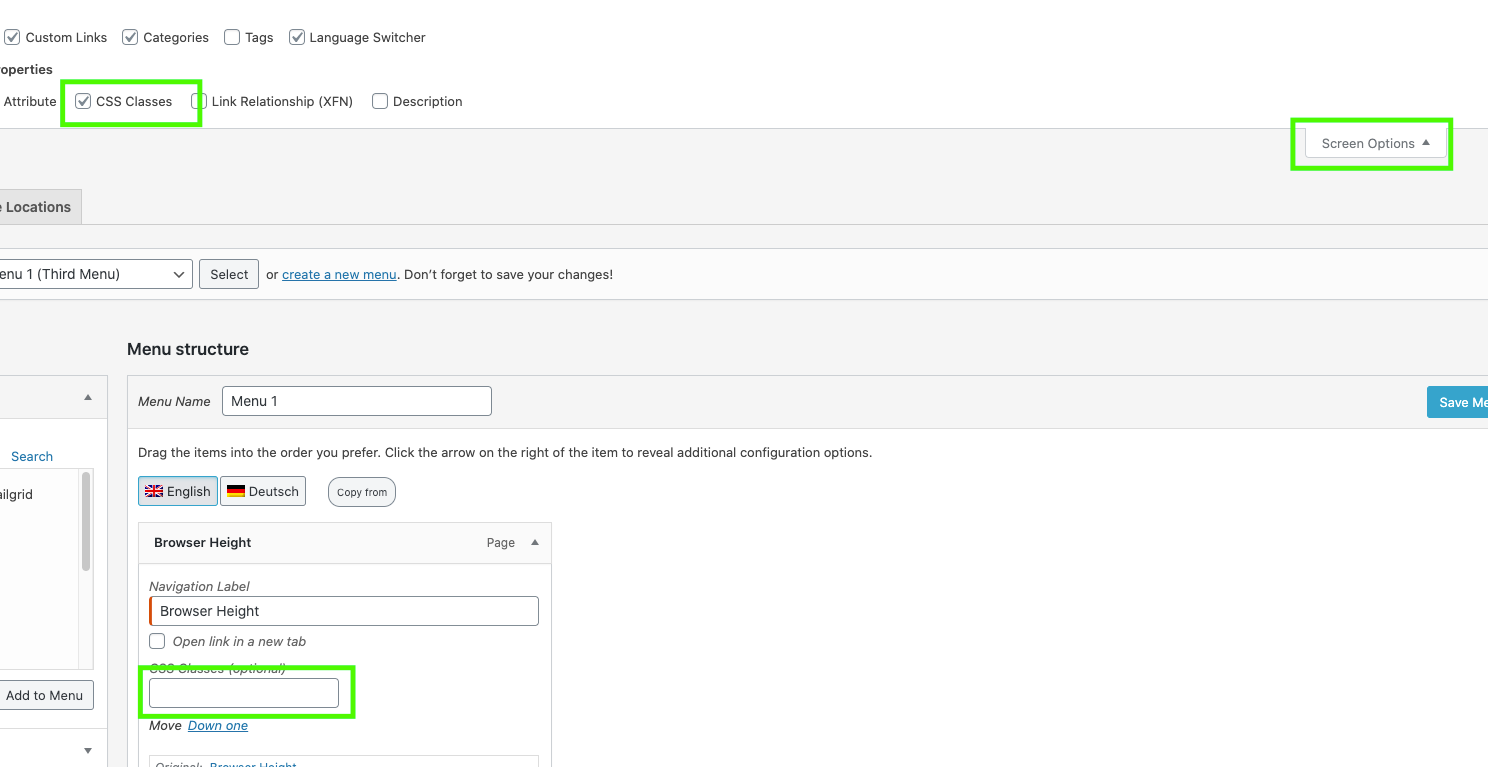
            Screenshot 2020-04-22 at 14.45.54.png
            in that field enter: scrolltotop
            also try and see if you can remove the link #laytheme

            and you can remove your javascript code in lay options -> custom html& css:
            remove all js code that has to do with "scroll-to-anch-mob" and any scrolling js code

            ArneRobotA 1 Reply Last reply
            0
            • arminunruhA arminunruh

              Ok there was a bug that I just fixed, now anchorscroll should work again if you update. But please still make sure you do the things below:

              Oh and the mobile site-title/text-logo is still gone even after the update.

              you need to set the mobile title in customizer -> mobile -> mobile site title

              @arminunruh I don't really understand where I should remove and put which code? Can you explain it again?

              you need to change the class in appearance -> menus
              make sure css classes are shown and then change the css class in the textfield that is marked green at the bottom of this screenshot
              Screenshot 2020-04-22 at 14.45.54.png
              in that field enter: scrolltotop
              also try and see if you can remove the link #laytheme

              and you can remove your javascript code in lay options -> custom html& css:
              remove all js code that has to do with "scroll-to-anch-mob" and any scrolling js code

              ArneRobotA
              ArneRobotA
              ArneRobot
              wrote on last edited by
              #9

              @arminunruh I have removed all custom code and replaced the CSS-menu-class with "scrolltotop". It doesn't work. I also updated LayTheme.

              1 Reply Last reply
              0
              • arminunruhA
                arminunruhA
                arminunruh
                Global Moderator
                wrote on last edited by
                #10

                yea i did another mistake :((((, sry, if you update again later today i think it should work

                ArneRobotA 1 Reply Last reply
                0
                • arminunruhA arminunruh

                  yea i did another mistake :((((, sry, if you update again later today i think it should work

                  ArneRobotA
                  ArneRobotA
                  ArneRobot
                  wrote on last edited by ArneRobot
                  #11

                  @arminunruh Hello. I updated and placed the ids on my text-blocks again. But it still doesn't work. :-(
                  Should I add my custom JS back again? Did you get it to work in your development environment? Making a menu link to anchors?

                  1 Reply Last reply
                  0
                  • arminunruhA
                    arminunruhA
                    arminunruh
                    Global Moderator
                    wrote on last edited by
                    #12

                    well you added scrolltotop
                    to every menupoint

                    thats not what i meant,
                    it should only be on the menupoint where you want the website to scroll to the top
                    for the others that should scroll to a certain anchor, remove that class and also remove the #hash link for that scrolltotop link
                    if thats possible

                    ArneRobotA 1 Reply Last reply
                    0
                    • arminunruhA arminunruh

                      well you added scrolltotop
                      to every menupoint

                      thats not what i meant,
                      it should only be on the menupoint where you want the website to scroll to the top
                      for the others that should scroll to a certain anchor, remove that class and also remove the #hash link for that scrolltotop link
                      if thats possible

                      ArneRobotA
                      ArneRobotA
                      ArneRobot
                      wrote on last edited by
                      #13

                      @arminunruh Hello Armin. Thank you for the help. Here is the current situation:

                      • The scroll to top button on my second menu on the bottom of the page works now!

                      • The main menu does scroll to the section but also somehow loads that section so that the rest of the page is gone after and only that one section is visible. The hash "#exhibition" etc. gets added to the URL so I guess that might be a problem.

                      • My legal links at the bottom of the page do work (make section visible scroll to their top) but also add the hash "https://anime-architecture.org/**#legal**" which they shouldn't

                      So maybe there is some problem with the default action of those anchor links? Do we need a script to disable default and kill the hash in the URL?

                      Thank you!

                      ArneRobotA 1 Reply Last reply
                      0
                      • ArneRobotA ArneRobot

                        @arminunruh Hello Armin. Thank you for the help. Here is the current situation:

                        • The scroll to top button on my second menu on the bottom of the page works now!

                        • The main menu does scroll to the section but also somehow loads that section so that the rest of the page is gone after and only that one section is visible. The hash "#exhibition" etc. gets added to the URL so I guess that might be a problem.

                        • My legal links at the bottom of the page do work (make section visible scroll to their top) but also add the hash "https://anime-architecture.org/**#legal**" which they shouldn't

                        So maybe there is some problem with the default action of those anchor links? Do we need a script to disable default and kill the hash in the URL?

                        Thank you!

                        ArneRobotA
                        ArneRobotA
                        ArneRobot
                        wrote on last edited by
                        #14

                        @arminunruh @mariusjopen Can someone please have a look a this! The site in question is a customer website which he paid for and I need it to get back to work! Had I known that the update would have had this effect, I would not have done it. Are anchor links in the menu NOT possible anymwore in LayTheme 3? Or how can I do them? Thank you!

                        1 Reply Last reply
                        0
                        • arminunruhA
                          arminunruhA
                          arminunruh
                          Global Moderator
                          wrote on last edited by
                          #15

                          hey man,

                          you can always go back to the old lay theme and old plugins:

                          http://laythemeforum.com/topic/5306/your-customized-lay-theme-doesn-t-work-properly-any-more-after-updating-you-can-use-the-old-version-of-lay-theme-if-you-like

                          1 Reply Last reply
                          0
                          • arminunruhA
                            arminunruhA
                            arminunruh
                            Global Moderator
                            wrote on last edited by arminunruh
                            #16

                            you can also send your /wp-admin/ login data to info@laytheme.com and a link to this post and I'll take another look

                            i'm helping as much and as fast as i can and want to and i'm working on another feature right now, so my time is a bit limited

                            i'm sorry we couldn't solve this problem faster

                            ArneRobotA 1 Reply Last reply
                            0
                            • arminunruhA arminunruh

                              you can also send your /wp-admin/ login data to info@laytheme.com and a link to this post and I'll take another look

                              i'm helping as much and as fast as i can and want to and i'm working on another feature right now, so my time is a bit limited

                              i'm sorry we couldn't solve this problem faster

                              ArneRobotA
                              ArneRobotA
                              ArneRobot
                              wrote on last edited by
                              #17

                              @arminunruh of course I know that you are working hard on this. I was just a bit shocked when the main navigation stopped working after what I considered a standard theme update. And I need it back to work before my customer gets worried.

                              Email sent, thank you!

                              1 Reply Last reply
                              0
                              • mariusjopenM
                                mariusjopenM
                                mariusjopen
                                Global Moderator
                                wrote on last edited by
                                #18

                                Dear @ArneRobot
                                Yes, thank you for using LayTheme!
                                Best!
                                Marius

                                www.mariusjopen.world

                                ArneRobotA 1 Reply Last reply
                                0
                                • mariusjopenM mariusjopen

                                  Dear @ArneRobot
                                  Yes, thank you for using LayTheme!
                                  Best!
                                  Marius

                                  ArneRobotA
                                  ArneRobotA
                                  ArneRobot
                                  wrote on last edited by
                                  #19

                                  @mariusjopen Unfortunately we were still not able to solve this problem. I was in contact with @arminunruh, just made the latest update. Still problems with the scroll. A click on the menu links apply the hash-link (#exhibition, #publication…) to the URL/slug and then the website loads just that part/div and you can't get back to the rest of the page. Eg. scroll up to the header slider. Can you please look into that again?

                                  1 Reply Last reply
                                  0
                                  • mariusjopenM
                                    mariusjopenM
                                    mariusjopen
                                    Global Moderator
                                    wrote on last edited by
                                    #20

                                    Dear @ArneRobot
                                    I see the anchor links working.
                                    Can you please write down the current problem and the situation?
                                    I am reading through many threads daily and that would help a lot.
                                    Thank you!
                                    Marius

                                    www.mariusjopen.world

                                    ArneRobotA 1 Reply Last reply
                                    0
                                    • mariusjopenM mariusjopen

                                      Dear @ArneRobot
                                      I see the anchor links working.
                                      Can you please write down the current problem and the situation?
                                      I am reading through many threads daily and that would help a lot.
                                      Thank you!
                                      Marius

                                      ArneRobotA
                                      ArneRobotA
                                      ArneRobot
                                      wrote on last edited by
                                      #21

                                      @mariusjopen Hello Marius. I did describe the problem in my last post, but here we go again:

                                      A click on the menu links apply the hash-link (#exhibition, #publication…) to the URL/slug and then the website loads just that part/div and you can't get back to the rest of the page. Eg. scroll up to the header slider.

                                      So the anchor links work once when scrolling down but not the way they should. In desktop view you cannot go back to the very top of the page (the slider). If you scroll to "Publications" you can not scroll back to "Exhibition". If you use the menu link "Exhibition" it will jump back up but not with a smooth scroll. And the rest of the page appears empty under the footer.

                                      Please test the page and you will see what I mean. It's just a few clicks.

                                      1 Reply Last reply
                                      0
                                      • mariusjopenM
                                        mariusjopenM
                                        mariusjopen
                                        Global Moderator
                                        wrote on last edited by
                                        #22

                                        Dear @ArneRobot
                                        ok. Wow. I have not see this before. Thank you for rephrasing it.
                                        We will have another look!
                                        Best!
                                        Marius

                                        www.mariusjopen.world

                                        1 Reply Last reply
                                        0
                                        • arminunruhA
                                          arminunruhA
                                          arminunruh
                                          Global Moderator
                                          wrote on last edited by
                                          #23

                                          yea it was some custom css problem

                                          1 Reply Last reply
                                          0

                                          Hello! It looks like you're interested in this conversation, but you don't have an account yet.

                                          Getting fed up of having to scroll through the same posts each visit? When you register for an account, you'll always come back to exactly where you were before, and choose to be notified of new replies (either via email, or push notification). You'll also be able to save bookmarks and upvote posts to show your appreciation to other community members.

                                          With your input, this post could be even better đź’—

                                          Register Login
                                          Reply
                                          • Reply as topic
                                          Log in to reply
                                          • Oldest to Newest
                                          • Newest to Oldest
                                          • Most Votes


                                          Online Users
                                          Forgot your key, lost your files, need a previous Lay Theme or Addon version? Go to www.laykeymanager.com
                                          laytheme.com
                                          • Login

                                          • Don't have an account? Register

                                          • Login or register to search.
                                          • First post
                                            Last post
                                          0
                                          • Recent
                                          • Tags
                                          • Popular
                                          • Users
                                          • Search