Skip to content
  • Recent
  • Tags
  • Popular
  • Users
  • Search
Skins
  • Light
  • Brite
  • Cerulean
  • Cosmo
  • Flatly
  • Journal
  • Litera
  • Lumen
  • Lux
  • Materia
  • Minty
  • Morph
  • Pulse
  • Sandstone
  • Simplex
  • Sketchy
  • Spacelab
  • United
  • Yeti
  • Zephyr
  • Dark
  • Cyborg
  • Darkly
  • Quartz
  • Slate
  • Solar
  • Superhero
  • Vapor

  • Default (No Skin)
  • No Skin
Collapse

Lay Theme Forum

  1. Home
  2. Bug Reports
  3. Image hover addon

Image hover addon

Scheduled Pinned Locked Moved Bug Reports
28 Posts 9 Posters 4.8k Views 3 Watching
  • Oldest to Newest
  • Newest to Oldest
  • Most Votes
Reply
  • Reply as topic
Log in to reply
This topic has been deleted. Only users with topic management privileges can see it.
  • T
    T
    tonigiard
    wrote on last edited by
    #2
    This post is deleted!
    1 Reply Last reply
    0
    • D
      D
      danoR
      wrote on last edited by
      #3

      same here! doesn’t show up in my link modal either.

      1 Reply Last reply
      0
      • T
        T
        tonigiard
        wrote on last edited by
        #4

        I had the same issue but i just forgot to uptade my laytheme ! After the update, all is ok.

        1 Reply Last reply
        0
        • D
          D
          danoR
          wrote on last edited by
          #5

          Under "Themes" my Child Theme is activated with all my settings and Custom Css made (Version 1.9.6). When I update to the recent LayTheme it shows an additional theme tile without the customizations. Is there any way to use the Image hover addon in the old version of Lay? Don’t want to loose all my custom css codes. thanks for you help!

          1 Reply Last reply
          0
          • V
            V
            vthevoz
            wrote on last edited by
            #6

            Same here, reinstalled lay theme from scratch and deactivated unnecessary plug-ins, still not showing up. Any ideas? Maybe a conflict with the other add-ons?

            V 1 Reply Last reply
            0
            • V vthevoz

              Same here, reinstalled lay theme from scratch and deactivated unnecessary plug-ins, still not showing up. Any ideas? Maybe a conflict with the other add-ons?

              V
              V
              vthevoz
              wrote on last edited by
              #7

              @vthevoz my website has gone blank as well (thankfully not to annoying as there wasn't anything important yet).

              1 Reply Last reply
              0
              • V
                V
                vthevoz
                wrote on last edited by
                #8

                Any news? Seems this bug is recurrent with quite a few users and sincerely hope we find a fix or reason. I reinstalled WP database and plug-ins from scratch, tried Safari and Chrome, nothing seems to change.

                Noticed the website goes blanc when all 3 add-ons are activated (full screen slider, carousel and image hover), but not when either image over add-on is activated alone or the 2 other ones are activate alone. In all cases, Link modal does not show the option to choose a image for hover…

                1 Reply Last reply
                0
                • T
                  T
                  ton
                  wrote on last edited by
                  #9

                  same here! doesn’t show up in my link modal either. updated everything and it is not working though...

                  1 Reply Last reply
                  0
                  • RichardR
                    RichardR
                    Richard
                    Global Moderator
                    wrote on last edited by
                    #10

                    Dear @NAS @tonigiard @danoR @vthevoz @ton

                    I will forward this Armin for further inspection

                    Thank you for your patience with this very new Addon.

                    Sincerely
                    Richard

                    1 Reply Last reply
                    1
                    • arminunruhA
                      arminunruhA
                      arminunruh
                      Global Moderator
                      wrote on last edited by
                      #11

                      Hey, if your website goes blank please:
                      can you send your website address, /wp-admin/ username and password and a link to this topic to info@laytheme.com?

                      Then I'll take a look!

                      @ton said in Image hover addon:

                      same here! doesn’t show up in my link modal either. updated everything and it is not working though...

                      Hey!
                      If the imagehover addon "Set Hover Image" button does not show up, please make sure the imagehover addon is installed in the folder "wp-content" / "plugins" / "laytheme-imagehover"
                      you can look at the folder by accessing your webserver via FTP.

                      if the folder name is different, the button will not show up.

                      u can also just deactivate and then delete the plugin in "plugins" in your wp-admin and reinstall it. maybe this works!

                      T N 2 Replies Last reply
                      0
                      • arminunruhA arminunruh

                        Hey, if your website goes blank please:
                        can you send your website address, /wp-admin/ username and password and a link to this topic to info@laytheme.com?

                        Then I'll take a look!

                        @ton said in Image hover addon:

                        same here! doesn’t show up in my link modal either. updated everything and it is not working though...

                        Hey!
                        If the imagehover addon "Set Hover Image" button does not show up, please make sure the imagehover addon is installed in the folder "wp-content" / "plugins" / "laytheme-imagehover"
                        you can look at the folder by accessing your webserver via FTP.

                        if the folder name is different, the button will not show up.

                        u can also just deactivate and then delete the plugin in "plugins" in your wp-admin and reinstall it. maybe this works!

                        T
                        T
                        ton
                        wrote on last edited by
                        #12
                        This post is deleted!
                        1 Reply Last reply
                        0
                        • arminunruhA arminunruh

                          Hey, if your website goes blank please:
                          can you send your website address, /wp-admin/ username and password and a link to this topic to info@laytheme.com?

                          Then I'll take a look!

                          @ton said in Image hover addon:

                          same here! doesn’t show up in my link modal either. updated everything and it is not working though...

                          Hey!
                          If the imagehover addon "Set Hover Image" button does not show up, please make sure the imagehover addon is installed in the folder "wp-content" / "plugins" / "laytheme-imagehover"
                          you can look at the folder by accessing your webserver via FTP.

                          if the folder name is different, the button will not show up.

                          u can also just deactivate and then delete the plugin in "plugins" in your wp-admin and reinstall it. maybe this works!

                          N
                          N
                          NAS
                          wrote on last edited by
                          #13

                          @arminunruh Hey I tried uninstall /reinstall and also checked in my wp-content folder and it's in the right place. Still have a blank site unfortunately. I've emailed my details thanks armin

                          1 Reply Last reply
                          0
                          • N
                            N
                            NAS
                            wrote on last edited by
                            #14

                            thanks for help with this armin if anyone else is struggling make sure your laytheme is upto date then reinstall plugin.

                            1 Reply Last reply
                            0
                            • RichardR
                              RichardR
                              Richard
                              Global Moderator
                              wrote on last edited by
                              #15

                              Dear @NAS

                              Just wanted to Follow up for the future if people have this issue,

                              Did Re-installing it work :) ?

                              Thank you for using Lay theme

                              Sincerely
                              Richard

                              1 Reply Last reply
                              0
                              • J
                                J
                                jnemeck
                                wrote on last edited by
                                #16

                                @danoR said in Image hover addon:

                                same here! doesn’t show up in my link modal either.

                                Hi there)
                                Unfortunately, I have the same problem. Installed new plugin fine. But doesn't show up in the link panel when following steps to link through text.

                                Thnx

                                1 Reply Last reply
                                0
                                • RichardR
                                  RichardR
                                  Richard
                                  Global Moderator
                                  wrote on last edited by
                                  #17

                                  Dear @jnemeck

                                  You have tried the steps talked about in this thread and it still doesn't work?

                                  • Make sure your Lay Theme is up to date then re-install plugin.

                                  • If the imagehover addon "Set Hover Image" button does not show up, please make sure the imagehover addon is installed in the folder "wp-content" / "plugins" / "laytheme-imagehover"
                                    you can look at the folder by accessing your webserver via FTP.

                                  if the folder name is different, the button will not show up.

                                  u can also just deactivate and then delete the plugin in "plugins" in your wp-admin and reinstall it. maybe this works!

                                  Best wishes
                                  Richard

                                  J 1 Reply Last reply
                                  1
                                  • RichardR Richard

                                    Dear @jnemeck

                                    You have tried the steps talked about in this thread and it still doesn't work?

                                    • Make sure your Lay Theme is up to date then re-install plugin.

                                    • If the imagehover addon "Set Hover Image" button does not show up, please make sure the imagehover addon is installed in the folder "wp-content" / "plugins" / "laytheme-imagehover"
                                      you can look at the folder by accessing your webserver via FTP.

                                    if the folder name is different, the button will not show up.

                                    u can also just deactivate and then delete the plugin in "plugins" in your wp-admin and reinstall it. maybe this works!

                                    Best wishes
                                    Richard

                                    J
                                    J
                                    jnemeck
                                    wrote on last edited by
                                    #18

                                    @Richard-Keith said in Image hover addon:

                                    laytheme-imagehover

                                    Hi Richard,

                                    thanks for the replay. I did reinstall the addon, and also check if it's in the right folder in the FTP. It should be all good. My Lay Theme might not be up to date, I have version Version: 3.2.3 but I don't see any update button in my Theme... you think that this might be the issue? How can I update the Lay Theme?

                                    Thank you a lot!
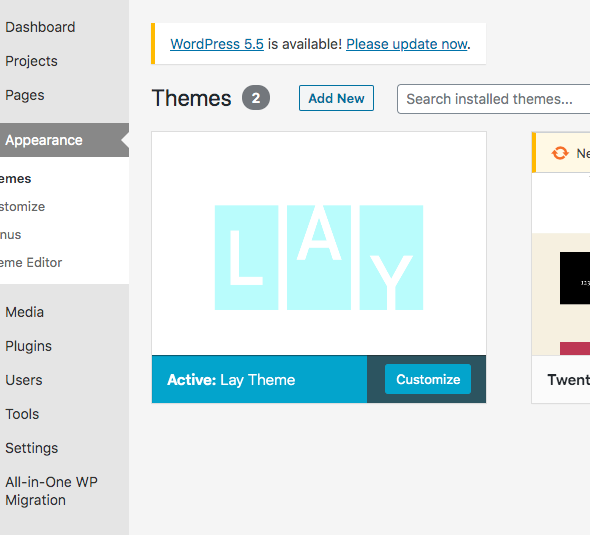
                                    Snímek obrazovky 2020-08-24 v 12.38.31.png Snímek obrazovky 2020-08-24 v 12.38.47.png

                                    1 Reply Last reply
                                    0
                                    • RichardR
                                      RichardR
                                      Richard
                                      Global Moderator
                                      wrote on last edited by
                                      #19

                                      Dear @jnemeck

                                      And you are unable to access the update through "Dashboard" - "Updates" either

                                      Screen Shot 2020-08-26 at 6.54.51 PM.png

                                      There have been trouble's lately with the newest php, along with possible firewall's but i am unsure in this case -

                                      I will let Armin know,
                                      To speed up the process could you post a link to your website -

                                      As well as send your website address, /wp-admin/ username and password and a link to this topic to info@laytheme.com?

                                      Best wishes and thanks for using Lay Theme
                                      Rich

                                      J 1 Reply Last reply
                                      0
                                      • RichardR Richard

                                        Dear @jnemeck

                                        And you are unable to access the update through "Dashboard" - "Updates" either

                                        Screen Shot 2020-08-26 at 6.54.51 PM.png

                                        There have been trouble's lately with the newest php, along with possible firewall's but i am unsure in this case -

                                        I will let Armin know,
                                        To speed up the process could you post a link to your website -

                                        As well as send your website address, /wp-admin/ username and password and a link to this topic to info@laytheme.com?

                                        Best wishes and thanks for using Lay Theme
                                        Rich

                                        J
                                        J
                                        jnemeck
                                        wrote on last edited by
                                        #20

                                        @Richard-Keith

                                        Hi Richard,

                                        yes I also checked the updates, but nothing there...
                                        Snímek obrazovky 2020-08-26 v 20.18.37.png

                                        I just send you the login details to the email.

                                        Thanks,
                                        Best,
                                        Johana

                                        1 Reply Last reply
                                        0
                                        • RichardR
                                          RichardR
                                          Richard
                                          Global Moderator
                                          wrote on last edited by Richard
                                          #21

                                          Dear @jnemeck

                                          Thank you,
                                          Will get back to you shortly.

                                          Sincerely
                                          Richard

                                          1 Reply Last reply
                                          0

                                          Hello! It looks like you're interested in this conversation, but you don't have an account yet.

                                          Getting fed up of having to scroll through the same posts each visit? When you register for an account, you'll always come back to exactly where you were before, and choose to be notified of new replies (either via email, or push notification). You'll also be able to save bookmarks and upvote posts to show your appreciation to other community members.

                                          With your input, this post could be even better 💗

                                          Register Login
                                          Reply
                                          • Reply as topic
                                          Log in to reply
                                          • Oldest to Newest
                                          • Newest to Oldest
                                          • Most Votes


                                          Online Users
                                          Forgot your key, lost your files, need a previous Lay Theme or Addon version? Go to www.laykeymanager.com
                                          laytheme.com
                                          • Login

                                          • Don't have an account? Register

                                          • Login or register to search.
                                          • First post
                                            Last post
                                          0
                                          • Recent
                                          • Tags
                                          • Popular
                                          • Users
                                          • Search