Skip to content
  • Recent
  • Tags
  • Popular
  • Users
  • Search
Skins
  • Light
  • Brite
  • Cerulean
  • Cosmo
  • Flatly
  • Journal
  • Litera
  • Lumen
  • Lux
  • Materia
  • Minty
  • Morph
  • Pulse
  • Sandstone
  • Simplex
  • Sketchy
  • Spacelab
  • United
  • Yeti
  • Zephyr
  • Dark
  • Cyborg
  • Darkly
  • Quartz
  • Slate
  • Solar
  • Superhero
  • Vapor

  • Default (No Skin)
  • No Skin
Collapse

Lay Theme Forum

  1. Home
  2. Bug Reports
  3. Update not working…

Update not working…

Scheduled Pinned Locked Moved Bug Reports
7 Posts 3 Posters 955 Views 1 Watching
  • Oldest to Newest
  • Newest to Oldest
  • Most Votes
Reply
  • Reply as topic
Log in to reply
This topic has been deleted. Only users with topic management privileges can see it.
  • M
    M
    mrrpringle
    wrote on last edited by
    #1

    Hi, my client keeps getting this message emailed to them:

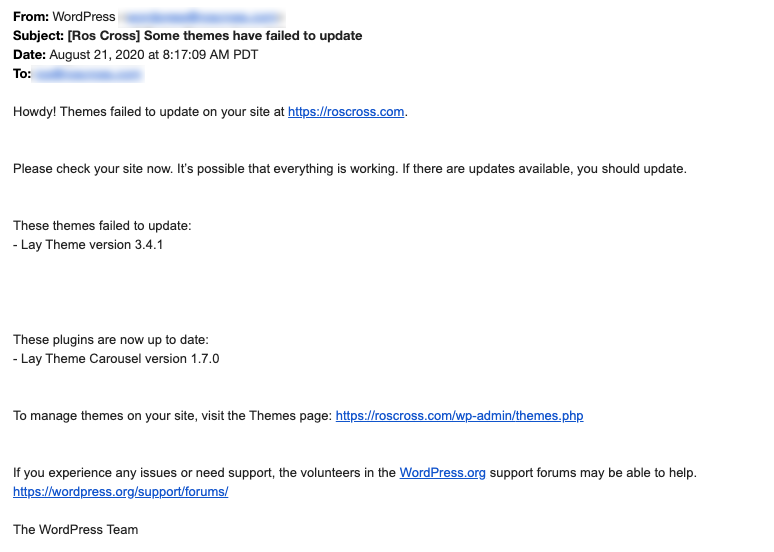
    Howdy! Themes failed to update on your site at http://roscross.net.

    Please check your site now. It’s possible that everything is working. If there are updates available, you should update.

    These themes failed to update:

    • Lay Theme version 3.4.1*

    I checked and manually updated the latest version but this keeps happening. Any idea what's going on? Thanks!

    1 Reply Last reply
    0
    • RichardR
      RichardR
      Richard
      Global Moderator
      wrote on last edited by
      #2

      Dear @mrrpringle

      Are also the Addons that go along with the theme up-to-date?

      Armin has posted in a previous thread:

      "When a website is down after updating this can often be related to people updating their addons but not their theme or updating their theme and not the addons.

      There was a major change in lay theme and all addons needed updating.

      This issue here is likely solved by doing the steps that are noted above:

      screenshot-2020-08-17-at-09.35.03.png

      and

      screenshot-2020-08-17-at-09.35.31.png

      please make sure to read and do the steps that I mention in that text at the top of the forum"

      If your problem still occurs then please:

      Write an email to info@laytheme.com and include a link to this conversation with your login info.

      Many wishes
      Sincerely
      Ricahrd

      1 Reply Last reply
      0
      • M
        M
        mrrpringle
        wrote on last edited by
        #3

        Hello,

        Thanks for your response.

        The website is not down and the addons/theme are up to date. I've also entered the license key.

        My client is still receiving this email (twice a day):Screen Shot 2020-08-25 at 9.10.04 AM.png

        I've now updated the theme & website (seemingly successfully) 3 or more times. Is there anything else I can do to prevent these emails?

        Thank you.

        1 Reply Last reply
        0
        • RichardR
          RichardR
          Richard
          Global Moderator
          wrote on last edited by Richard
          #4

          Dear @mrrpringle

          And on your Webhost when checking the Email settings, there isn't anything occuring there?

          If not Could you please send your website address, /wp-admin/ username and password and a link to this topic to info@laytheme.com?

          I have googled the issue but still have found no solution as of yet that doesn't involve pasting code in the wp_functions file.

          Let me know, and thank you as always for using Lay Theme!

          Richard

          1 Reply Last reply
          0
          • M
            M
            mrrpringle
            wrote on last edited by
            #5

            Thanks Richard. I sent an email. Appreciate your help thus far.

            1 Reply Last reply
            0
            • RichardR
              RichardR
              Richard
              Global Moderator
              wrote on last edited by
              #6

              Dear @mrrpringle

              Thankyou :)
              Will get back to you soon.

              Until then thank you for your patience and best wishes

              Sincerely
              Richard

              1 Reply Last reply
              0
              • arminunruhA
                arminunruhA
                arminunruh
                Global Moderator
                wrote on last edited by
                #7

                hey!
                i haven't seen this issue before. can you ask your website host about what may be happening?
                maybe theres insufficient disk space or your servers firewall restrictions are too tight? not sure


                1 Reply Last reply
                0

                Hello! It looks like you're interested in this conversation, but you don't have an account yet.

                Getting fed up of having to scroll through the same posts each visit? When you register for an account, you'll always come back to exactly where you were before, and choose to be notified of new replies (either via email, or push notification). You'll also be able to save bookmarks and upvote posts to show your appreciation to other community members.

                With your input, this post could be even better 💗

                Register Login
                Reply
                • Reply as topic
                Log in to reply
                • Oldest to Newest
                • Newest to Oldest
                • Most Votes


                Online Users
                Forgot your key, lost your files, need a previous Lay Theme or Addon version? Go to www.laykeymanager.com
                laytheme.com
                • Login

                • Don't have an account? Register

                • Login or register to search.
                • First post
                  Last post
                0
                • Recent
                • Tags
                • Popular
                • Users
                • Search