Fonts not displaying on Desktop (Chrome, Edge)
-
Previously working WOFF fonts are now not displaying on desktop (Chrome, Edge) but displaying on Safari and iPhone.
What is the fix?
Website link below: https://svinder.com/
-
Dear @svinder
This is strange indeed, here in your console the Fonts are being blocked:
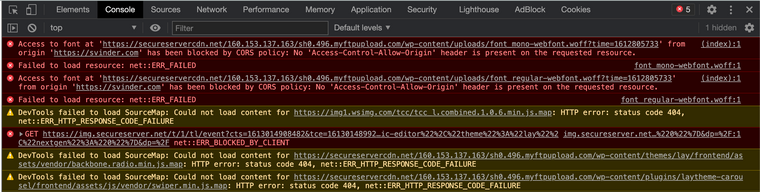
Did this occur with a recent update of Lay Theme?
Do you have any third-party plugins installed that when temporarily de-activated solve this?Searching the error command online:
https://wordpress.org/support/topic/access-to-font-at-from-origin-has-been-blocked-by-cors-policy-no-access-cont/Talk soon :)
Richard
-
Dear @svinder
This is strange indeed, here in your console the Fonts are being blocked:
Did this occur with a recent update of Lay Theme?
Do you have any third-party plugins installed that when temporarily de-activated solve this?Searching the error command online:
https://wordpress.org/support/topic/access-to-font-at-from-origin-has-been-blocked-by-cors-policy-no-access-cont/Talk soon :)
Richard
-
-
-

Hello! It looks like you're interested in this conversation, but you don't have an account yet.
Getting fed up of having to scroll through the same posts each visit? When you register for an account, you'll always come back to exactly where you were before, and choose to be notified of new replies (either via email, or push notification). You'll also be able to save bookmarks and upvote posts to show your appreciation to other community members.
With your input, this post could be even better 💗
Register Login