Skip to content
  • Recent
  • Tags
  • Popular
  • Users
  • Search
Skins
  • Light
  • Brite
  • Cerulean
  • Cosmo
  • Flatly
  • Journal
  • Litera
  • Lumen
  • Lux
  • Materia
  • Minty
  • Morph
  • Pulse
  • Sandstone
  • Simplex
  • Sketchy
  • Spacelab
  • United
  • Yeti
  • Zephyr
  • Dark
  • Cyborg
  • Darkly
  • Quartz
  • Slate
  • Solar
  • Superhero
  • Vapor

  • Default (No Skin)
  • No Skin
Collapse

Lay Theme Forum

  1. Home
  2. Feedback
  3. Row Height Options

Row Height Options

Scheduled Pinned Locked Moved Feedback
13 Posts 6 Posters 3.4k Views 1 Watching
  • Oldest to Newest
  • Newest to Oldest
  • Most Votes
Reply
  • Reply as topic
Log in to reply
This topic has been deleted. Only users with topic management privileges can see it.
  • mariusjopenM
    mariusjopenM
    mariusjopen
    Global Moderator
    wrote on last edited by
    #2

    Hi @Anthony
    yes. Thank you for the valuable input.

    We write it down for future improvement.

    All the best!

    Marius

    www.mariusjopen.world

    1 Reply Last reply
    0
    • M
      M
      MaxWinter
      wrote on last edited by
      #3

      Hello,

      is there alreday an option to play with the hight of a row? Would be happy to use it :)

      Cheers!

      1 Reply Last reply
      0
      • RichardR
        RichardR
        Richard
        Global Moderator
        wrote on last edited by
        #4

        Dear @MaxWinter

        Normally the Row's height is determined by its contents and its good that it works this way. An option was added long ago to "use browser height as row height' to facilitate the needs like @Anthony mentioned. If a row needs a specific height you could give the Row a custom ID or Class then using Custom CSS - target that row specifically and set its height to whatever you wish based on pixels (px) percentage (%) viewport height (VH) or even a :Calc() function - so the options to customize are available to users :)

        Best
        Richard

        1 Reply Last reply
        0
        • B
          B
          Bella
          wrote on last edited by
          #5

          Hello @Richard
          Could changing the row height be a feature for the future?
          It would be really great if this was possible and as easy to do as it is now to change the row gutter.

          For example: I will need this quite often, when there is a background image with text over it. It looks a lot nicer when there is a bit of space around the text but for that the row/the image height would have to be greater than the text.
          I have tried using the text field for this but haven't managed to get it right that way.
          I don't know how to use Custom CSS unfortunately and if I have to do this for every row with text it would take a lot of time.

          The option to easily change the row height would really save a lot of time and improve the design options a lot.

          Thanks!

          1 Reply Last reply
          0
          • RichardR
            RichardR
            Richard
            Global Moderator
            wrote on last edited by
            #6

            Dear Bella

            @Bella

            Thank you for the concise post and your thoughts. I have added to the development notes along with this thread. Even though it is indeed a valid idea, i cannot guarantee when or if this feature arrives sorry.


            Sincerely
            Richard
            B 1 Reply Last reply
            0
            • RichardR Richard

              Dear Bella

              @Bella

              Thank you for the concise post and your thoughts. I have added to the development notes along with this thread. Even though it is indeed a valid idea, i cannot guarantee when or if this feature arrives sorry.


              Sincerely
              Richard
              B
              B
              Bella
              wrote on last edited by
              #7
              This post is deleted!
              B 1 Reply Last reply
              0
              • B Bella
                [[topic:post-is-deleted]]
                B
                B
                Bella
                wrote on last edited by
                #8
                This post is deleted!
                B 1 Reply Last reply
                0
                • B Bella
                  [[topic:post-is-deleted]]
                  B
                  B
                  Bella
                  wrote on last edited by
                  #9
                  This post is deleted!
                  1 Reply Last reply
                  0
                  • B
                    B
                    Bella
                    wrote on last edited by Bella
                    #10

                    Hey @Richard ,
                    you can disregard my earlier post, I did find the "easy solution" and have managed to get an ok result with adding margins in the CSS now.

                    There is one last thing I'm wondering about this though.
                    Is there a way to get the width of the custom CSS side margins from one section to match the column width of my grid layout from other sections?
                    I have 31 columns and usually use 29 with 1 empty one on each side.
                    I have seen in the html code for other sections that it says "span-29".
                    Can I use this in the CSS for the custom margin somehow too, so it would match the other sections?
                    I have now set the custom margin to 4vw, which on 100% view size on my laptop looks similar to the other sections "margins" (where I used 29 columns). But when I change the view to a lower % then the custom code margin stays a lot bigger than the other "column margins" from my other sections.
                    Here is the link, the section that says "Need a soundtrack ..." is the one where I would like to change the margin to match the column count of 29.
                    https://rosereichart.com/coming-soon/
                    Thanks so much!

                    1 Reply Last reply
                    0
                    • RichardR
                      RichardR
                      Richard
                      Global Moderator
                      wrote on last edited by Richard
                      #11

                      Dear @Bella

                      Unsure if the intended CSS is working for you on different viewport widths:
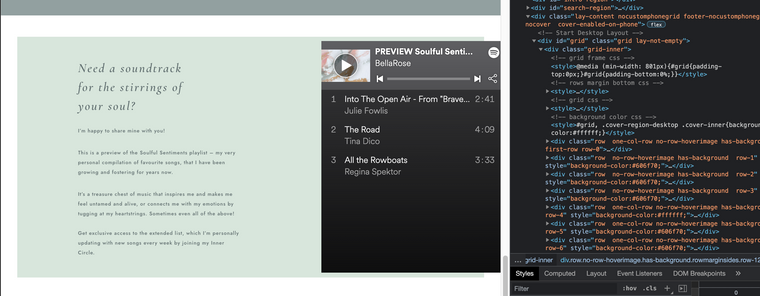
                      Screen Shot 2021-06-12 at 6.21.43 PM.png

                      Because this is based on Custom CSS i may have to come back later sorry when I am able, unfortunately I cannot currently! 🌝


                      I Hope if others have insight they will post please


                      Sincerely
                      Richard
                      1 Reply Last reply
                      0
                      • L
                        L
                        Lucas G
                        wrote on last edited by
                        #12

                        hello,
                        It seems to me that there is no answer here but subject is still related.

                        My home page is divided in 2 columns (50%each)
                        On each one, I would like to create square space that will be

                        • width (49% page width)
                        • height (49% of page width -- NOT PAGE HEIGHT)
                          in each square i will add sometime text, big or small images.

                        It cannot be px-fix neither height-related because I would loose the square-grid that give me this structure.

                        Hope this is well explained
                        and you ll be able to give me an easy to follow solution (im no coder, just photographer)

                        1 Reply Last reply
                        0
                        • RichardR
                          RichardR
                          Richard
                          Global Moderator
                          wrote on last edited by
                          #13

                          Dear @Lucas-G

                          Looking into Viewport Units would likely be very helpful 🌝

                          You can calculate dimensions based on your browsers screen size = VH & VW ( Viewport Heights & Viewport Width ).

                          https://www.w3schools.com/cssref/css_units.asp


                          Also this should help when needing to apply this CSS to Lay Theme Elements:

                          https://laytheme.com/documentation.html#custom-css-styling


                          Hope this helps and have a wonderful day Lucas 🌝

                          Sincerely
                          Richard

                          1 Reply Last reply
                          0

                          Hello! It looks like you're interested in this conversation, but you don't have an account yet.

                          Getting fed up of having to scroll through the same posts each visit? When you register for an account, you'll always come back to exactly where you were before, and choose to be notified of new replies (either via email, or push notification). You'll also be able to save bookmarks and upvote posts to show your appreciation to other community members.

                          With your input, this post could be even better 💗

                          Register Login
                          Reply
                          • Reply as topic
                          Log in to reply
                          • Oldest to Newest
                          • Newest to Oldest
                          • Most Votes


                          Online Users
                          A
                          Anna_S
                          Forgot your key, lost your files, need a previous Lay Theme or Addon version? Go to www.laykeymanager.com
                          laytheme.com
                          • Login

                          • Don't have an account? Register

                          • Login or register to search.
                          • First post
                            Last post
                          0
                          • Recent
                          • Tags
                          • Popular
                          • Users
                          • Search
