Skip to content
  • Recent
  • Tags
  • Popular
  • Users
  • Search
Skins
  • Light
  • Brite
  • Cerulean
  • Cosmo
  • Flatly
  • Journal
  • Litera
  • Lumen
  • Lux
  • Materia
  • Minty
  • Morph
  • Pulse
  • Sandstone
  • Simplex
  • Sketchy
  • Spacelab
  • United
  • Yeti
  • Zephyr
  • Dark
  • Cyborg
  • Darkly
  • Quartz
  • Slate
  • Solar
  • Superhero
  • Vapor

  • Default (No Skin)
  • No Skin
Collapse

Lay Theme Forum

  1. Home
  2. Feedback
  3. Custom Cursor Pointer

Custom Cursor Pointer

Scheduled Pinned Locked Moved Feedback
cursorpointerimagecustomarrow
34 Posts 14 Posters 14.9k Views 5 Watching
  • Oldest to Newest
  • Newest to Oldest
  • Most Votes
Reply
  • Reply as topic
Log in to reply
This topic has been deleted. Only users with topic management privileges can see it.
  • L
    L
    Laurence
    wrote on last edited by
    #10

    Hello

    I followed this thread as well to create a standard custom cursor that stays both when being the arrow and when hovering over an image. Somehow it does not work out that my picture (even though its a small one) appears as the cursor.

    I use the following code at the moment:

    body {
    cursor:
    url(http://planktonbasel.ch/wp-content/uploads/2021/04/PLG_Identity_CURSOR_0421_LF03.png) 4 12, auto;
    }

    www.planktonbasel.ch

    Thanks a lot already for any help!
    Best
    Laurence

    L 1 Reply Last reply
    0
    • L Laurence

      Hello

      I followed this thread as well to create a standard custom cursor that stays both when being the arrow and when hovering over an image. Somehow it does not work out that my picture (even though its a small one) appears as the cursor.

      I use the following code at the moment:

      body {
      cursor:
      url(http://planktonbasel.ch/wp-content/uploads/2021/04/PLG_Identity_CURSOR_0421_LF03.png) 4 12, auto;
      }

      www.planktonbasel.ch

      Thanks a lot already for any help!
      Best
      Laurence

      L
      L
      Laurence
      wrote on last edited by
      #11

      The custom cursor still doesn't work – A tip would be much appreciated, thanks beforehand!

      1 Reply Last reply
      0
      • RichardR
        RichardR
        Richard
        Global Moderator
        wrote on last edited by Richard
        #12

        Dear @Laurence

        Apologies that there has been delay in answering.

        Could you please, so that i may understand better rephrase:

        "that stays both when being the arrow and when hovering over an image."

        This would be appreciated 🌻


        Have a wonderful day Laurence & thank you for using Laytheme

        Sincerely
        Richard
        L 1 Reply Last reply
        0
        • RichardR Richard

          Dear @Laurence

          Apologies that there has been delay in answering.

          Could you please, so that i may understand better rephrase:

          "that stays both when being the arrow and when hovering over an image."

          This would be appreciated 🌻


          Have a wonderful day Laurence & thank you for using Laytheme

          Sincerely
          Richard
          L
          L
          Laurence
          wrote on last edited by
          #13

          Dear @Richard

          Sorry for my late reply, dove into other projects the last two weeks..
          And Thanks for your answer!
          Yeah, can understand that this formulation is a bit confusing. What I meant was that the cursor stays always in the same shape (a little plankton), both when moving over a link or an image (where normally the cursor changes from an arrow shape to a little hand with a pointed finger)
          Hope that explains it a bit better..

          Thanks beforehand for your help!

          I enjoy very much to work with LayTheme!
          Laurence

          1 Reply Last reply
          0
          • RichardR
            RichardR
            Richard
            Global Moderator
            wrote on last edited by
            #14

            Dear Laurence

            @Laurence

            Thank you for clarifying 🌝


            If needed, you can specify your custom cursor (little plankton) to work on links <a> and images <img>.

            Please apply the following code:

            body, a, img {
            cursor:
            url(http://planktonbasel.ch/wp-content/uploads/2021/04/PLG_Identity_CURSOR_0421_LF03.png) 4 12, auto;
            }
            

            To:

            Lay Options ➑️ Custom CSS & HTML ➑️ Custom CSS


            Best wishes Laurence, hope this helps!

            Sincerely
            Richard
            L 1 Reply Last reply
            0
            • RichardR Richard

              Dear Laurence

              @Laurence

              Thank you for clarifying 🌝


              If needed, you can specify your custom cursor (little plankton) to work on links <a> and images <img>.

              Please apply the following code:

              body, a, img {
              cursor:
              url(http://planktonbasel.ch/wp-content/uploads/2021/04/PLG_Identity_CURSOR_0421_LF03.png) 4 12, auto;
              }
              

              To:

              Lay Options ➑️ Custom CSS & HTML ➑️ Custom CSS


              Best wishes Laurence, hope this helps!

              Sincerely
              Richard
              L
              L
              Laurence
              wrote on last edited by
              #15

              @Richard said in Custom Cursor Pointer:

              body, a, img {
              cursor:
              url(http://planktonbasel.ch/wp-content/uploads/2021/04/PLG_Identity_CURSOR_0421_LF03.png) 4 12, auto;
              }

              Thank you @Richard!
              Just tried it but strangely enough it doesn't work – the cursor does not change into the image (little plankton) at all. I don't know if I do a basic mistake when applying the code or something is wrong with the picture..

              Could I maybe send you a PM with the Wordpress Password so you can have a closer look?

              Thanks already!
              Have a good day
              Laurence

              1 Reply Last reply
              0
              • RichardR
                RichardR
                Richard
                Global Moderator
                wrote on last edited by
                #16

                Dear Laurence

                @Laurence

                Of course ✨
                Send me a message via 'chats' and let's take a look! 🌝


                Best wishes
                Richard
                1 Reply Last reply
                0
                • FWF
                  FWF
                  FW
                  wrote on last edited by
                  #17

                  Hey I do have the same issue.
                  I tried to have an custom cursor before in lay theme and it did work.
                  But right now it doesnt work.
                  Any idea?

                  1 Reply Last reply
                  0
                  • RichardR
                    RichardR
                    Richard
                    Global Moderator
                    wrote on last edited by
                    #18

                    Dear @FW

                    Could you please post a link to the website with the Custom Cursor issue?


                    Talk soon and best wishes 🌝

                    Richard
                    1 Reply Last reply
                    0
                    • I
                      I
                      iinnas
                      wrote on last edited by
                      #19

                      Hi guys
                      I'm trying to introduce my own custom cursor pointer.
                      I've try the css from above:

                      body {
                      cursor: url(https://werneramann.com/wa2021/wp-content/uploads/2021/06/favicon-werner-amann.png) 4 12, auto;
                      }

                      But the cursor doesn't show up. I'm not sure if I make a mistake by uploading the wrong image file. I use the same image as for my favicon.

                      Website is: https://werneramann.com/wa2021/storiesandportrait/

                      Hope you can help!

                      cheers
                      Annika

                      1 Reply Last reply
                      0
                      • RichardR
                        RichardR
                        Richard
                        Global Moderator
                        wrote on last edited by
                        #20

                        Dear Anikka

                        @iinnas

                        I believe you are unable to see the cursor because the image size is too big . πŸŽ†
                        Currently your png is 400px by 400px. I think the requirements are 36px by 36px.

                        Please reduce the size and test again if possible.


                        Hope this helps and best wishes Anikka 🌝

                        Richard
                        1 Reply Last reply
                        0
                        • C
                          C
                          carlastreckwall
                          wrote on last edited by
                          #21

                          I have the same issue as above and tried a lot of different sizes which doesn't fix the problem. Did you guys succeed?

                          1 Reply Last reply
                          0
                          • RichardR
                            RichardR
                            Richard
                            Global Moderator
                            wrote on last edited by
                            #22

                            Dear @carlastreckwall

                            Are you able to post a link to your website with the custom cursor in question? A closer inspection may bring a solution πŸ”


                            Best wishes & have a wonderful day 🌼
                            Richard
                            1 Reply Last reply
                            0
                            • F
                              F
                              fabiocs
                              wrote on last edited by
                              #23

                              I would like to make my custom a cursor bigger that 36px x 36px, I read that is possible using .cur file, but this is not supported on wordpress.

                              Is there a way for this to work ???

                              website:
                              http://www.pazulloa.com/

                              code used:
                              body {
                              cursor: url("http://www.pazulloa.com/wp-content/uploads/2021/08/Estrella-cursor.png"), auto;
                              }
                              a { cursor: url("http://www.pazulloa.com/wp-content/uploads/2021/08/Estrella-cursor-hoover.png"), auto;
                              }

                              1 Reply Last reply
                              0
                              • D
                                D
                                djourina
                                wrote on last edited by djourina
                                #24

                                Re: Custom Cursor Pointer - png?

                                Hi all,
                                I am trying to create a custom cursor that looks and behaves like a light source. Until now I am straggling to get the image as png working. Any suggestions?

                                Code I used:

                                body, a, img {
                                cursor: url (https:/link and name.png) 4 12, auto;
                                }

                                1 Reply Last reply
                                0
                                • RichardR
                                  RichardR
                                  Richard
                                  Global Moderator
                                  wrote on last edited by
                                  #25

                                  Dear @djourina

                                  Maybe this is it: when calling a cursor source from a URL you must have it within parentheses ' ' :

                                  E.g:

                                  cursor:url('http://upload.wikimedia.org/wikipedia/commons/d/de/POL_apple.jpg');
                                  

                                  https://stackoverflow.com/questions/18551277/using-external-images-for-css-custom-cursors


                                  Best wishes
                                  Richard
                                  1 Reply Last reply
                                  0
                                  • K
                                    K
                                    kylie_g
                                    wrote on last edited by
                                    #26

                                    Hey, the solutions in the forum haven't worked for me yet, so i am asking individually:
                                    I want to apply a custom curser, which does not work on linked imaged (the little white hand cursor keeps appearing).
                                    It bothers me most on my landing page with a carousel, all the images have links.

                                    my custom css:

                                    body, a, img {
                                    cursor: url(https://norakeilig.com/wp-content/uploads/2023/11/cursi-1-e1701094228969.png), pointer;
                                    }

                                    Can someone help?
                                    Super happy with laytheme besides that :)

                                    1 Reply Last reply
                                    0
                                    • arminunruhA
                                      arminunruhA
                                      arminunruh
                                      Global Moderator
                                      wrote on last edited by
                                      #27

                                      body, a, img {
                                      cursor: url(https://norakeilig.com/wp-content/uploads/2023/11/cursi-1-e1701094228969.png), pointer !important;
                                      }

                                      try with !important; does it work?

                                      1 Reply Last reply
                                      0
                                      • K
                                        K
                                        kylie_g
                                        wrote on last edited by
                                        #28

                                        Thank you Armin, unfortunately, it doesn't work at all anymore.
                                        If I set a cursor in Customize or in the CSS - I only see the normal hand now.
                                        Some days ago I had a customized curser at least in some parts of the page. what went wrong?

                                        1 Reply Last reply
                                        0
                                        • arminunruhA
                                          arminunruhA
                                          arminunruh
                                          Global Moderator
                                          wrote on last edited by
                                          #29

                                          can u use a smaller image, try that please
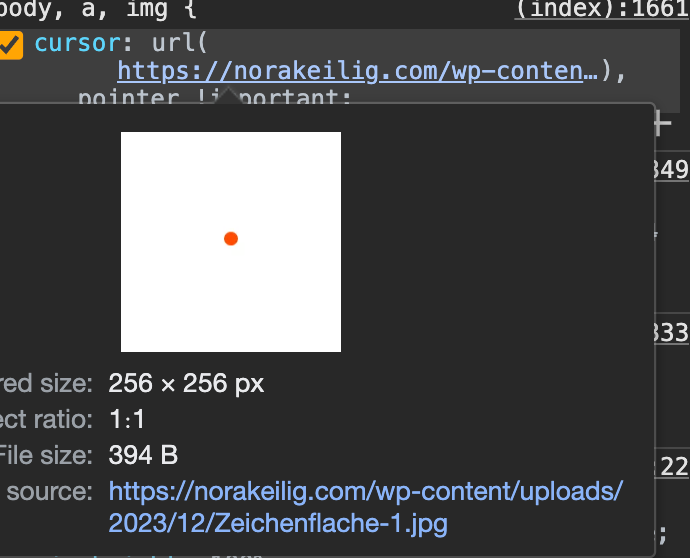
                                          Screenshot 2023-12-05 at 08.18.20.png

                                          your image is 256 x 256 its too big i think

                                          1 Reply Last reply
                                          0

                                          Hello! It looks like you're interested in this conversation, but you don't have an account yet.

                                          Getting fed up of having to scroll through the same posts each visit? When you register for an account, you'll always come back to exactly where you were before, and choose to be notified of new replies (either via email, or push notification). You'll also be able to save bookmarks and upvote posts to show your appreciation to other community members.

                                          With your input, this post could be even better πŸ’—

                                          Register Login
                                          Reply
                                          • Reply as topic
                                          Log in to reply
                                          • Oldest to Newest
                                          • Newest to Oldest
                                          • Most Votes


                                          Online Users
                                          Forgot your key, lost your files, need a previous Lay Theme or Addon version? Go to www.laykeymanager.com
                                          laytheme.com
                                          • Login

                                          • Don't have an account? Register

                                          • Login or register to search.
                                          • First post
                                            Last post
                                          0
                                          • Recent
                                          • Tags
                                          • Popular
                                          • Users
                                          • Search