Image hover addon set active
-
-
Dear @gridch
This would require you adding a class to the "imagehover region" through custom code.
Sorry if difficult to see but here is the imagehover region holding the image sources in waiting (hidden):
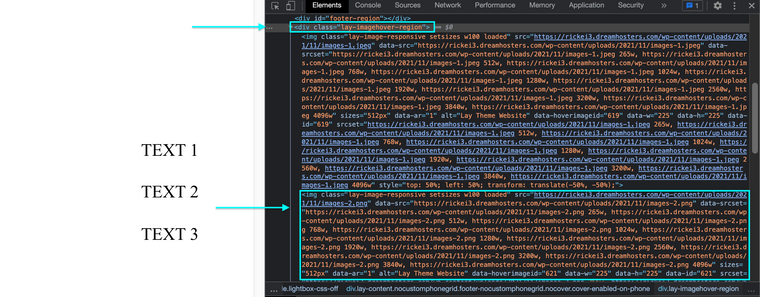
Then on "hover" the class
showis added to both thelay-imagehover-regionas well as the specific image in the list that relates to the link(text). In this case it being the second: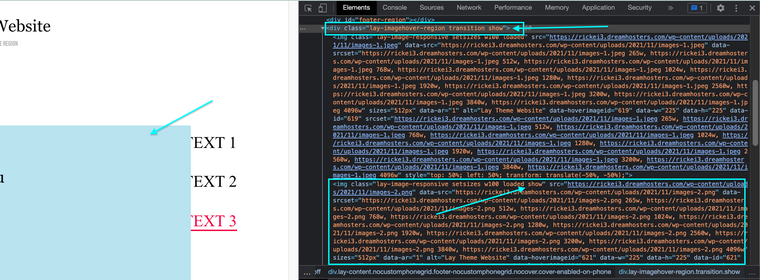
By making sure that the class
showis added permanently the image should stay visible, though i have not tested all this myself. If that doesn't work then you could use jQuery to always "hover" over the text you want:https://stackoverflow.com/questions/2290829/how-to-force-a-hover-state-with-jquery
Hope this helps @gridch & best wishes 🌻
Richard
-
Hello Richard,
Thank you for your help; I tried to force the image I want to keep permanently shown with the css "display: block;"
This is my image:
.lay-imagehover-region img[data-hoverimageid="652"] {
margin-left:600px;
margin-top: -88px;
display: block;
}But I don't know how to add a class that makes my image hover stays always visible or shown.
I tried with the code css "display: visible"; but I can't find the solution.
Do you know which could be the css code to achive it?
Thanks in advance,
Best
-
Dear @gridch
Look into the jQuery "AddClass"
You won't need the click function just the addClass:
jQuery("define element").addClass("define class");Also make sure to wrap any JS Code in a Newpage Event as documented here:
Best wishes 🌻
Richard
-
Hello Richard,
Thank you.
I think I need to add the following code to custom CSS & HTML page, in custom <head> content:
<script>
window.laytheme.on("newpageshown", function(layoutObj, type, obj){
console.log("layoutObj", layoutObj);
console.log("type", type);
console.log("obj", obj);
});
</script>And below I have to add the following:
jQuery("define element").addClass("show");
My addClass would be: "show" but which would be my element?
Please I will appreciate your help.
-
This is my website www.griseldaduch.com
I would love to have my image from text "Botanicals" shown permanently.
-
-
Dear @gridch
You could try:
.lay-imagehover-region, img[data-hoverimageid="211"] {
    opacity:1 !important;
}


.row-0{
    z-index:20;
}
The row-0
z-indexis needed for to keep your menu in front:

You will see the downside of this method is that to get the image visible we must set the image hover region to 1 opacity & the img itself. This means the last hovered image remains visible. Test to see 🌝
Merry Christmas 🎄
Richard
-
-
-
Finally I found a website which achieved the effect I was searching for months now. Unfortunately I did not get it working on my own Lay-theme based website. Is there something I am missing.
I try to achieve this effect with hover images centered and fullscreen. In front I have a list of different project links, which should trigger different images.
Would be really looking forward to any help.

Hello! It looks like you're interested in this conversation, but you don't have an account yet.
Getting fed up of having to scroll through the same posts each visit? When you register for an account, you'll always come back to exactly where you were before, and choose to be notified of new replies (either via email, or push notification). You'll also be able to save bookmarks and upvote posts to show your appreciation to other community members.
With your input, this post could be even better 💗
Register Login