Skip to content
  • Recent
  • Tags
  • Popular
  • Users
  • Search
Skins
  • Light
  • Brite
  • Cerulean
  • Cosmo
  • Flatly
  • Journal
  • Litera
  • Lumen
  • Lux
  • Materia
  • Minty
  • Morph
  • Pulse
  • Sandstone
  • Simplex
  • Sketchy
  • Spacelab
  • United
  • Yeti
  • Zephyr
  • Dark
  • Cyborg
  • Darkly
  • Quartz
  • Slate
  • Solar
  • Superhero
  • Vapor

  • Default (No Skin)
  • No Skin
Collapse

Lay Theme Forum

  1. Home
  2. Bug Reports
  3. Slow loading time for images – tried everything but CSS

Slow loading time for images – tried everything but CSS

Scheduled Pinned Locked Moved Bug Reports
7 Posts 3 Posters 1.1k Views 2 Watching
  • Oldest to Newest
  • Newest to Oldest
  • Most Votes
Reply
  • Reply as topic
Log in to reply
This topic has been deleted. Only users with topic management privileges can see it.
  • D
    D
    Dominik Gauly
    wrote on last edited by
    #1

    Hey Laytheme team,

    I have used your troubleshooting list for slow loading times, installed only one plugin called “WP Fastest Cache” and compressed all images to a minimum. The website does still not load as fast as it should.

    Could you have a look at the CSS used here, or do you have any other tipp that I could try? Don’t know what to do any more tried over the last months...

    Best,
    Dominik

    https://www.tobiaskirschner.de/

    1 Reply Last reply
    0
    • arminunruhA
      arminunruhA
      arminunruh
      Global Moderator
      wrote on last edited by
      #2

      hey!

      the site loads pretty fast for me

      you can also go to lay options
      there set the "Transition duration when navigating" to 0
      this way it will navigate faster

      A 1 Reply Last reply
      0
      • arminunruhA arminunruh

        hey!

        the site loads pretty fast for me

        you can also go to lay options
        there set the "Transition duration when navigating" to 0
        this way it will navigate faster

        A
        A
        augustoemendoza
        wrote on last edited by augustoemendoza
        #3

        @arminunruh
        I'm experiencing similar issued on several of my sites just like the one in this thread.

        I've tried everything and I mean it.

        I noticed a pattern with my sites including this: https://www.tobiaskirschner.de

        The pages that load slowly are all using the project thumbnails. These take forever to load.

        Is there anything that can be checked here?

        for some reason this site, has no loading issues:
        http://wherewestand.co.uk

        1 Reply Last reply
        0
        • arminunruhA
          arminunruhA
          arminunruh
          Global Moderator
          wrote on last edited by
          #4

          hey there! nice sites!
          ok i dont see a thumbnailgrid there

          but yea i will write this down and test this!!

          A 1 Reply Last reply
          0
          • arminunruhA arminunruh

            hey there! nice sites!
            ok i dont see a thumbnailgrid there

            but yea i will write this down and test this!!

            A
            A
            augustoemendoza
            wrote on last edited by
            #5

            @arminunruh Thanks for the comment and feature!

            Can you please check on this site:
            https://www.jasongalbut.com

            I'm having a terrible load time and I've tried everything.

            1 Reply Last reply
            0
            • arminunruhA
              arminunruhA
              arminunruh
              Global Moderator
              wrote on last edited by
              #6

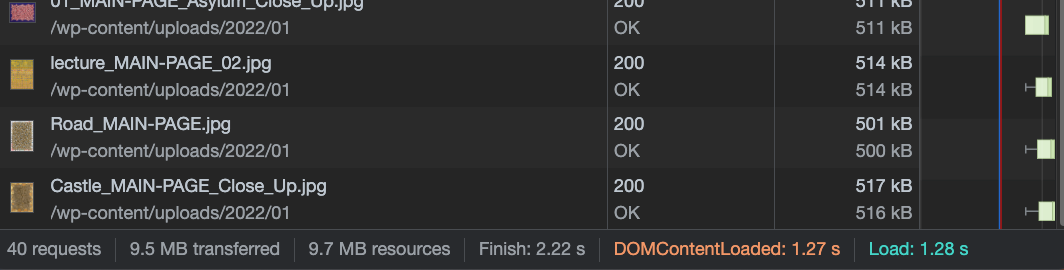
              Screenshot 2023-03-06 at 14.09.31.png

              that site takes 2 seconds for me to load
              how long does it take for u?

              can u enable lazyloading images in lay options, cause i think the site loads all images on its homepage at the same time

              1 Reply Last reply
              0
              • arminunruhA
                arminunruhA
                arminunruh
                Global Moderator
                wrote on last edited by
                #7

                also do the wp-fastest-cache plugin part here
                https://laytheme.com/documentation/speeding-up-your-website.html

                and use the same configuration as on the screenshot

                finally u can ask ur webhost to see if there may be any problem

                1 Reply Last reply
                0

                Hello! It looks like you're interested in this conversation, but you don't have an account yet.

                Getting fed up of having to scroll through the same posts each visit? When you register for an account, you'll always come back to exactly where you were before, and choose to be notified of new replies (either via email, or push notification). You'll also be able to save bookmarks and upvote posts to show your appreciation to other community members.

                With your input, this post could be even better 💗

                Register Login
                Reply
                • Reply as topic
                Log in to reply
                • Oldest to Newest
                • Newest to Oldest
                • Most Votes


                Online Users
                Forgot your key, lost your files, need a previous Lay Theme or Addon version? Go to www.laykeymanager.com
                laytheme.com
                • Login

                • Don't have an account? Register

                • Login or register to search.
                • First post
                  Last post
                0
                • Recent
                • Tags
                • Popular
                • Users
                • Search