Problem with Imagehover – suddenly covering everything?
-
Hello,
It's probably since a recent update(?) because I didn't have this issue when the site was launched.
I have the project index in which previously just the background image would change on hover, leaving everything on top visible.
Now suddenly it's covering everything, so it's impossible to see which project you are hovering on. If I decrease the z-index of the imagehover element, the whole element hides below the main content (and therefore behind the main background).
See: https://nelliserzanowa.com/
I know there is the "fixed and centered" option which leaves the texts visible, but this option leaves empty spaces left and right where I need it to cover the background fully, as it did before.
Is there a workaround here?
Thanks.
-
Hello,
It's probably since a recent update(?) because I didn't have this issue when the site was launched.
I have the project index in which previously just the background image would change on hover, leaving everything on top visible.
Now suddenly it's covering everything, so it's impossible to see which project you are hovering on. If I decrease the z-index of the imagehover element, the whole element hides below the main content (and therefore behind the main background).
See: https://nelliserzanowa.com/
I know there is the "fixed and centered" option which leaves the texts visible, but this option leaves empty spaces left and right where I need it to cover the background fully, as it did before.
Is there a workaround here?
Thanks.
@wjlz I also experienced the same Issue with the new update. I could not yet find a way to solve the problem. Will follow this thread to find a solution. If I come across a proper workaround will let you know
-
sorry
when u update lay theme and the imagehover addon in a few hours it should work again!
-
sorry
when u update lay theme and the imagehover addon in a few hours it should work again!
@arminunruh thanks for reaching out and looking into the issue. I have updated to the latest Lay Theme Version. Some bugs seem to be solved, but there is still a few issues. Project thumbnails are still hidden behind the image hover add-on as well as Projects index and in the footer area wherever you use small icons these are also hidden. Basically it is only bare "text" coming trough. Thanks for your help
-
ok let me check
its always best if u can post a link @Simonabele so i can debug things
-
make sure u also updated the imagehover addon
the purple image is the hover image.
its behind text and above the orange project thumbnail:
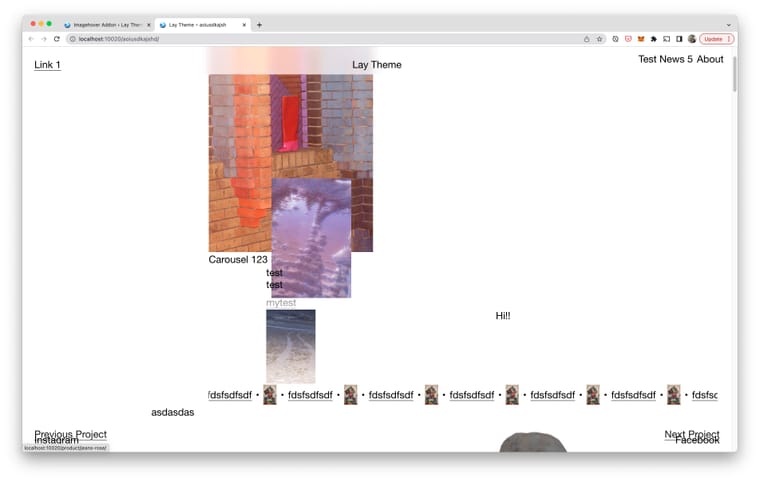
in lay options → imagehover addon
this setting is turned on:

and its a page without a cover
-
@Simonabele said in Problem with Imagehover – suddenly covering everything?:
Project thumbnails are still hidden behind the image hover add-on
ah nevermind!
please update lay theme and the imagehover addon in a few hours then go to lay options → imagehover addon and see these settings:
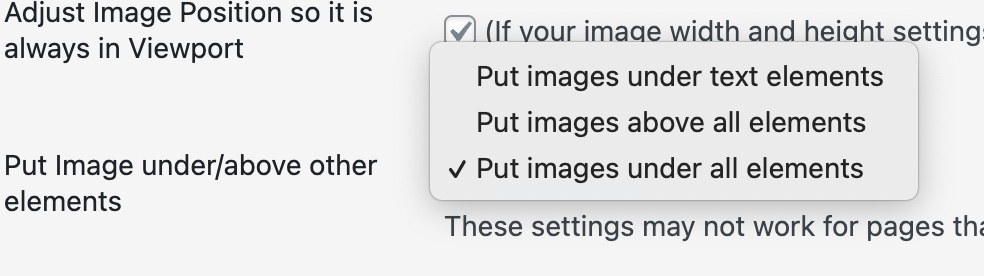
Then choose "put images under all elements"
This should provide the behaviour you expect! -
@arminunruh thanks for reaching out and looking into the issue. I have updated to the latest Lay Theme Version. Some bugs seem to be solved, but there is still a few issues. Project thumbnails are still hidden behind the image hover add-on as well as Projects index and in the footer area wherever you use small icons these are also hidden. Basically it is only bare "text" coming trough. Thanks for your help
@Simonabele said in Problem with Imagehover – suddenly covering everything?:
in the footer area wherever you use small icons these are also hidden.

i have just tried this and added small social media icons to the footer
for me they do show up. can you post a link so i can test this? thanks! -

Hello! It looks like you're interested in this conversation, but you don't have an account yet.
Getting fed up of having to scroll through the same posts each visit? When you register for an account, you'll always come back to exactly where you were before, and choose to be notified of new replies (either via email, or push notification). You'll also be able to save bookmarks and upvote posts to show your appreciation to other community members.
With your input, this post could be even better 💗
Register Login