New imagehover feature
-
Hi again :)
I have a small concern when using image hover new feature, and is that when I activate the scroll option, when I land into the website I see that it doesn't start from the top, but from an intermediate point making the first elements inaccessible and not really making a smooth user experience. Is there any way to solve this? My logic would be to start directly from the first element.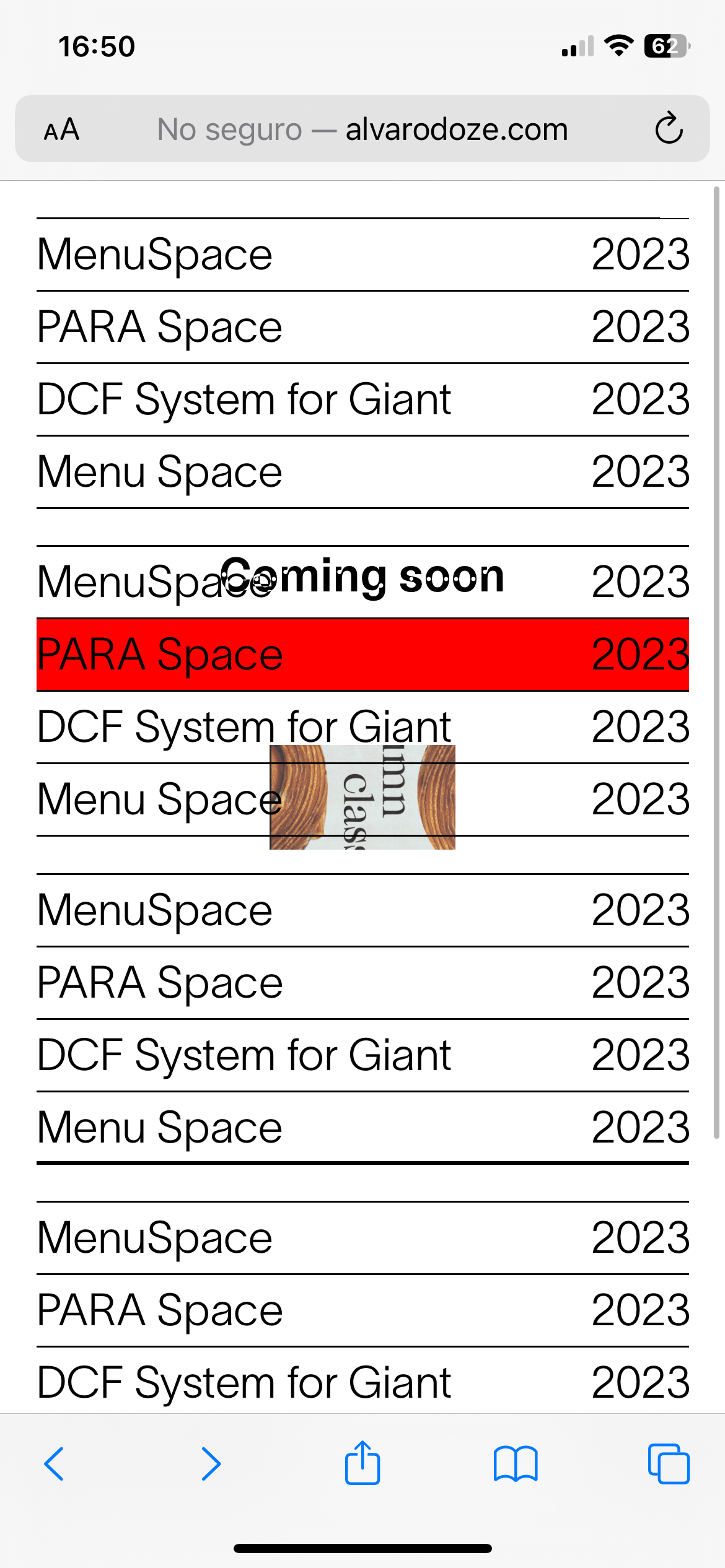
Cheers
-
The same goes with the ones at the bottom, when the scroll stops the "feature stops" making it hard to navigate... and breaking the whole experience. I guess I can fake it like this webiste by putting space in the top and at the bottom https://notedesignstudio.se/index/ but... yea just cheking..
-
Looks wrong in a way

-
yea you need to put space at the top or the bottom

or change that value in lay options → imagehvoer addon
-
look at the mobile version of my programming studio website:
i just put some space at the top
and i left enough space at the bottom so you can scroll all the way through


Hello! It looks like you're interested in this conversation, but you don't have an account yet.
Getting fed up of having to scroll through the same posts each visit? When you register for an account, you'll always come back to exactly where you were before, and choose to be notified of new replies (either via email, or push notification). You'll also be able to save bookmarks and upvote posts to show your appreciation to other community members.
With your input, this post could be even better 💗
Register Login