Skip to content
  • Recent
  • Tags
  • Popular
  • Users
  • Search
Skins
  • Light
  • Brite
  • Cerulean
  • Cosmo
  • Flatly
  • Journal
  • Litera
  • Lumen
  • Lux
  • Materia
  • Minty
  • Morph
  • Pulse
  • Sandstone
  • Simplex
  • Sketchy
  • Spacelab
  • United
  • Yeti
  • Zephyr
  • Dark
  • Cyborg
  • Darkly
  • Quartz
  • Slate
  • Solar
  • Superhero
  • Vapor

  • Default (No Skin)
  • No Skin
Collapse

Lay Theme Forum

  1. Home
  2. Connect and find Help
  3. Cursor invert color (black/white text)

Cursor invert color (black/white text)

Scheduled Pinned Locked Moved Connect and find Help
20 Posts 8 Posters 6.3k Views 1 Watching
  • Oldest to Newest
  • Newest to Oldest
  • Most Votes
Reply
  • Reply as topic
Log in to reply
This topic has been deleted. Only users with topic management privileges can see it.
  • RichardR Richard

    Dear @chloe543268

    Happy to help.
    This was fun to look into, its a nice trick they have done :)

    So its actually not a Cursor in the general sense - its an element ( box ) that moves in place of the cursor:

    You will need to add the following code into 'Lay -Options - Custom CSS & HTML'

    At the top of the page in 'Custom CSS':

    .pointer {
        cursor: none;
        background-color: #fff;
        position: fixed;
        text-align: center;
        width: 52px;
        height: 52px;
        z-index: 1000;
        transform: translate(-50%, -50%);
        pointer-events: none;
        mix-blend-mode: difference;
        overflow: hidden;
        border-radius: 50%;
    }
    

    NOTE: this 'background-color: #fff;' will be your starting colour so if your webpage has a black background you will see it but with a white background it will blend in. - you can change it to suit your needs

    Secondly in the ' Custom <head> content' add the following:

    <script>
    window.laytheme.on("newpageshown", function(layoutObj, type, obj){
        
      jQuery("body").append('<div class="pointer"></div>');
        jQuery("body").on("mousemove", function(e) {
    	jQuery(".pointer").css({ top: e.clientY + "px", left: e.clientX + "px" });
    	
    });
    
      });
    </script>
    

    Remember to save at the bottom of the page and then have a look at your Webpage.

    Its a cool effect, hope this helps and have a wonderful day. Let me know how you go! :)

    Best
    Richard

    X
    X
    XLD
    wrote on last edited by
    #8

    Re: Cursor invert color (black/white text)

    Dear @Richard-Keith

    I love this – thank you so much…

    Two things:

    (01)
    The cursor (element box) blends in perfectly on a white background page. But when I navigate to a black background page, the mix-blend-mode only works after a manual browser refresh.

    Can you help?

    (02)
    The default "arrow cursor" is still visible above the new custom cursor. Any idea why?

    Many thanks in advance!

    L 1 Reply Last reply
    0
    • RichardR
      RichardR
      Richard
      Global Moderator
      wrote on last edited by
      #9

      Hey :) @XLD

      Could you post a link to your website? :)

      If the question is in regards to when the cursor hits the edge of the browser and reverts back to standard - that is not a Lay Theme issue - this is a browser thing that is out of my hands :(

      Best
      Richard

      1 Reply Last reply
      0
      • E
        E
        evey_k
        wrote on last edited by
        #10
        This post is deleted!
        1 Reply Last reply
        0
        • E
          E
          evey_k
          wrote on last edited by evey_k
          #11
          This post is deleted!
          1 Reply Last reply
          0
          • RichardR Richard

            Dear @chloe543268

            Happy to help.
            This was fun to look into, its a nice trick they have done :)

            So its actually not a Cursor in the general sense - its an element ( box ) that moves in place of the cursor:

            You will need to add the following code into 'Lay -Options - Custom CSS & HTML'

            At the top of the page in 'Custom CSS':

            .pointer {
                cursor: none;
                background-color: #fff;
                position: fixed;
                text-align: center;
                width: 52px;
                height: 52px;
                z-index: 1000;
                transform: translate(-50%, -50%);
                pointer-events: none;
                mix-blend-mode: difference;
                overflow: hidden;
                border-radius: 50%;
            }
            

            NOTE: this 'background-color: #fff;' will be your starting colour so if your webpage has a black background you will see it but with a white background it will blend in. - you can change it to suit your needs

            Secondly in the ' Custom <head> content' add the following:

            <script>
            window.laytheme.on("newpageshown", function(layoutObj, type, obj){
                
              jQuery("body").append('<div class="pointer"></div>');
                jQuery("body").on("mousemove", function(e) {
            	jQuery(".pointer").css({ top: e.clientY + "px", left: e.clientX + "px" });
            	
            });
            
              });
            </script>
            

            Remember to save at the bottom of the page and then have a look at your Webpage.

            Its a cool effect, hope this helps and have a wonderful day. Let me know how you go! :)

            Best
            Richard

            A
            A
            alberto_califano
            wrote on last edited by
            #12

            @Richard Hello, I wanted to have a cursor with mix blend mode and I was able to do it by using the code written here.

            The only problem is that when I go from a page to another it stop to work, and the cursor become invisible.

            Does anyone have any ideas on why that happen?

            Many thanks,
            Alberto

            1 Reply Last reply
            0
            • arminunruhA
              arminunruhA
              arminunruh
              Global Moderator
              wrote on last edited by
              #13

              yea this code:

              <script>
              window.laytheme.on("newpageshown", function(layoutObj, type, obj){
                  
                jQuery("body").append('<div class="pointer"></div>');
                  jQuery("body").on("mousemove", function(e) {
              	jQuery(".pointer").css({ top: e.clientY + "px", left: e.clientX + "px" });
              });
              
                });
              </script>
              

              its wrong, because it adds a new pointer div everytime you go to a new page ^^

              just do it like this instead:

              jQuery(document).ready(function(){
                  jQuery("body").append('<div class="pointer"></div>');
                  jQuery("body").on("mousemove", function(e) {
                    jQuery(".pointer").css({ top: e.clientY + "px", left: e.clientX + "px" });
                  });
              })
              
              A 1 Reply Last reply
              0
              • arminunruhA arminunruh

                yea this code:

                <script>
                window.laytheme.on("newpageshown", function(layoutObj, type, obj){
                    
                  jQuery("body").append('<div class="pointer"></div>');
                    jQuery("body").on("mousemove", function(e) {
                	jQuery(".pointer").css({ top: e.clientY + "px", left: e.clientX + "px" });
                });
                
                  });
                </script>
                

                its wrong, because it adds a new pointer div everytime you go to a new page ^^

                just do it like this instead:

                jQuery(document).ready(function(){
                    jQuery("body").append('<div class="pointer"></div>');
                    jQuery("body").on("mousemove", function(e) {
                      jQuery(".pointer").css({ top: e.clientY + "px", left: e.clientX + "px" });
                    });
                })
                
                A
                A
                alberto_califano
                wrote on last edited by
                #14

                @arminunruh Thank you so much! It works perfectly now.

                1 Reply Last reply
                0
                • X XLD

                  Re: Cursor invert color (black/white text)

                  Dear @Richard-Keith

                  I love this – thank you so much…

                  Two things:

                  (01)
                  The cursor (element box) blends in perfectly on a white background page. But when I navigate to a black background page, the mix-blend-mode only works after a manual browser refresh.

                  Can you help?

                  (02)
                  The default "arrow cursor" is still visible above the new custom cursor. Any idea why?

                  Many thanks in advance!

                  L
                  L
                  LenaW
                  wrote on last edited by
                  #15

                  @XLD @Richard thanks for having this function explained, I bump into the same thing of also having the default "arrow cursor" still visible. How did you did you solve this in the end?
                  Many Thanks!
                  https://lenawinterink.com/category/test-work-category/

                  1 Reply Last reply
                  0
                  • arminunruhA
                    arminunruhA
                    arminunruh
                    Global Moderator
                    wrote on last edited by
                    #16
                    *, a{
                    cursor: none!important
                    }
                    

                    https://developer.mozilla.org/en-US/docs/Web/CSS/cursor

                    maybe this

                    1 Reply Last reply
                    0
                    • arminunruhA
                      arminunruhA
                      arminunruh
                      Global Moderator
                      wrote on last edited by
                      #17

                      ur website runs so fast wow even here in brazil. which webhost did you get or which caching plugin do you use?

                      1 Reply Last reply
                      0
                      • K
                        K
                        KW1
                        wrote on last edited by
                        #18

                        Thank you for this topic and the explanations. One question: How do I manage to use the same effect, but use a customized .svg as shape? I'm stuck at the moment...

                        1 Reply Last reply
                        0
                        • arminunruhA
                          arminunruhA
                          arminunruh
                          Global Moderator
                          wrote on last edited by
                          #19

                          Ok so first off, if anyone just wants a inverted cursor, i think this should be the correct code:

                          In "Custom CSS":

                          *{
                              cursor: none!important;
                          }
                          .pointer {
                              cursor: none;
                              background-color: #fff;
                              position: fixed;
                              text-align: center;
                              width: 52px;
                              height: 52px;
                              z-index: 1000;
                              transform: translate(-50%, -50%);
                              pointer-events: none;
                              mix-blend-mode: difference;
                              overflow: hidden;
                              border-radius: 50%;
                          }
                          

                          in HTML at bottom:

                          <script>
                          jQuery("body").append('<div class="pointer"></div>');
                          jQuery("body").on("mousemove", function(e) {
                          	jQuery(".pointer").css({ top: e.clientY + "px", left: e.clientX + "px" });
                          });
                          </script>
                          

                          previous code was using newpageshown to add the pointer div, but then it means it adds a new one every time you navigate on the page, thats not needed

                          1 Reply Last reply
                          0
                          • arminunruhA
                            arminunruhA
                            arminunruh
                            Global Moderator
                            wrote on last edited by
                            #20

                            to use a svg image, use https://developer.mozilla.org/en-US/docs/Web/CSS/background-image

                            in HTML at bottom:

                            <script>
                            jQuery("body").append('<div class="pointer"></div>');
                            jQuery("body").on("mousemove", function(e) {
                            	jQuery(".pointer").css({ top: e.clientY + "px", left: e.clientX + "px" });
                            });
                            </script>
                            

                            In "Custom CSS":

                            *{
                                cursor: none!important;
                            }
                            .pointer {
                                cursor: none;
                                position: fixed;
                                text-align: center;
                                width: 52px;
                                height: 52px;
                                z-index: 1000;
                                transform: translate(-50%, -50%);
                                pointer-events: none;
                                mix-blend-mode: difference;
                                overflow: hidden;
                                border-radius: 50%;
                                background-image: url("http://localhost:10020/wp-content/uploads/2024/09/close-button.svg");
                                background-position: center;
                                background-repeat: no-repeat;
                            }
                            

                            this is the part u change:
                            background-image: url("http://localhost:10020/wp-content/uploads/2024/09/close-button.svg");

                            get the url from wp-admin media library, when u click on an image u get File URL:
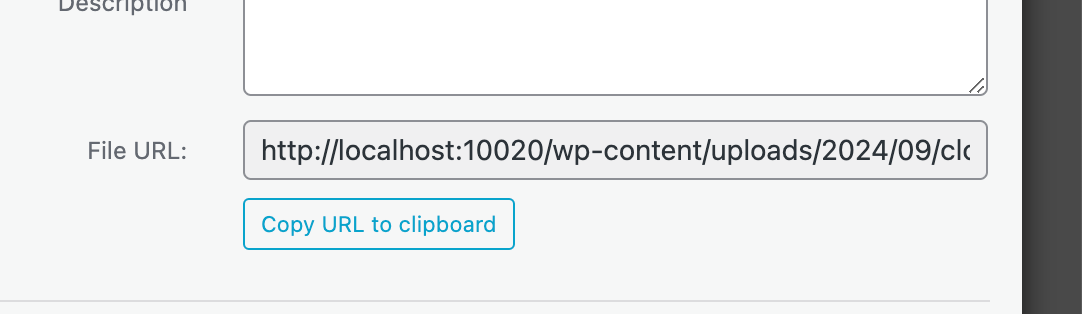
                            Screenshot 2025-02-19 at 09.05.14.png

                            1 Reply Last reply
                            0
                            • arminunruhA arminunruh referenced this topic on

                            Hello! It looks like you're interested in this conversation, but you don't have an account yet.

                            Getting fed up of having to scroll through the same posts each visit? When you register for an account, you'll always come back to exactly where you were before, and choose to be notified of new replies (either via email, or push notification). You'll also be able to save bookmarks and upvote posts to show your appreciation to other community members.

                            With your input, this post could be even better 💗

                            Register Login
                            Reply
                            • Reply as topic
                            Log in to reply
                            • Oldest to Newest
                            • Newest to Oldest
                            • Most Votes


                            Online Users
                            Forgot your key, lost your files, need a previous Lay Theme or Addon version? Go to www.laykeymanager.com
                            laytheme.com
                            • Login

                            • Don't have an account? Register

                            • Login or register to search.
                            • First post
                              Last post
                            0
                            • Recent
                            • Tags
                            • Popular
                            • Users
                            • Search

