Skip to content
  • Recent
  • Tags
  • Popular
  • Users
  • Search
Skins
  • Light
  • Brite
  • Cerulean
  • Cosmo
  • Flatly
  • Journal
  • Litera
  • Lumen
  • Lux
  • Materia
  • Minty
  • Morph
  • Pulse
  • Sandstone
  • Simplex
  • Sketchy
  • Spacelab
  • United
  • Yeti
  • Zephyr
  • Dark
  • Cyborg
  • Darkly
  • Quartz
  • Slate
  • Solar
  • Superhero
  • Vapor

  • Default (No Skin)
  • No Skin
Collapse

Lay Theme Forum

  1. Home
  2. Feedback
  3. Ability to lock elements

Ability to lock elements

Scheduled Pinned Locked Moved Feedback
17 Posts 3 Posters 2.7k Views 2 Watching
  • Oldest to Newest
  • Newest to Oldest
  • Most Votes
Reply
  • Reply as topic
Log in to reply
This topic has been deleted. Only users with topic management privileges can see it.
  • M
    M
    michael_vvc
    wrote on last edited by
    #6

    great @arminunruh 💫

    1 Reply Last reply
    1
    • G
      G
      Glyph
      wrote on last edited by
      #7

      Amazing @arminunruh , will this allow the item to still be edited while its position is only locked? That's the ideal scenario as @michael_vvc mentioned

      1 Reply Last reply
      0
      • arminunruhA
        arminunruhA
        arminunruh
        Global Moderator
        wrote on last edited by
        #8

        ah you wanted only the position to be locked? i misread that :DD.
        yea that makes sense mmh

        ok i will change it so its still editable.
        we dont really need a locked element, where you cant edit it at all anymore no?

        1 Reply Last reply
        0
        • G
          G
          Glyph
          wrote on last edited by
          #9

          I think both options are actually really useful. Locking it entirely prevents accidental editing/deleting which is a risk. While locking position only allows editing and prevents accidental movement/repositioning. Both would be great features. Could you have "Lock Position" and "Lock Element"?

          1 Reply Last reply
          0
          • arminunruhA
            arminunruhA
            arminunruh
            Global Moderator
            wrote on last edited by
            #10

            image.png

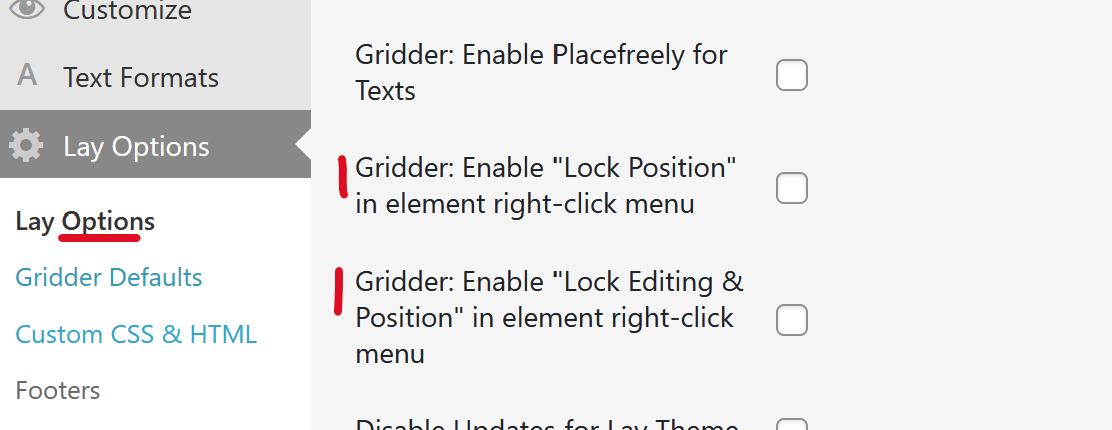
            so i will do it like this. in lay options in the "other" section
            we will have these 2 settings. enabling them will show these buttons in the gridder:
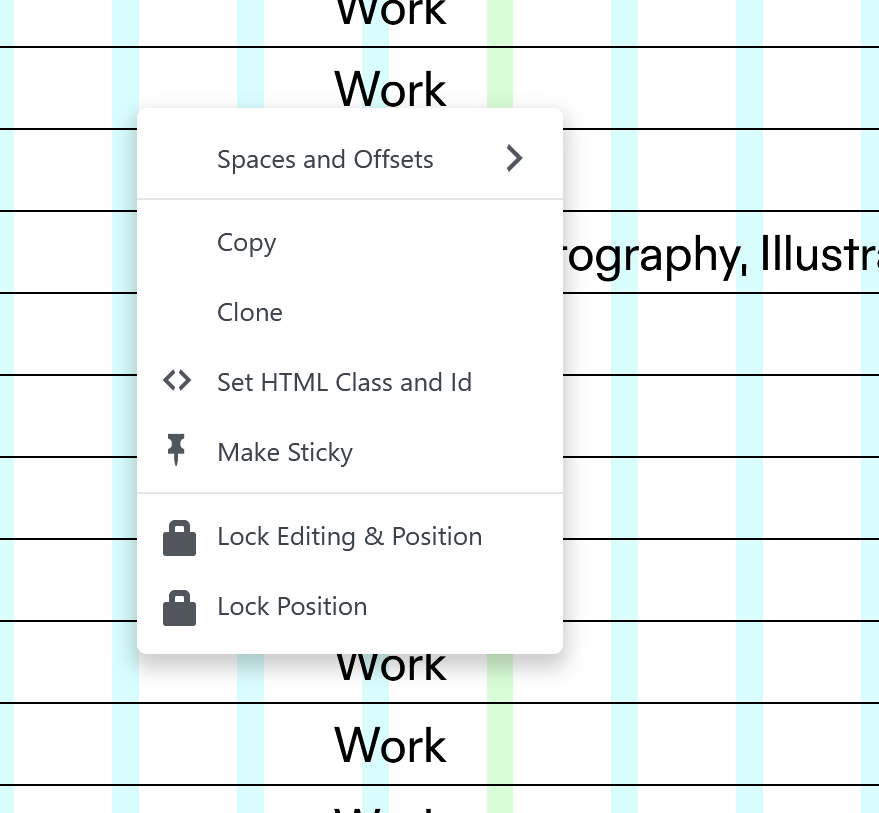
            image.png

            1 Reply Last reply
            0
            • M
              M
              michael_vvc
              wrote on last edited by michael_vvc
              #11

              that's a great solution! thanks @arminunruh

              1 Reply Last reply
              0
              • G
                G
                Glyph
                wrote on last edited by
                #12

                Yeah this is great @arminunruh. A really nice feature addition. Thanks for taking that on board.

                1 Reply Last reply
                1
                • arminunruhA
                  arminunruhA
                  arminunruh
                  Global Moderator
                  wrote on last edited by
                  #13

                  sure! the update is released now

                  1 Reply Last reply
                  0
                  • G
                    G
                    Glyph
                    wrote on last edited by
                    #14

                    @arminunruh This is working well. Would it be possible to add a little icon to those elements that are locked, so they can easily be seen on the page. Like a little padlock in the top right corner? Currently the only way to know is to manually try and move things which is time consuming if you have a page with a number of locked elements you are trying to manage.

                    1 Reply Last reply
                    0
                    • arminunruhA
                      arminunruhA
                      arminunruh
                      Global Moderator
                      wrote on last edited by
                      #15

                      sure its a great idea:
                      will be included with the next update
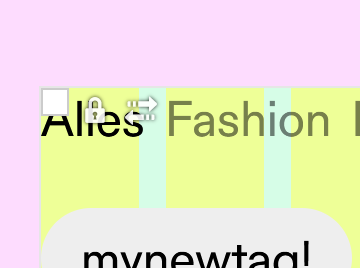
                      image.png

                      1 Reply Last reply
                      0
                      • G
                        G
                        Glyph
                        wrote on last edited by Glyph
                        #16

                        @arminunruh Just a little bug/annoyance with this. Once an element is locked, and you go back to the menu, the label should change to 'Unlock'. Right now it just shows a subtle tinted background to suggest it's locked, but remains labeled as 'Lock', as if it's not locked. It would make much more sense if the menu option changed to 'Unlock'.

                        1 Reply Last reply
                        0
                        • arminunruhA
                          arminunruhA
                          arminunruh
                          Global Moderator
                          wrote on last edited by
                          #17

                          yeah fair, the label should toggle to "Unlock" when the element is already locked.
                          and get the unlock icon!

                          ill fix that in the next release — the tinted bg is too subtle on its own.

                          1 Reply Last reply
                          0

                          Hello! It looks like you're interested in this conversation, but you don't have an account yet.

                          Getting fed up of having to scroll through the same posts each visit? When you register for an account, you'll always come back to exactly where you were before, and choose to be notified of new replies (either via email, or push notification). You'll also be able to save bookmarks and upvote posts to show your appreciation to other community members.

                          With your input, this post could be even better 💗

                          Register Login
                          Reply
                          • Reply as topic
                          Log in to reply
                          • Oldest to Newest
                          • Newest to Oldest
                          • Most Votes


                          Online Users
                          Forgot your key, lost your files, need a previous Lay Theme or Addon version? Go to www.laykeymanager.com
                          laytheme.com
                          • Login

                          • Don't have an account? Register

                          • Login or register to search.
                          • First post
                            Last post
                          0
                          • Recent
                          • Tags
                          • Popular
                          • Users
                          • Search