Skip to content
  • Recent
  • Tags
  • Popular
  • Users
  • Search
Skins
  • Light
  • Brite
  • Cerulean
  • Cosmo
  • Flatly
  • Journal
  • Litera
  • Lumen
  • Lux
  • Materia
  • Minty
  • Morph
  • Pulse
  • Sandstone
  • Simplex
  • Sketchy
  • Spacelab
  • United
  • Yeti
  • Zephyr
  • Dark
  • Cyborg
  • Darkly
  • Quartz
  • Slate
  • Solar
  • Superhero
  • Vapor

  • Default (No Skin)
  • No Skin
Collapse

Lay Theme Forum

  1. Home
  2. Bug Reports
  3. overlay page opening creates random position changes in Firefox

overlay page opening creates random position changes in Firefox

Scheduled Pinned Locked Moved Bug Reports
7 Posts 2 Posters 723 Views 2 Watching
  • Oldest to Newest
  • Newest to Oldest
  • Most Votes
Reply
  • Reply as topic
Log in to reply
This topic has been deleted. Only users with topic management privileges can see it.
  • dafvD
    dafvD
    dafv
    wrote on last edited by
    #1

    hi @arminunruh

    I have noticed that when I open an overlay page in Firefox, there are some elements on the main page that change their position. For now, I’ve only seen position changes in movable elements such as:

    • cover image with parallax (https://aaltar.com/edmond-catalogue/ — “Index” is the overlay page)
    • sticky elements (https://inesbaptista.com/ — “About” is the overlay page)

    I tested this in several browsers, and I can only see it happening in Firefox.
    Do you have any idea why this happens and how to solve it?

    Here are some screen recordings of the issues:
    https://www.swisstransfer.com/d/1541bad7-1fd9-41f8-b5de-6cace8a88036

    1 Reply Last reply
    0
    • arminunruhA
      arminunruhA
      arminunruh
      Global Moderator
      wrote on last edited by
      #2

      ah i see.

      can you try this:
      when editing the page that is the overlay, in the overlay settings to the right, uncheck this box
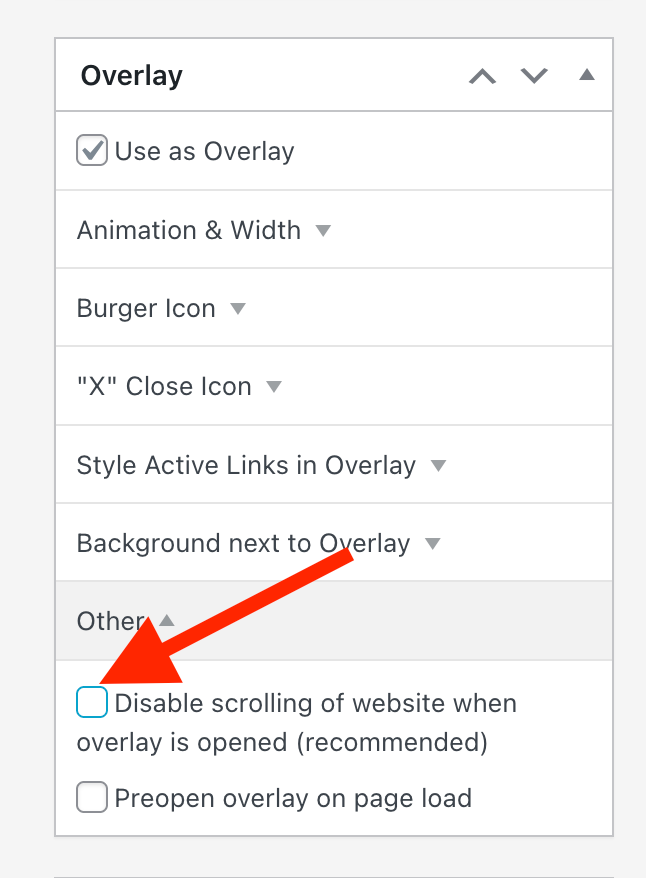
      Screenshot 2026-01-05 at 19.15.01.png

      dafvD 1 Reply Last reply
      0
      • arminunruhA arminunruh

        ah i see.

        can you try this:
        when editing the page that is the overlay, in the overlay settings to the right, uncheck this box

        Screenshot 2026-01-05 at 19.15.01.png

        dafvD
        dafvD
        dafv
        wrote on last edited by dafv
        #3

        @arminunruh I unchecked that box on both websites and the problem still persists.
        Also, I cleared the cache (on browsers and websites), and even with that box unchecked, the scroll seems to be disabled by default, which is weird.

        PS: I just noticed that the cover image issue happens in other browsers as well (e.g. Safari and Chrome), and not only in Firefox.

        1 Reply Last reply
        0
        • arminunruhA
          arminunruhA
          arminunruh
          Global Moderator
          wrote on last edited by
          #4

          it seems that some of the code for the new smooth scroll feature made it so page overlays are always "disable scroll",
          even if you turned off that setting

          i will release an update later today.
          then it will work with firefox if you have unchecked "disable scroll" for your page overlays
          i tested that

          dafvD 1 Reply Last reply
          0
          • arminunruhA arminunruh

            it seems that some of the code for the new smooth scroll feature made it so page overlays are always "disable scroll",
            even if you turned off that setting

            i will release an update later today.
            then it will work with firefox if you have unchecked "disable scroll" for your page overlays
            i tested that

            dafvD
            dafvD
            dafv
            wrote on last edited by
            #5

            hey @arminunruh, I tested it and now the “Disabled scrolling” toggle seems to be working perfectly. With that option unchecked, the previously mentioned position issue of the movable elements is fixed!

            However, when that option is enabled, all of those issues still happen just like before :/
            Do you have any idea on how to fix this (on both cover image and sticky elements)?

            1 Reply Last reply
            0
            • arminunruhA
              arminunruhA
              arminunruh
              Global Moderator
              wrote on last edited by
              #6

              its not really fixable with that setting enabled, because disabling scrolling has these side effects on firefox :/

              1 Reply Last reply
              0
              • dafvD
                dafvD
                dafv
                wrote on last edited by
                #7

                ah okay. Thanks anyway @arminunruh

                1 Reply Last reply
                0

                Hello! It looks like you're interested in this conversation, but you don't have an account yet.

                Getting fed up of having to scroll through the same posts each visit? When you register for an account, you'll always come back to exactly where you were before, and choose to be notified of new replies (either via email, or push notification). You'll also be able to save bookmarks and upvote posts to show your appreciation to other community members.

                With your input, this post could be even better 💗

                Register Login
                Reply
                • Reply as topic
                Log in to reply
                • Oldest to Newest
                • Newest to Oldest
                • Most Votes


                Online Users
                Forgot your key, lost your files, need a previous Lay Theme or Addon version? Go to www.laykeymanager.com
                laytheme.com
                • Login

                • Don't have an account? Register

                • Login or register to search.
                • First post
                  Last post
                0
                • Recent
                • Tags
                • Popular
                • Users
                • Search