Skip to content
  • Recent
  • Tags
  • Popular
  • Users
  • Search
Skins
  • Light
  • Brite
  • Cerulean
  • Cosmo
  • Flatly
  • Journal
  • Litera
  • Lumen
  • Lux
  • Materia
  • Minty
  • Morph
  • Pulse
  • Sandstone
  • Simplex
  • Sketchy
  • Spacelab
  • United
  • Yeti
  • Zephyr
  • Dark
  • Cyborg
  • Darkly
  • Quartz
  • Slate
  • Solar
  • Superhero
  • Vapor

  • Default (No Skin)
  • No Skin
Collapse

Lay Theme Forum

  1. Home
  2. Bug Reports
  3. order of project items is getting mixed up

order of project items is getting mixed up

Scheduled Pinned Locked Moved Bug Reports
13 Posts 3 Posters 481 Views 2 Watching
  • Oldest to Newest
  • Newest to Oldest
  • Most Votes
Reply
  • Reply as topic
Log in to reply
This topic has been deleted. Only users with topic management privileges can see it.
  • G Offline
    G Offline
    goetz
    wrote on last edited by
    #2

    My Domain is: www.goetzlange.de

    1 Reply Last reply
    0
    • arminunruhA Offline
      arminunruhA Offline
      arminunruh
      Global Moderator
      wrote on last edited by
      #3

      i see i had the same issue with projectindex and coded a workaround back then

      working on it now

      1 Reply Last reply
      0
      • G Offline
        G Offline
        goetz
        wrote on last edited by
        #4

        Thanks Armin!

        1 Reply Last reply
        0
        • G Offline
          G Offline
          goetz
          wrote on last edited by
          #5

          Would be nice if you could give me a massage when you solved the problem. Thank you!

          1 Reply Last reply
          0
          • arminunruhA Offline
            arminunruhA Offline
            arminunruh
            Global Moderator
            wrote on last edited by
            #6

            hey u can update lay theme now and then see if it is fixed!

            1 Reply Last reply
            0
            • G Offline
              G Offline
              goetz
              wrote on last edited by
              #7

              fixed! Thank you very much for the great support!

              1 Reply Last reply
              1
              • arminunruhA Offline
                arminunruhA Offline
                arminunruh
                Global Moderator
                wrote on last edited by
                #8

                very nice :))

                1 Reply Last reply
                0
                • S Offline
                  S Offline
                  sreibel
                  wrote last edited by
                  #9

                  Hi,

                  when using "Sort by Date" in the Project Thumbnail Grid block, the sort order is hardcoded to DESC, meaning the post with the farthest future date appears first. For event-based sites, the expected behavior is the opposite: the nearest upcoming date should appear first, in ascending order.

                  The fix is a one-line change in frontend/assets/php/elements/thumbnailgrid_functions.php at the two places where $order is set:

                  Current:
                  if( $orderby == 'menu_order' || $orderby == 'post_title' ) {
                  $order = 'ASC';
                  }

                  Suggested fix:
                  if( $orderby == 'menu_order' || $orderby == 'post_title' || $orderby == 'post_date' ) {
                  $order = 'ASC';
                  }

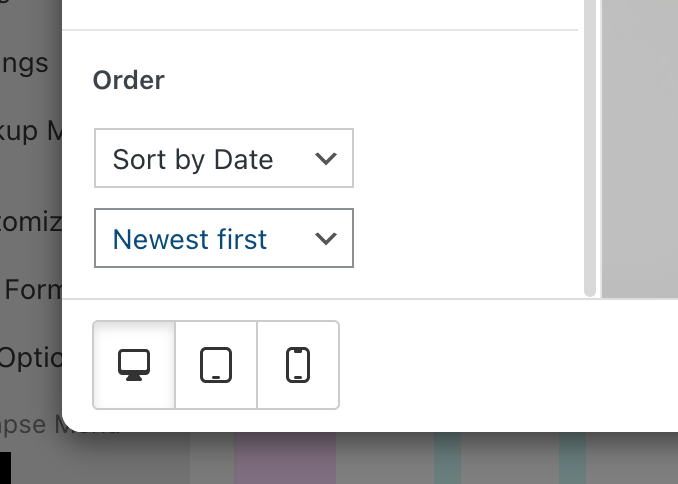
                  Ideally this could also be a configurable option in the block editor, for example "Sort by Date ascending" vs. "Sort by Date descending", similar to the existing "Reverse Order" button.

                  Thank you!

                  1 Reply Last reply
                  0
                  • arminunruhA Offline
                    arminunruhA Offline
                    arminunruh
                    Global Moderator
                    wrote last edited by
                    #10

                    hey! Oh yeah, this is a very good call and an amazing idea. I will implement this, and it will be included with the next update. Thanks for the heads up.

                    1 Reply Last reply
                    0
                    • arminunruhA Offline
                      arminunruhA Offline
                      arminunruh
                      Global Moderator
                      wrote last edited by
                      #11

                      well, probably I can't just change the default order, but i will insert a new setting for this

                      1 Reply Last reply
                      0
                      • arminunruhA Offline
                        arminunruhA Offline
                        arminunruh
                        Global Moderator
                        wrote last edited by
                        #12

                        grafik.png

                        this is what it will look like

                        1 Reply Last reply
                        0
                        • S Offline
                          S Offline
                          sreibel
                          wrote last edited by
                          #13

                          Thanks so much Armin!

                          1 Reply Last reply
                          0
                          Reply
                          • Reply as topic
                          Log in to reply
                          • Oldest to Newest
                          • Newest to Oldest
                          • Most Votes


                          For paid 1-on-1 Lay Theme Coaching, contact Audrey (audrey@cyberslayers.work) or me (info@laytheme.com).

                          We also code custom websites or bespoke Lay features. Drop me a line at info@laytheme.com or check out my work at arminunruh.com.

                          Want to support my work? paypal.me/arminunruh

                          Before you post:
                          1. When using a WordPress Cache plugin, disable it or clear your cache.
                          2. Update Lay Theme and all Lay Theme Addons
                          3. Disable all Plugins
                          4. Go to Lay Options → Custom CSS & HTML, click "Turn Off All Custom Code", click "Save Changes"

                          This often solves issues you might run into

                          When you post:
                          1. Post a link to where the problem is
                          2. Does the problem happen on Chrome, Firefox, Safari or iPhone or Android?
                          3. If the problem is difficult to explain, post screenshots / link to a video to explain it
                          Online Users
                          Forgot your key, lost your files, need a previous Lay Theme or Addon version? Go to www.laykeymanager.com
                          laytheme.com
                          • Login

                          • Don't have an account? Register

                          • Login or register to search.
                          • First post
                            Last post
                          0
                          • Recent
                          • Tags
                          • Popular
                          • Users
                          • Search