Skip to content
  • Recent
  • Tags
  • Popular
  • Users
  • Search
Skins
  • Light
  • Brite
  • Cerulean
  • Cosmo
  • Flatly
  • Journal
  • Litera
  • Lumen
  • Lux
  • Materia
  • Minty
  • Morph
  • Pulse
  • Sandstone
  • Simplex
  • Sketchy
  • Spacelab
  • United
  • Yeti
  • Zephyr
  • Dark
  • Cyborg
  • Darkly
  • Quartz
  • Slate
  • Solar
  • Superhero
  • Vapor

  • Default (No Skin)
  • No Skin
Collapse

Lay Theme Forum

  1. Home
  2. Bug Reports
  3. tablet breakpoint doesn't work

tablet breakpoint doesn't work

Scheduled Pinned Locked Moved Bug Reports
8 Posts 2 Posters 564 Views 2 Watching
  • Oldest to Newest
  • Newest to Oldest
  • Most Votes
Reply
  • Reply as topic
Log in to reply
This topic has been deleted. Only users with topic management privileges can see it.
  • V
    V
    veitsons
    wrote on last edited by
    #1

    For some reason the tablet breakpoint doesn't work since the last update (11.4.0). Any change in the px doesn't make any change. Thanks for fixing.

    1 Reply Last reply
    0
    • arminunruhA
      arminunruhA
      arminunruh
      Global Moderator
      wrote on last edited by
      #2

      Hello, okay, I'm gonna check it out!

      1 Reply Last reply
      0
      • arminunruhA
        arminunruhA
        arminunruh
        Global Moderator
        wrote on last edited by arminunruh
        #3

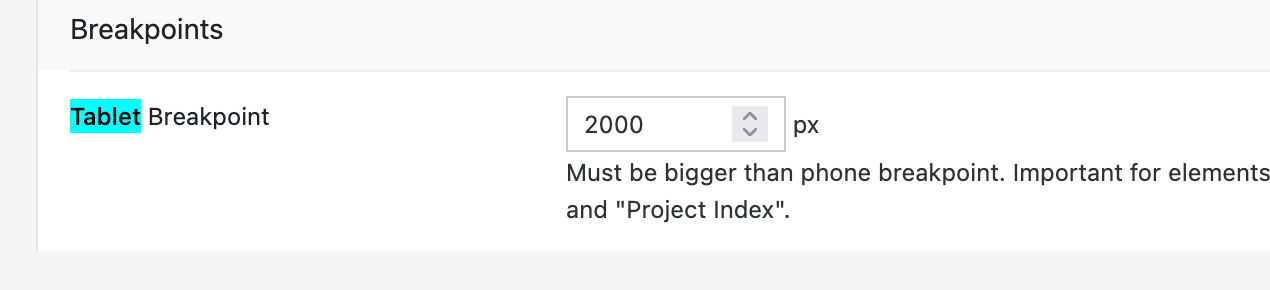
        so when I change the number in the tablet breakpoint here and save it, I can just save it normally, and the number stays that way too.

        Did you have a problem with that? Is that what you meant?

        This is the tablet breakpoint and Lay Options:
        grafik.png

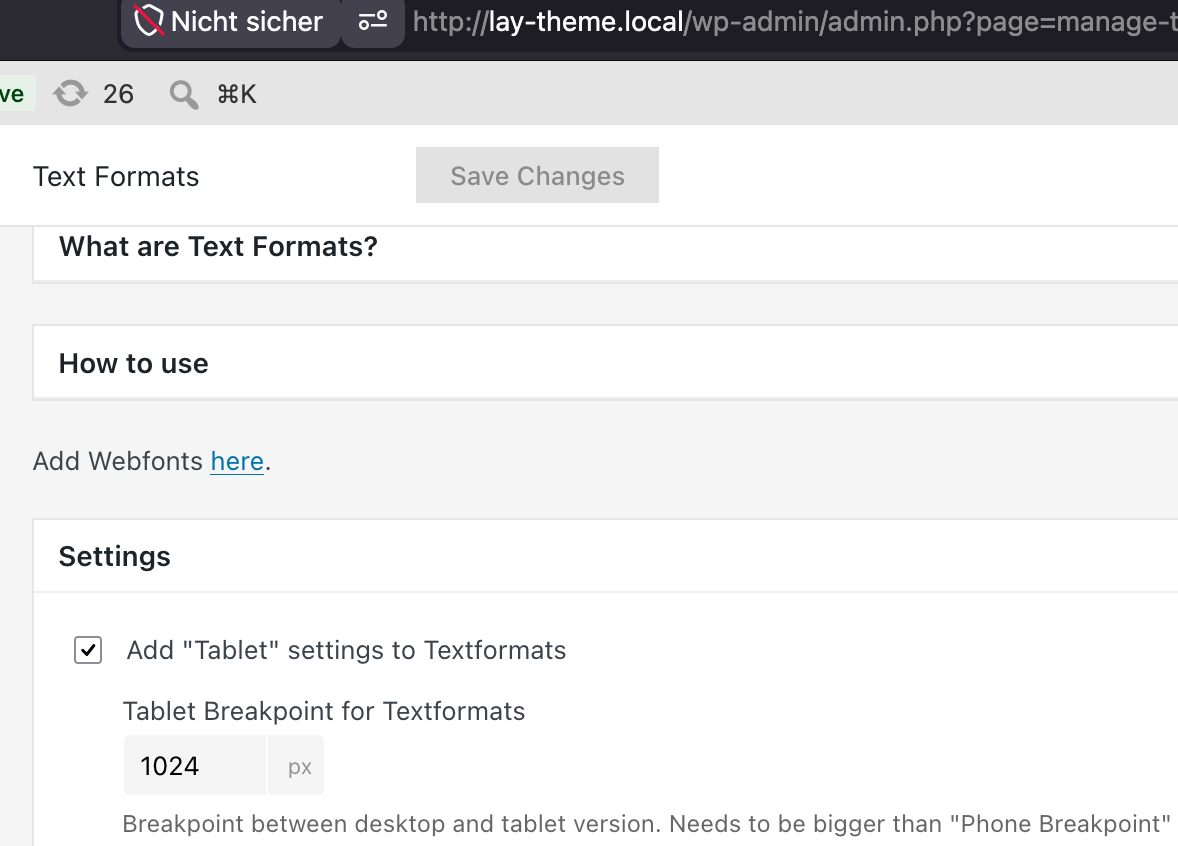
        Or do you mean the tablet breakpoint for text formats?
        grafik.png

        1 Reply Last reply
        0
        • arminunruhA
          arminunruhA
          arminunruh
          Global Moderator
          wrote on last edited by arminunruh
          #4

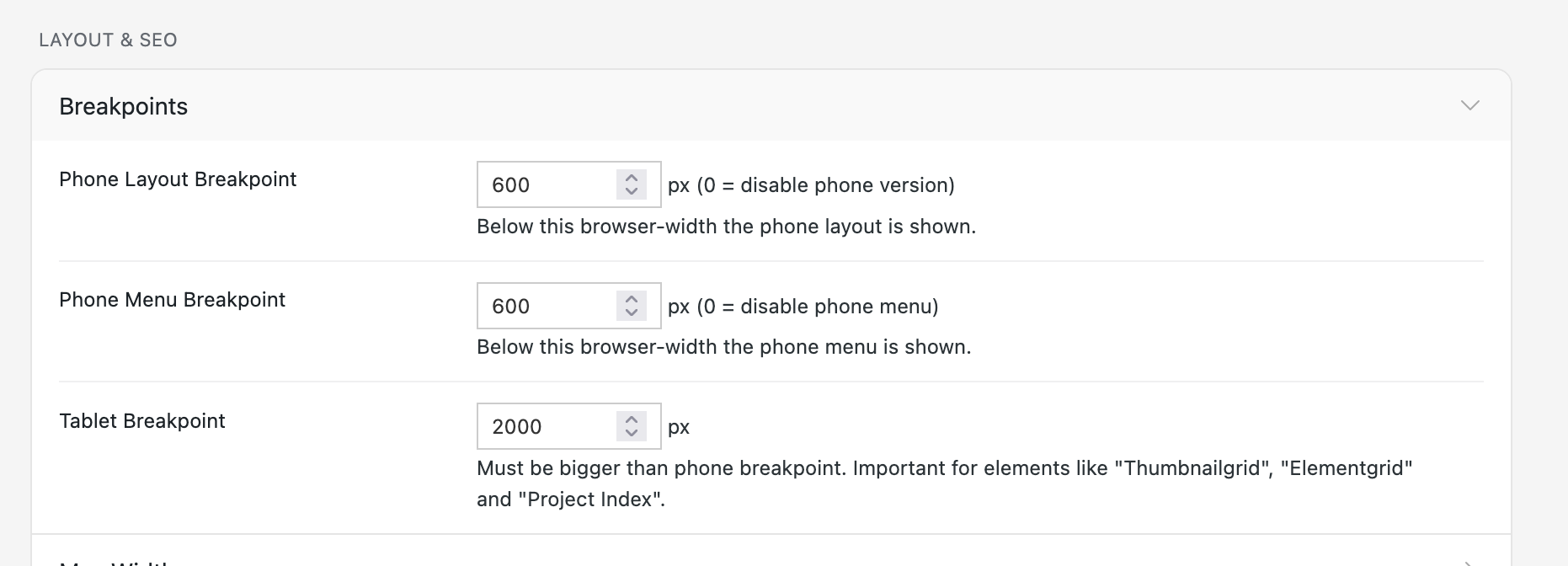
          one reason why it doesn't work could be that you made the phone breakpoint larger than the tablet breakpoint.
          grafik.png

          So here, make sure the very first field has a smaller number than the last tablet field.

          1 Reply Last reply
          0
          • V
            V
            veitsons
            wrote on last edited by
            #5

            Many thanks for your reply! I didn't realize that I had to adjust this in the lay options as well as in the text formats. Got it now. Thanks, Armin! Wouldn't it be good to have these settings next to each other?

            1 Reply Last reply
            0
            • arminunruhA
              arminunruhA
              arminunruh
              Global Moderator
              wrote on last edited by
              #6

              Yeah, I will put the text formats tablet settings there too.
              It's just tablet breakpoints for two different things:

              1. For the text formats

              2. For elements that react to tablet, like thumbnail grid, element grid, and project index

              1 Reply Last reply
              0
              • V
                V
                veitsons
                wrote on last edited by
                #7

                LayTheme becomes more flexible, greater and limitless, I just love it. Sometimes it's hard to follow the rapid development of the theme ;-)

                1 Reply Last reply
                0
                • arminunruhA
                  arminunruhA
                  arminunruh
                  Global Moderator
                  wrote on last edited by
                  #8

                  That's true. That's why I'm creating blueprints now, so people don't have to know everything in every setting and they can just start from a point somewhere instead of having a blank canvas.

                  1 Reply Last reply
                  0

                  Hello! It looks like you're interested in this conversation, but you don't have an account yet.

                  Getting fed up of having to scroll through the same posts each visit? When you register for an account, you'll always come back to exactly where you were before, and choose to be notified of new replies (either via email, or push notification). You'll also be able to save bookmarks and upvote posts to show your appreciation to other community members.

                  With your input, this post could be even better 💗

                  Register Login
                  Reply
                  • Reply as topic
                  Log in to reply
                  • Oldest to Newest
                  • Newest to Oldest
                  • Most Votes


                  Online Users
                  Forgot your key, lost your files, need a previous Lay Theme or Addon version? Go to www.laykeymanager.com
                  laytheme.com
                  • Login

                  • Don't have an account? Register

                  • Login or register to search.
                  • First post
                    Last post
                  0
                  • Recent
                  • Tags
                  • Popular
                  • Users
                  • Search