Skip to content
  • Recent
  • Tags
  • Popular
  • Users
  • Search
Skins
  • Light
  • Brite
  • Cerulean
  • Cosmo
  • Flatly
  • Journal
  • Litera
  • Lumen
  • Lux
  • Materia
  • Minty
  • Morph
  • Pulse
  • Sandstone
  • Simplex
  • Sketchy
  • Spacelab
  • United
  • Yeti
  • Zephyr
  • Dark
  • Cyborg
  • Darkly
  • Quartz
  • Slate
  • Solar
  • Superhero
  • Vapor

  • Default (No Skin)
  • No Skin
Collapse

Lay Theme Forum

  1. Home
  2. Feedback
  3. Adobe Typekit

Adobe Typekit

Scheduled Pinned Locked Moved Feedback
12 Posts 4 Posters 5.2k Views 2 Watching
  • Oldest to Newest
  • Newest to Oldest
  • Most Votes
Reply
  • Reply as topic
Log in to reply
This topic has been deleted. Only users with topic management privileges can see it.
  • M
    M
    moloken
    wrote on last edited by
    #1

    Hey,

    Is it possible to add webfonts from Typekit? Can't figure out how...

    Thanks in advice

    arminunruhA 1 Reply Last reply
    0
    • M moloken

      Hey,

      Is it possible to add webfonts from Typekit? Can't figure out how...

      Thanks in advice

      arminunruhA
      arminunruhA
      arminunruh
      Global Moderator
      wrote on last edited by
      #2

      Just worked on this today. It will be possible in the new update.
      Coming soon :D

      1 Reply Last reply
      1
      • M
        M
        moloken
        wrote on last edited by
        #3

        Woop woop! You're the man!

        1 Reply Last reply
        0
        • arminunruhA
          arminunruhA
          arminunruh
          Global Moderator
          wrote on last edited by arminunruh
          #4

          Hey!
          Ok now in version 1.022 you can add a webfont by <script> tag and CSS. This lets you add an Adobe Typekit webfont!
          Let me show you how to do that.

          You go to "Lay Options" -> "Webfonts". Click "Add Webfont". Choose "Add by <script> tag and CSS". Type in your font-name and your JavaScript code.

          My JavaScript code of Adobe Typekit looks like this:
          <script src="//use.typekit.net/suo6pbu.js"></script>
          <script>try{Typekit.load();}catch(e){}</script>

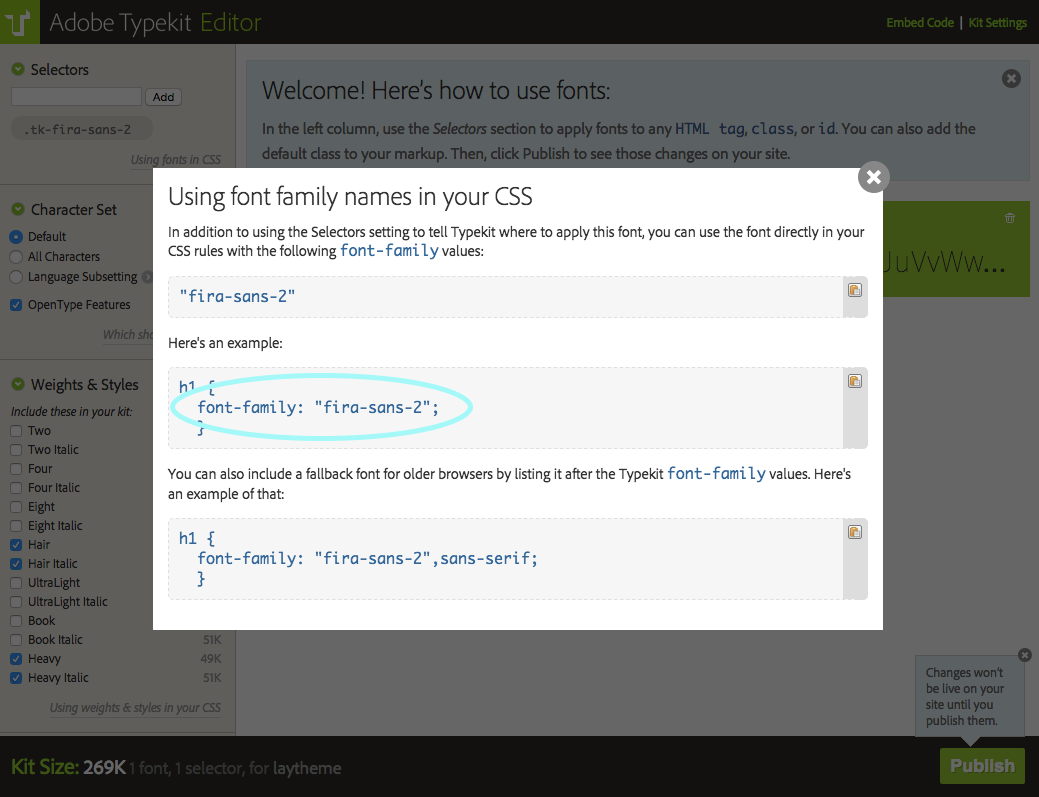
          Then at "font-family CSS" you need to type in your font family CSS. Here's where you find it in Adobe Typekit:
          Screen Shot 2015-05-11 at 18.29.50.png

          Screen Shot 2015-05-11 at 18.30.01.png

          Cool! Let me know if it works for you.

          1 Reply Last reply
          0
          • M
            M
            moloken
            wrote on last edited by
            #5

            Hey,

            There seems to be a bug here.

            It worked like a charm to add the webfont from Typekit. You can use the font under Text Formats and add a paragraph style for example:
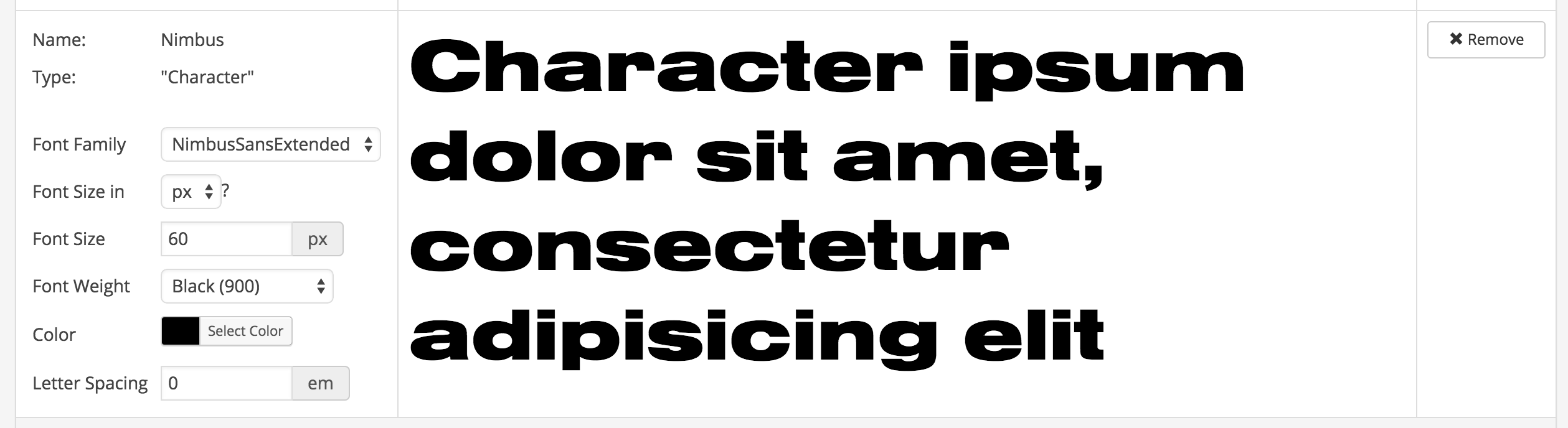
            Screen Shot 2015-05-11 at 18.32.20.png

            But when you use it directly on a page text field it's like the preview doesn't work?
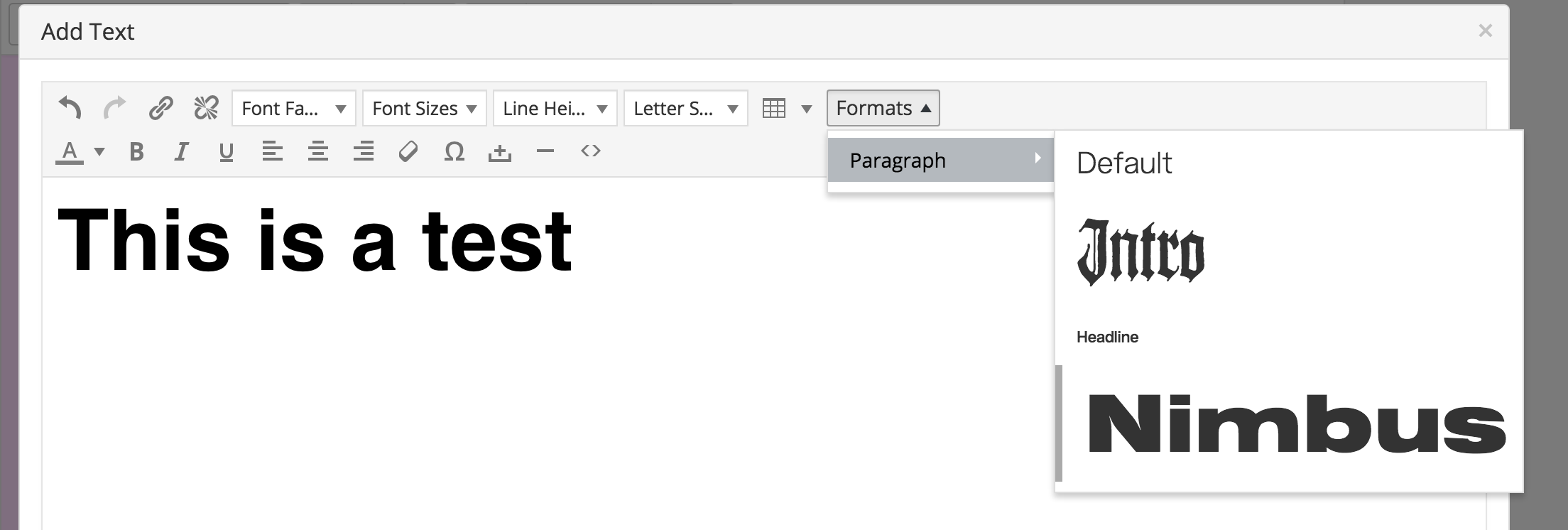
            Screen Shot 2015-05-11 at 18.34.43.png

            It's rendered correctly on the website though...

            1 Reply Last reply
            0
            • arminunruhA
              arminunruhA
              arminunruh
              Global Moderator
              wrote on last edited by arminunruh
              #6

              Yeah, as I wrote in the description on the "Webfonts" admin page:

              "Please note that Webfonts added by "<script>" tag and CSS are not displayed correctly in the text editor. Also, here in the Webfonts Manager they will only be displayed correctly after you clicked Save Changes."

              :D

              Nerdy explanation why it doesn't work:
              This is because the texteditor tinymce is an iframe. With JavaScript, I can load webfonts added by CSS and <link> tag into it, but if I load a <script> tag into it, the script doesn't get executed (this is standard browser behaviour). So the font is not displayed. Afaik I can only add fonts to tinymce's <head> by JS. For Adobe Typekit, Fontdeck, Google Webfonts and Fonts.com it would be possible to show the correct font with JS by loading it using this library: https://github.com/typekit/webfontloader. But then I would have needed specific code for each of these foundries.

              I decided to stay flexible and not code the "add by <script> tag" specifically for these foundries. You can now add fonts from any foundry by <script> tag, possibly future ones :+1: But the downside is that these fonts don't show up correctly in the texteditor :(

              Nice font by the way!

              1 Reply Last reply
              0
              • M
                M
                moloken
                wrote on last edited by
                #7

                Ooops. My mistake! :)

                1 Reply Last reply
                0
                • arminunruhA
                  arminunruhA
                  arminunruh
                  Global Moderator
                  wrote on last edited by
                  #8

                  Hey,

                  Here is a different way to insert your typekit font with <link>:

                  "lay options" -> "webfonts" -> "+ add font" -> "add by link tag and css"

                  Make sure your website domain is entered in the kit settings in "Domains":
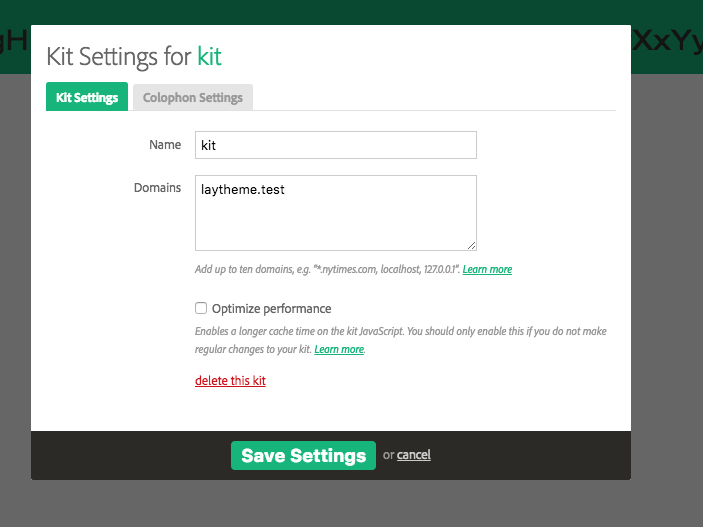
                  0_1516098835638_Screen Shot 2018-01-16 at 11.30.08.png

                  Now click on "Embed Code" and you'll see the default <link> tag. Put this tag inside "Link tag:" when adding the webfont to lay theme.
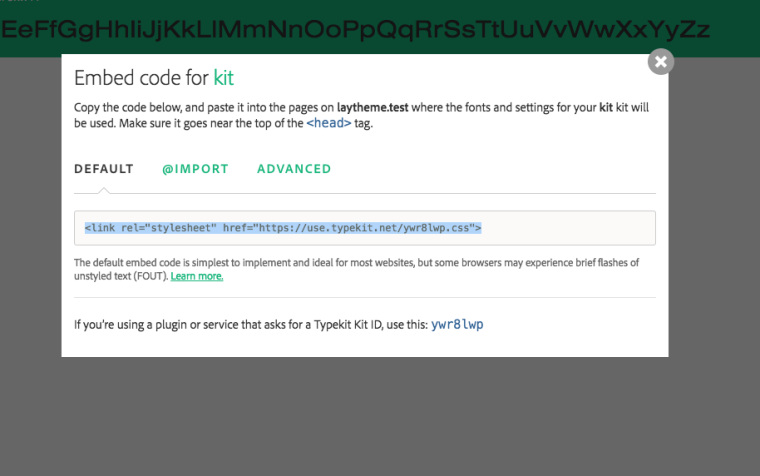
                  0_1516098940621_Screen Shot 2018-01-16 at 11.27.54.png

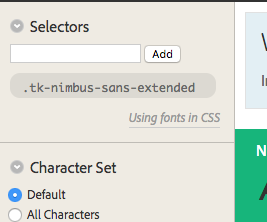
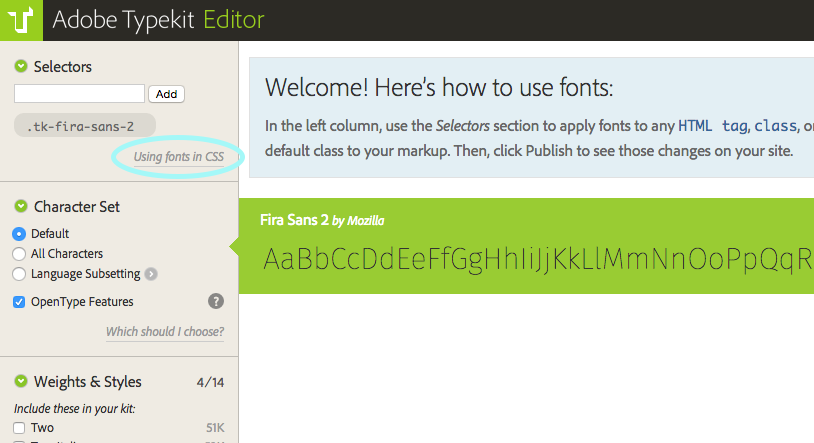
                  Now click "using fonts in css"
                  0_1516099158515_Screen Shot 2018-01-16 at 11.29.44.png
                  Copy this CSS (selected here) and insert it in "font-family" CSS: in lay theme.
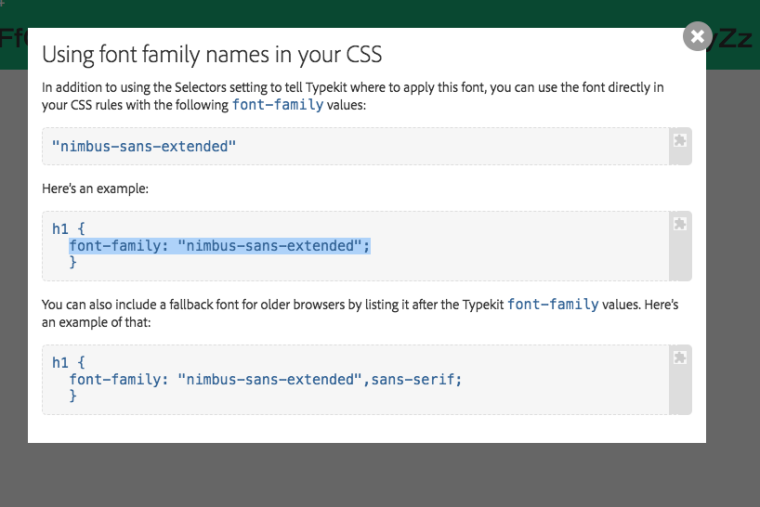
                  0_1516099251877_Screen Shot 2018-01-16 at 11.40.20.png

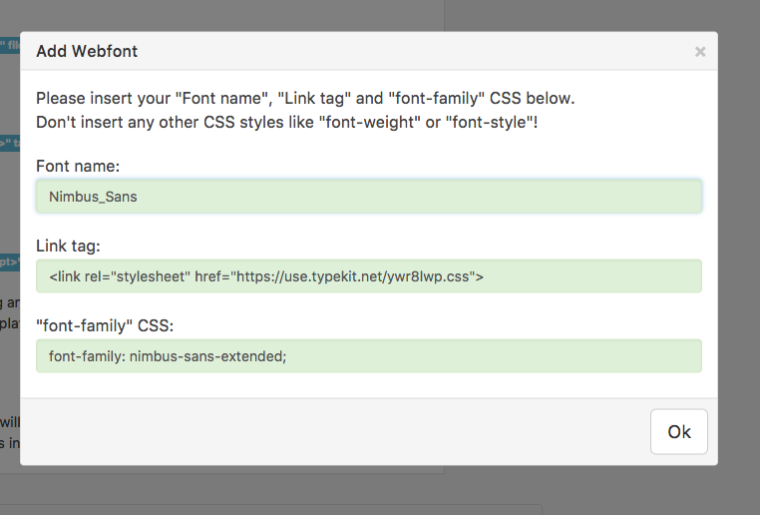
                  In the end it looks like this:
                  0_1516099379376_Screen Shot 2018-01-16 at 11.29.52.png

                  S 1 Reply Last reply
                  0
                  • arminunruhA arminunruh

                    Hey,

                    Here is a different way to insert your typekit font with <link>:

                    "lay options" -> "webfonts" -> "+ add font" -> "add by link tag and css"

                    Make sure your website domain is entered in the kit settings in "Domains":
                    0_1516098835638_Screen Shot 2018-01-16 at 11.30.08.png

                    Now click on "Embed Code" and you'll see the default <link> tag. Put this tag inside "Link tag:" when adding the webfont to lay theme.
                    0_1516098940621_Screen Shot 2018-01-16 at 11.27.54.png

                    Now click "using fonts in css"
                    0_1516099158515_Screen Shot 2018-01-16 at 11.29.44.png
                    Copy this CSS (selected here) and insert it in "font-family" CSS: in lay theme.
                    0_1516099251877_Screen Shot 2018-01-16 at 11.40.20.png

                    In the end it looks like this:
                    0_1516099379376_Screen Shot 2018-01-16 at 11.29.52.png

                    S
                    S
                    sampittman
                    wrote on last edited by
                    #9

                    @arminunruh Hi Armin,
                    I've tried both way of adding the font 'P22 Underground' from Adobe Typekit but I've had no luck so far. Would you be able to take a look for me?

                    Thanks
                    Sam

                    1 Reply Last reply
                    0
                    • mariusjopenM
                      mariusjopenM
                      mariusjopen
                      Global Moderator
                      wrote on last edited by
                      #10

                      Deas @sampittman
                      Can you post a link to our website?
                      Then we can have a look and inspect that.

                      Best!

                      Marius

                      www.mariusjopen.world

                      S 1 Reply Last reply
                      0
                      • mariusjopenM mariusjopen

                        Deas @sampittman
                        Can you post a link to our website?
                        Then we can have a look and inspect that.

                        Best!

                        Marius

                        S
                        S
                        sampittman
                        wrote on last edited by
                        #11

                        @mariusjopen sure!
                        Here goes... http://mrlondoner.co.uk/about

                        1 Reply Last reply
                        0
                        • mariusjopenM
                          mariusjopenM
                          mariusjopen
                          Global Moderator
                          wrote on last edited by
                          #12

                          Dear @sampittman
                          it looks like the CSS file you are linking to – does not exist:
                          https://use.typekit.net/yiq0bel.css

                          Is this the correct url?

                          Best!

                          Marius

                          www.mariusjopen.world

                          1 Reply Last reply
                          0

                          Hello! It looks like you're interested in this conversation, but you don't have an account yet.

                          Getting fed up of having to scroll through the same posts each visit? When you register for an account, you'll always come back to exactly where you were before, and choose to be notified of new replies (either via email, or push notification). You'll also be able to save bookmarks and upvote posts to show your appreciation to other community members.

                          With your input, this post could be even better 💗

                          Register Login
                          Reply
                          • Reply as topic
                          Log in to reply
                          • Oldest to Newest
                          • Newest to Oldest
                          • Most Votes


                          Online Users
                          Forgot your key, lost your files, need a previous Lay Theme or Addon version? Go to www.laykeymanager.com
                          laytheme.com
                          • Login

                          • Don't have an account? Register

                          • Login or register to search.
                          • First post
                            Last post
                          0
                          • Recent
                          • Tags
                          • Popular
                          • Users
                          • Search