Mobile Menu offset in newest Firefox
-
Hi!
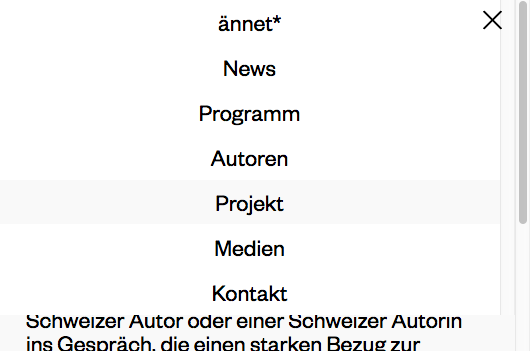
I just seen a bug in the newest firefox (firefox quantum, 57.0.4., 64-Bit, on macOs Sierra 10.12.6) (It worked fine in Safari & Chrome)
On the right side a gap appears as soon as the dropdown menu slides down. Maybe something scroll-bar related? The space looks quite the same like the scrollbar.
Here a screenshot:
Cheers
Max -
-


Hello! It looks like you're interested in this conversation, but you don't have an account yet.
Getting fed up of having to scroll through the same posts each visit? When you register for an account, you'll always come back to exactly where you were before, and choose to be notified of new replies (either via email, or push notification). You'll also be able to save bookmarks and upvote posts to show your appreciation to other community members.
With your input, this post could be even better 💗
Register Login