Skip to content
  • Recent
  • Tags
  • Popular
  • Users
  • Search
Skins
  • Light
  • Brite
  • Cerulean
  • Cosmo
  • Flatly
  • Journal
  • Litera
  • Lumen
  • Lux
  • Materia
  • Minty
  • Morph
  • Pulse
  • Sandstone
  • Simplex
  • Sketchy
  • Spacelab
  • United
  • Yeti
  • Zephyr
  • Dark
  • Cyborg
  • Darkly
  • Quartz
  • Slate
  • Solar
  • Superhero
  • Vapor

  • Default (No Skin)
  • No Skin
Collapse

Lay Theme Forum

  1. Home
  2. Bug Reports
  3. Menu disappeared on Front page

Menu disappeared on Front page

Scheduled Pinned Locked Moved Bug Reports
9 Posts 2 Posters 1.2k Views 2 Watching
  • Oldest to Newest
  • Newest to Oldest
  • Most Votes
Reply
  • Reply as topic
Log in to reply
This topic has been deleted. Only users with topic management privileges can see it.
  • F
    F
    FANER
    wrote on last edited by FANER
    #1

    Hi there

    On a clients website the menu disappeared on the frontpage.

    The strange thing is, that if open the englisch or german page, it appears. It just happend when I open the „automatic“ front page.

    Doesn’t work: https://www.z20.ch/
    Works: https://www.z20.ch/en/start/
    Works: https://www.z20.ch/de/start-de/

    I updated everything. Shut the menu off and on. Cleaned the cache.
    Any ideas?

    {EDIT}
    it seems, that the menu items are there, but they are not visible. or maybe behind the menu bar? –> see Screenshot
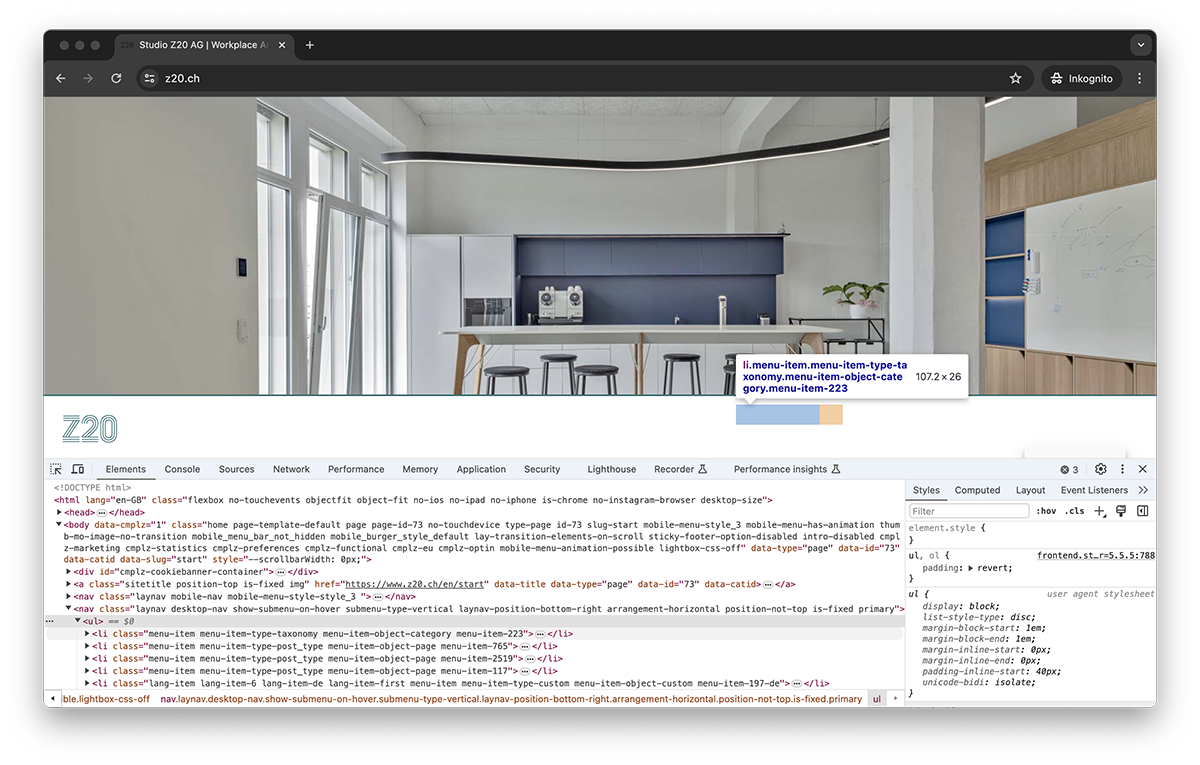
    bug.png

    1 Reply Last reply
    0
    • arminunruhA
      arminunruhA
      arminunruh
      Global Moderator
      wrote on last edited by
      #2

      try this css

      .laynav.desktop-nav{
      z-index: 20;
      }
      
      F 2 Replies Last reply
      0
      • arminunruhA arminunruh

        try this css

        .laynav.desktop-nav{
        z-index: 20;
        }
        
        F
        F
        FANER
        wrote on last edited by
        #3

        @arminunruh sadly it doesn’t do the trick.

        1 Reply Last reply
        0
        • arminunruhA arminunruh

          try this css

          .laynav.desktop-nav{
          z-index: 20;
          }
          
          F
          F
          FANER
          wrote on last edited by
          #4

          Hey @arminunruh,

          I was wondering if changing the Menu Position would do anything. So I checked that and realized, that this “automatic” front page is actually an old (non existing) version of the front page.

          I have no clue whats going on :D. May you can help? Is Polylang here a problem, maybe?

          1 Reply Last reply
          0
          • arminunruhA
            arminunruhA
            arminunruh
            Global Moderator
            wrote on last edited by arminunruh
            #5

            you didnt even use the css that i gave you, i dont see it in use on your website

            .laynav.desktop-nav{
            z-index:20!important;
            }
            

            maybe u forgot to clear/disable caching plugin?
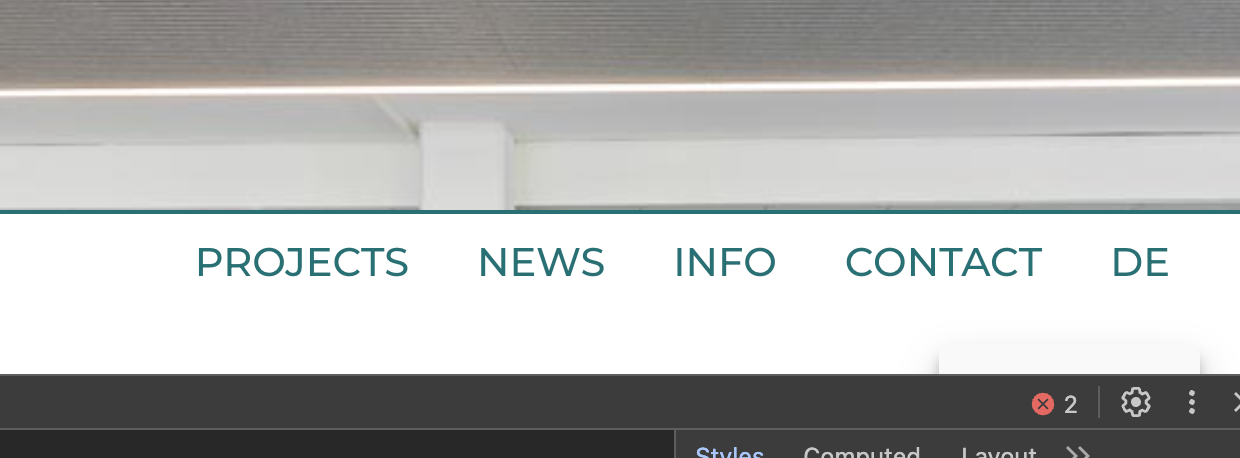
            Screenshot 2024-05-18 at 09.59.42.png

            then it looks like this

            you should be able to set the frontpage in customize → frontpage

            im not sure if there is an automatic frontpage. i think there are just pages with different languages

            1 Reply Last reply
            0
            • F
              F
              FANER
              wrote on last edited by FANER
              #6

              @arminunruh maybe may description is not clear, sorry for that.

              I added the code given by you

              it appears on
              englisch https://www.z20.ch/en/start/
              and german: https://www.z20.ch/de/start-de/

              But if type in browser www.z20.ch (without de or en) an page opens, which shouldn't exist (you may have to open it in inkognito mode).

              I am using a caching plugin and tried to redirect the front page. maybe its not a laytheme issue, but wordpress / plugin / or even hosting?

              1 Reply Last reply
              0
              • arminunruhA
                arminunruhA
                arminunruh
                Global Moderator
                wrote on last edited by
                #7

                yea thats weird!

                can you send your website address, /wp-admin/ username and password and a link to this topic to info@laytheme.com?

                what if you go to customize → menu → menu bar

                then hide the menu bar

                this way it wont overlap the menu
                does this change take effect on this page?

                https://www.z20.ch/

                looking at the code, this page:
                https://www.z20.ch/

                and this page:

                https://www.z20.ch/start/

                are the same. both have the id-73

                did you try disabling the caching plugin

                1 Reply Last reply
                0
                • F
                  F
                  FANER
                  wrote on last edited by
                  #8

                  @arminunruh
                  with the help of a friend I managed to solve the problem. it was an issue between the cookie-plugin (complianz) and laytheme.

                  we figured it out now and everything works like a charme.

                  You may have a recommendation for a better plugin?

                  1 Reply Last reply
                  0
                  • arminunruhA
                    arminunruhA
                    arminunruh
                    Global Moderator
                    wrote on last edited by
                    #9

                    oh i think many people use borlands cookies

                    oh i see! yea if u have an issue its often good to disable all plugins and see if that fixes it

                    1 Reply Last reply
                    0

                    Hello! It looks like you're interested in this conversation, but you don't have an account yet.

                    Getting fed up of having to scroll through the same posts each visit? When you register for an account, you'll always come back to exactly where you were before, and choose to be notified of new replies (either via email, or push notification). You'll also be able to save bookmarks and upvote posts to show your appreciation to other community members.

                    With your input, this post could be even better 💗

                    Register Login
                    Reply
                    • Reply as topic
                    Log in to reply
                    • Oldest to Newest
                    • Newest to Oldest
                    • Most Votes


                    Online Users
                    I
                    itsbadjujuju
                    Forgot your key, lost your files, need a previous Lay Theme or Addon version? Go to www.laykeymanager.com
                    laytheme.com
                    • Login

                    • Don't have an account? Register

                    • Login or register to search.
                    • First post
                      Last post
                    0
                    • Recent
                    • Tags
                    • Popular
                    • Users
                    • Search