Skip to content
  • Recent
  • Tags
  • Popular
  • Users
  • Search
Skins
  • Light
  • Brite
  • Cerulean
  • Cosmo
  • Flatly
  • Journal
  • Litera
  • Lumen
  • Lux
  • Materia
  • Minty
  • Morph
  • Pulse
  • Sandstone
  • Simplex
  • Sketchy
  • Spacelab
  • United
  • Yeti
  • Zephyr
  • Dark
  • Cyborg
  • Darkly
  • Quartz
  • Slate
  • Solar
  • Superhero
  • Vapor

  • Default (No Skin)
  • No Skin
Collapse

Lay Theme Forum

  1. Home
  2. Addons
  3. z-index of imagehover and carousel behaving inconsistently
z-index of imagehover and carousel behaving inconsistently

Scheduled Pinned Locked Moved Addons
7 Posts 2 Posters 900 Views 2 Watching
  • Oldest to Newest
  • Newest to Oldest
  • Most Votes
Reply
  • Reply as topic
Log in to reply
This topic has been deleted. Only users with topic management privileges can see it.
  • M
    M
    MartinRL
    wrote on last edited by MartinRL
    #1

    Hi there,

    https://martinrobertlutz.de/index/ (password: xyz)

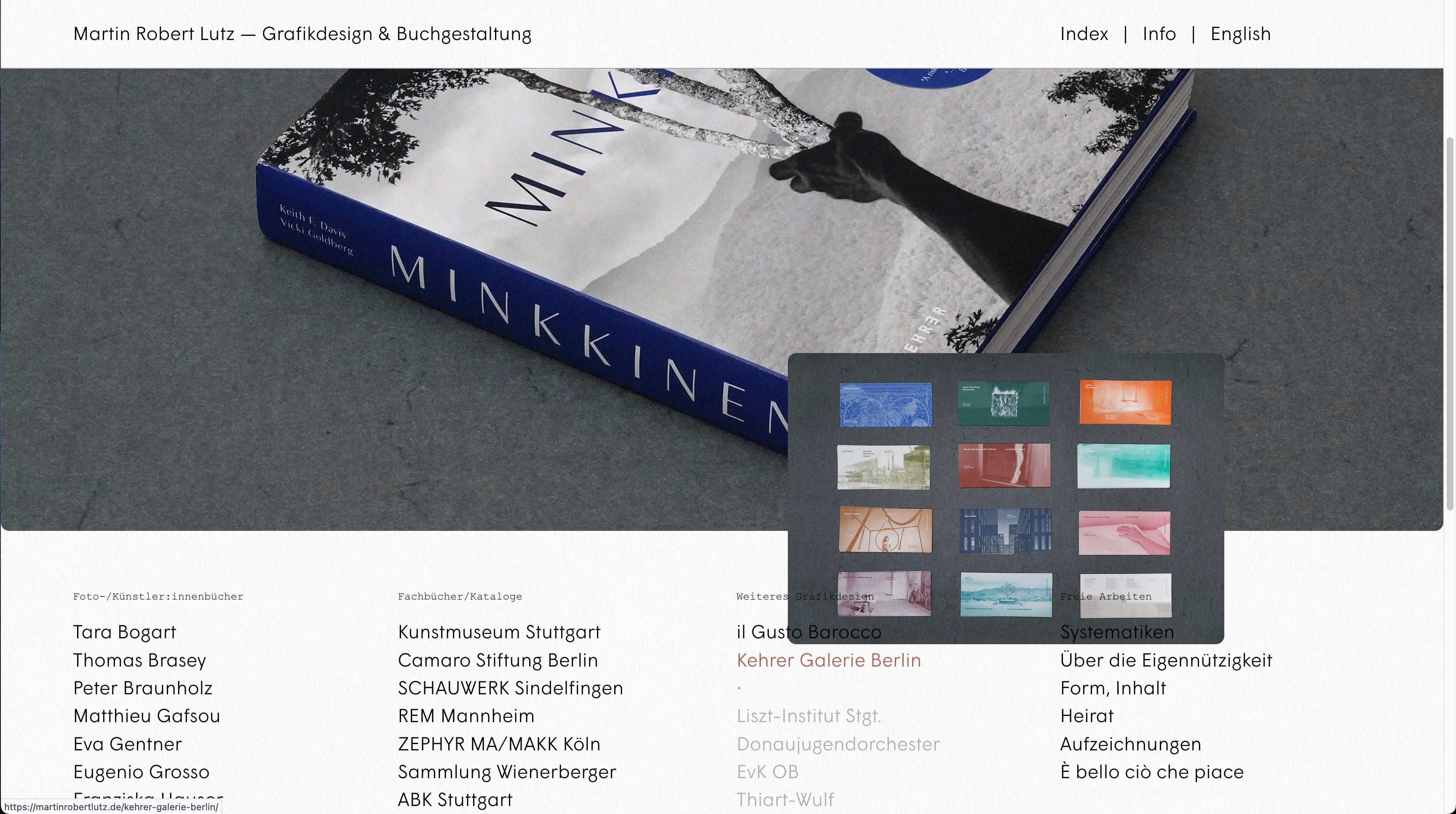
    When you scroll down to a position where the hovering images of the links in the index flip above the cursor, they lie on top of the carousel – as they should, since the carousel is placed on the bottom in the "layers" tool of the editor:

    Bildschirmfoto 2025-02-12 um 22.35.09.jpg

    However, there are also projects with no link, only a hovering image. These somehow lie underneath the carousel, even though they belong to the same text element:

    Bildschirmfoto 2025-02-12 um 22.35.23.jpg

    How come, and how can I make them lie on top as well? Addressing specific hovering images with their id via css has worked so far for size etc., but not for the z-index.

    –––

    Another issue that might be related, ist that the column on the right ("Freie Arbeiten...") behaves again differently. Here the hovering images lie on top of the text instead of underneath:

    Bildschirmfoto 2025-02-12 um 23.20.40.jpg

    This text element has no different class or anything than the other three columns, why does the global setting of the addon ('put images under all elements') not apply here?

    Thanks!
    Martin

    1 Reply Last reply
    0
    • arminunruhA
      arminunruhA
      arminunruh
      Global Moderator
      wrote on last edited by
      #2

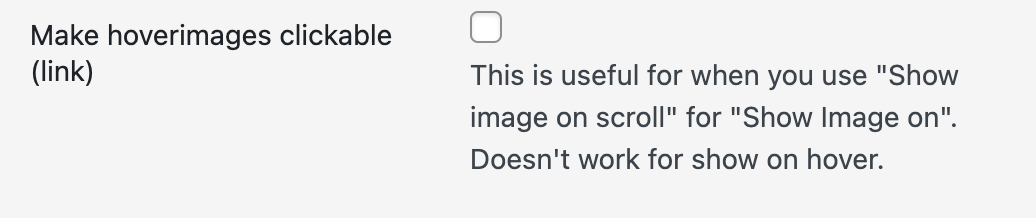
      it seems that you enabled this setting:
      lay options -> imagehvoer addon ->
      Screenshot 2025-02-13 at 14.15.49.png

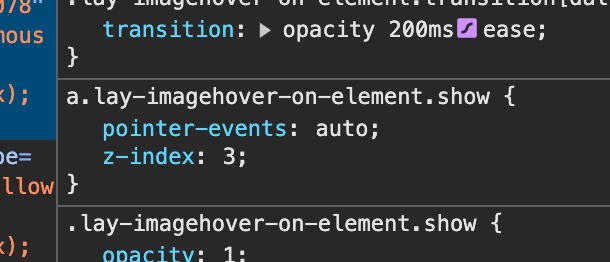
      it seems that all imagehover images that have a link are <a tags instead of <div tags

      and it seems that <a tags behave differently in how they overlap things as you can see here:
      Screenshot 2025-02-13 at 14.19.10.png

      their z-index is 3.

      thats because how can they be clickable if they are behind something. they cant. so i chose z-index:3 for them as a default.

      just disable this setting or try:

      a.lay-imagehover-on-element.show,
      div.lay-imagehover-on-element.show{
      z-index: 1!important;
      }
      

      or try z-index:2!important

      or whatever in

       Enter this css in "lay options" -> "custom css & html" -> "custom css for desktop"

      Just know that the click on the imagehover image wont work on tablets then i think

      1 Reply Last reply
      0
      • M
        M
        MartinRL
        wrote on last edited by
        #3

        Thanks!!

        Yes, I have the hoverimages set to clickable.

        Your code with z-index 2 solved both my issues. And all the links still work on a tablet, which is great!

        Just for understanding, that means I should also be able to address specific hover images by targeting the <a> tag, for instance if I want to have one specific hover image lie on top of all the other elements on the page. This code however doesn't seem to change anything (page: https://martinrobertlutz.de/about/ | pw: abc):

        a[data-hoverimageid="2323"] {
        display: inline-block !important;
        position: relative !important;
        z-index: 999 !important;
        }

        1 Reply Last reply
        0
        • M
          M
          MartinRL
          wrote on last edited by
          #4

          This javascript in the footer didn’t do anything either:

          <script>
          document.addEventListener("DOMContentLoaded", function() {
          var hoverImage = document.querySelector('[data-hoverimageid="2323"]');
          if (hoverImage) {
          hoverImage.style.position = "relative";
          hoverImage.style.zIndex = "999";
          }
          });
          </script>

          1 Reply Last reply
          0
          • arminunruhA
            arminunruhA
            arminunruh
            Global Moderator
            wrote on last edited by arminunruh
            #5

            Screenshot 2025-02-13 at 15.50.51.png

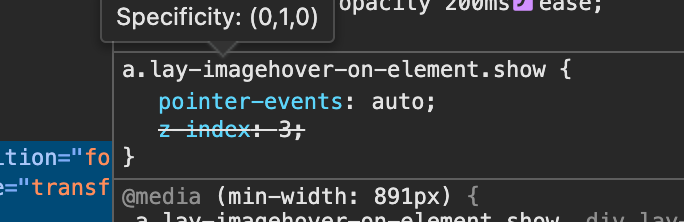
            please try to find this dom element in your inspector
            thats this one:

            Screenshot 2025-02-13 at 15.51.36.png

            Screenshot 2025-02-13 at 15.52.03.png

            use this css

            body.slug-about a.lay-imagehover-on-element{
            z-index: 999!important;
            }
            
            1 Reply Last reply
            0
            • M
              M
              MartinRL
              wrote on last edited by
              #6

              Understood!

              And it works like a charm.

              Honestly, thank you Armin for all the support. You guys rule! :-)

              Martin

              1 Reply Last reply
              1
              • arminunruhA
                arminunruhA
                arminunruh
                Global Moderator
                wrote on last edited by
                #7

                thx :)) <3

                1 Reply Last reply
                0

                Hello! It looks like you're interested in this conversation, but you don't have an account yet.

                Getting fed up of having to scroll through the same posts each visit? When you register for an account, you'll always come back to exactly where you were before, and choose to be notified of new replies (either via email, or push notification). You'll also be able to save bookmarks and upvote posts to show your appreciation to other community members.

                With your input, this post could be even better 💗

                Register Login
                Reply
                • Reply as topic
                Log in to reply
                • Oldest to Newest
                • Newest to Oldest
                • Most Votes


                Online Users
                Forgot your key, lost your files, need a previous Lay Theme or Addon version? Go to www.laykeymanager.com
                laytheme.com
                • Login

                • Don't have an account? Register

                • Login or register to search.
                • First post
                  Last post
                0
                • Recent
                • Tags
                • Popular
                • Users
                • Search

