Skip to content
  • Recent
  • Tags
  • Popular
  • Users
  • Search
Skins
  • Light
  • Brite
  • Cerulean
  • Cosmo
  • Flatly
  • Journal
  • Litera
  • Lumen
  • Lux
  • Materia
  • Minty
  • Morph
  • Pulse
  • Sandstone
  • Simplex
  • Sketchy
  • Spacelab
  • United
  • Yeti
  • Zephyr
  • Dark
  • Cyborg
  • Darkly
  • Quartz
  • Slate
  • Solar
  • Superhero
  • Vapor

  • Default (No Skin)
  • No Skin
Collapse

Lay Theme Forum

  1. Home
  2. Bug Reports
  3. Marquee and project index in firefox

Marquee and project index in firefox

Scheduled Pinned Locked Moved Bug Reports
4 Posts 3 Posters 558 Views 2 Watching
  • Oldest to Newest
  • Newest to Oldest
  • Most Votes
Reply
  • Reply as topic
Log in to reply
This topic has been deleted. Only users with topic management privileges can see it.
  • P
    P
    paulsboutique
    wrote on last edited by
    #1

    Hi,

    we have an issue with marquee and project index in firefox.
    In Chrome and Safari everything looks fine and font and background are centered like this:

    Marquee_Chrome.jpg

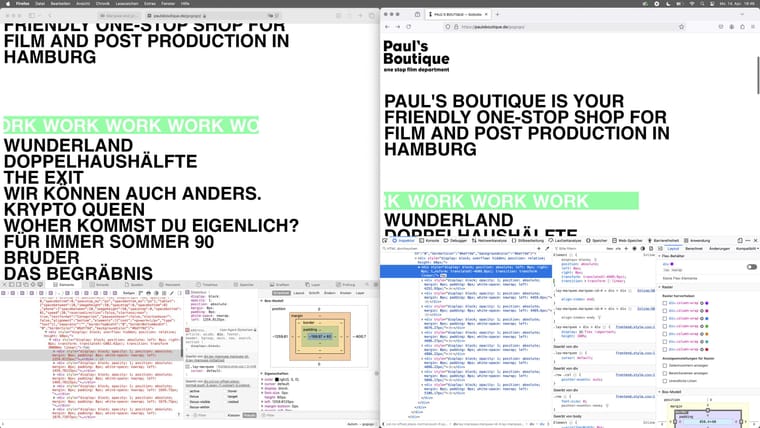
    In Firefox all fonts are too far up and even cut off at the top for the marquee parts:

    Marquee_Firefox.jpg

    We tried to fix it within the .css but could not get it to work.
    Is this a bug or do you have a suggestion for a firefox specific .css?

    The site is currently under construction but you can see the issue here:
    paulsboutique.de/gogogo

    Thanks a lot,
    Florian

    1 Reply Last reply
    0
    • F
      F
      felix_rabe
      wrote on last edited by felix_rabe
      #2

      @paulsboutique in the "_Categories_no_spaces" font-setting, if you change the font to "Helvetica neue" and the line height to "1" it looks more even. Different browsers can interpret styles differently. maybe you find a "true" Helvetica web font and not use the one that the computer has preinstalled, which you do right now. TexGyreHeros is a great open source alternative: https://ctan.org/pkg/tex-gyre-heros?lang=de
      abc.jpg

      1 Reply Last reply
      0
      • P
        P
        paulsboutique
        wrote on last edited by paulsboutique
        #3

        thanks a lot @felix_rabe ! Changed it to Helvetica neue and line height 1. It looks much better now – even though we kind of like the 0,9 line height. Might try the TexGyreHeros later, but for now we're pretty happy!

        1 Reply Last reply
        1
        • arminunruhA
          arminunruhA
          arminunruh
          Global Moderator
          wrote on last edited by
          #4

          Thanks a lot, Felix. That's a really great answer.

          1 Reply Last reply
          0

          Hello! It looks like you're interested in this conversation, but you don't have an account yet.

          Getting fed up of having to scroll through the same posts each visit? When you register for an account, you'll always come back to exactly where you were before, and choose to be notified of new replies (either via email, or push notification). You'll also be able to save bookmarks and upvote posts to show your appreciation to other community members.

          With your input, this post could be even better 💗

          Register Login
          Reply
          • Reply as topic
          Log in to reply
          • Oldest to Newest
          • Newest to Oldest
          • Most Votes


          Online Users
          Forgot your key, lost your files, need a previous Lay Theme or Addon version? Go to www.laykeymanager.com
          laytheme.com
          • Login

          • Don't have an account? Register

          • Login or register to search.
          • First post
            Last post
          0
          • Recent
          • Tags
          • Popular
          • Users
          • Search