Skip to content
  • Recent
  • Tags
  • Popular
  • Users
  • Search
Skins
  • Light
  • Brite
  • Cerulean
  • Cosmo
  • Flatly
  • Journal
  • Litera
  • Lumen
  • Lux
  • Materia
  • Minty
  • Morph
  • Pulse
  • Sandstone
  • Simplex
  • Sketchy
  • Spacelab
  • United
  • Yeti
  • Zephyr
  • Dark
  • Cyborg
  • Darkly
  • Quartz
  • Slate
  • Solar
  • Superhero
  • Vapor

  • Default (No Skin)
  • No Skin
Collapse

Lay Theme Forum

  1. Home
  2. Connect and find Help
  3. custom header item

custom header item

Scheduled Pinned Locked Moved Connect and find Help
6 Posts 3 Posters 4.8k Views 2 Watching
  • Oldest to Newest
  • Newest to Oldest
  • Most Votes
Reply
  • Reply as topic
Log in to reply
This topic has been deleted. Only users with topic management privileges can see it.
  • E
    E
    emresenoglu
    wrote on last edited by emresenoglu
    #1

    hey all - im guessing what im trying to do is fairly simple but after having spent hours on it i'm ready to ask for help :)

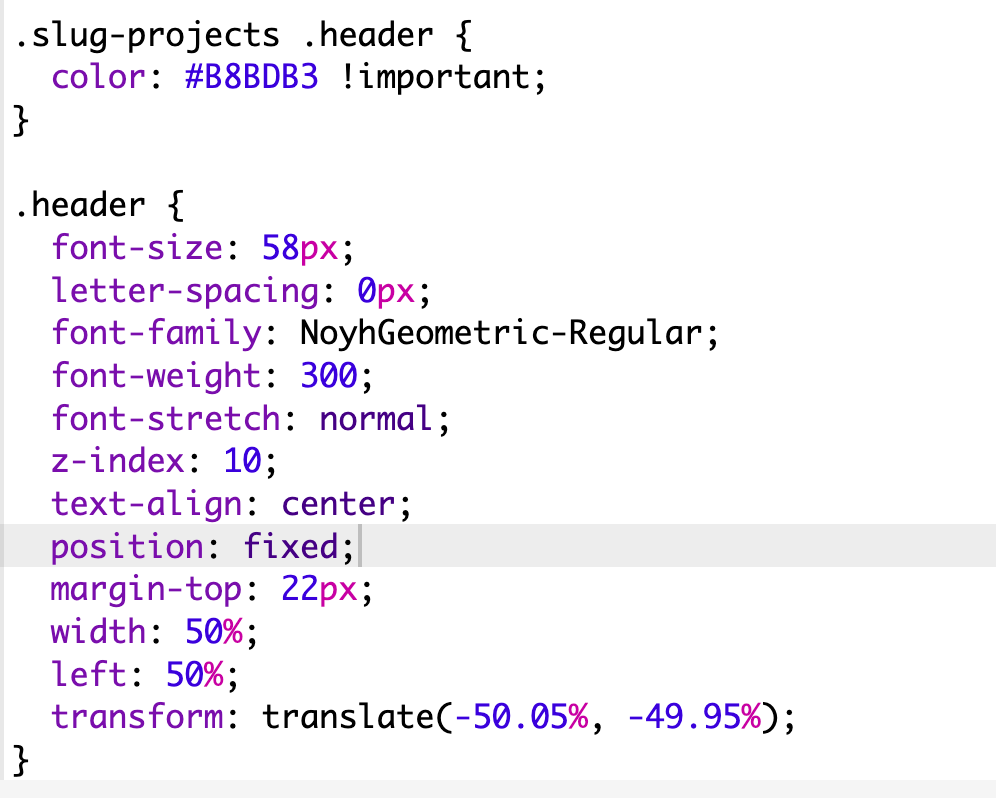
    im simply trying to add a 'Projects' text/button/clickable link to the top of my website. This should be a link to the projects page, it should be seen as active element (darker color) when on that page. It should also be hidden on the individual project pages however I was able to achieve this by css. It should have the exact same font / size as the site title and the corner menu.

    here's the website as it is now: www.senoglu.co

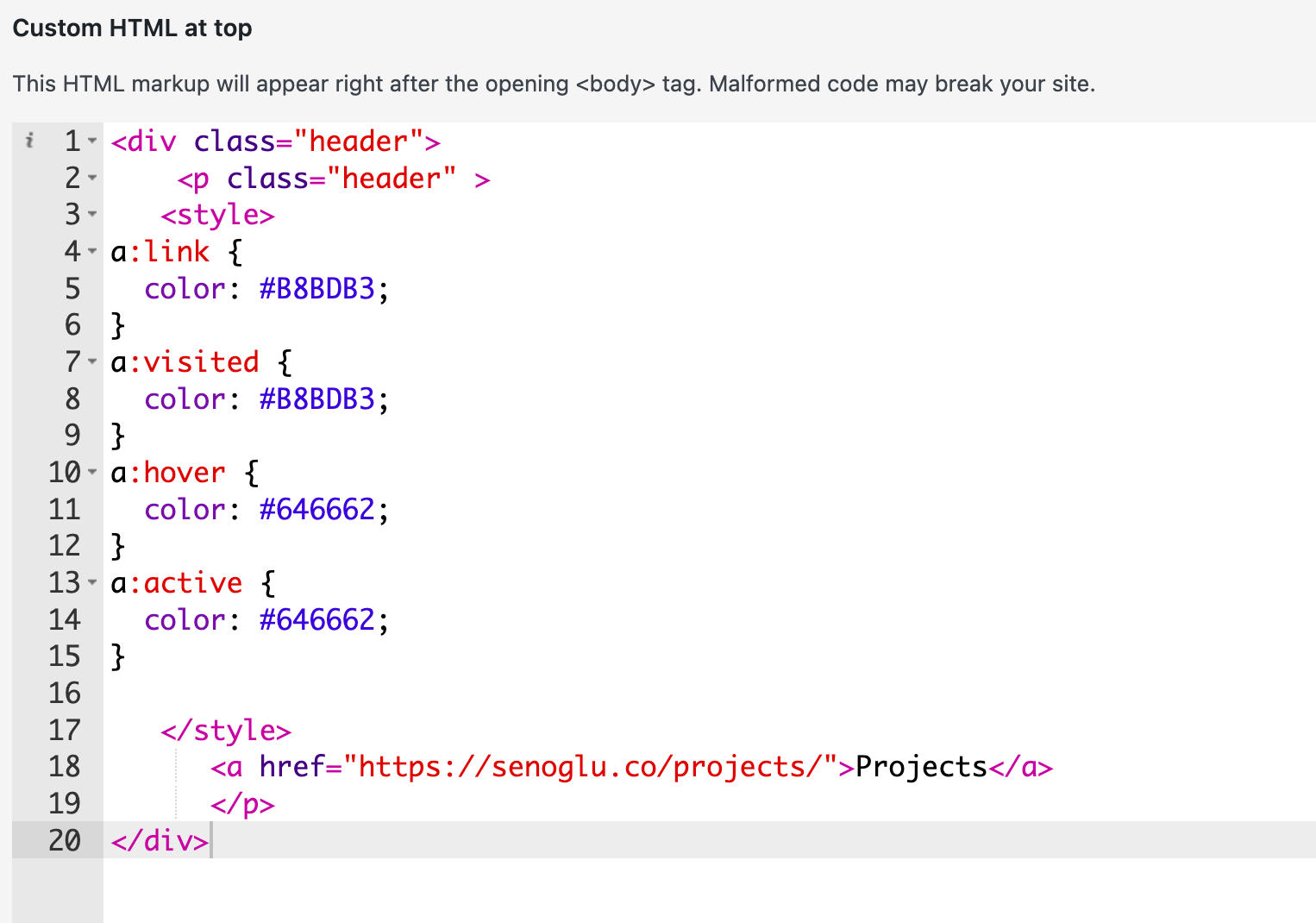
    you will notice that i've already achieved the major part of this by adding custom html, but on chrome the font size seems to change between pages, and i can't get the active page styling to work.

    the css:
    Screenshot 2025-08-01 at 16.45.38.png

    and the html:
    Screenshot 2025-08-01 at 16.46.15.png

    happy to pay if you are able to achieve exactly this!

    senoglu.co // archimats.com // imgemim.com // hakiurla.com

    1 Reply Last reply
    0
    • E
      E
      emresenoglu
      wrote on last edited by
      #2

      nevermind, silly me i used the wrong hex code :) problem solved!

      senoglu.co // archimats.com // imgemim.com // hakiurla.com

      1 Reply Last reply
      0
      • arminunruhA
        arminunruhA
        arminunruh
        Global Moderator
        wrote on last edited by
        #3

        Ah, nice. When you look at the HTML code of a Lay Theme website, you see that anchors typically have certain data attributes. This allows for the smooth transition between pages when you click on this anchor.

        image.png

        You can see the HTML code of your website when you right-click on a link (for example) and then click "Inspect element" in Chrome.

        The idea of a page you can find out when you edit the page in WP-Admin.
        The ID is part of the URL.

        image.png

        So you could add the correct data-id, data-type, and data-title attributes to your custom anchor, and that will make your website not do a hard reload when you click that anchor.

        1 Reply Last reply
        1
        • E
          E
          emresenoglu
          wrote on last edited by
          #4

          very helpful, thanks a lot armin. i'm looking forward to seeing what else i can tweak on my page.

          senoglu.co // archimats.com // imgemim.com // hakiurla.com

          1 Reply Last reply
          0
          • arminunruhA
            arminunruhA
            arminunruh
            Global Moderator
            wrote on last edited by
            #5

            actually you can now use this feature:
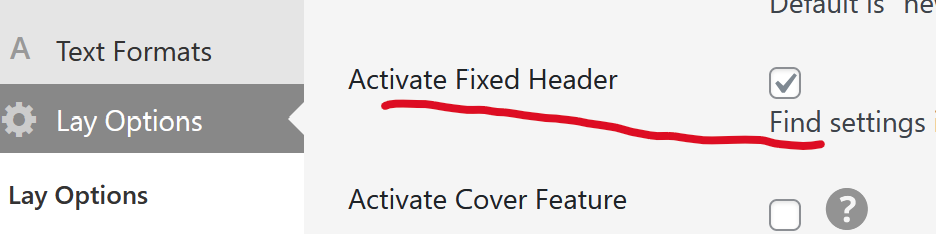
            image.png

            fixed header. with this you can use a page as a fixed overlay over your website!

            StarcS 1 Reply Last reply
            1
            • arminunruhA arminunruh

              actually you can now use this feature:

              image.png

              fixed header. with this you can use a page as a fixed overlay over your website!

              StarcS
              StarcS
              Starc
              wrote on last edited by
              #6
              This post is deleted!
              1 Reply Last reply
              0

              Hello! It looks like you're interested in this conversation, but you don't have an account yet.

              Getting fed up of having to scroll through the same posts each visit? When you register for an account, you'll always come back to exactly where you were before, and choose to be notified of new replies (either via email, or push notification). You'll also be able to save bookmarks and upvote posts to show your appreciation to other community members.

              With your input, this post could be even better 💗

              Register Login
              Reply
              • Reply as topic
              Log in to reply
              • Oldest to Newest
              • Newest to Oldest
              • Most Votes


              Online Users
              Forgot your key, lost your files, need a previous Lay Theme or Addon version? Go to www.laykeymanager.com
              laytheme.com
              • Login

              • Don't have an account? Register

              • Login or register to search.
              • First post
                Last post
              0
              • Recent
              • Tags
              • Popular
              • Users
              • Search