Skip to content
  • Recent
  • Tags
  • Popular
  • Users
  • Search
Skins
  • Light
  • Brite
  • Cerulean
  • Cosmo
  • Flatly
  • Journal
  • Litera
  • Lumen
  • Lux
  • Materia
  • Minty
  • Morph
  • Pulse
  • Sandstone
  • Simplex
  • Sketchy
  • Spacelab
  • United
  • Yeti
  • Zephyr
  • Dark
  • Cyborg
  • Darkly
  • Quartz
  • Slate
  • Solar
  • Superhero
  • Vapor

  • Default (No Skin)
  • No Skin
Collapse

Lay Theme Forum

  1. Home
  2. Bug Reports
  3. Thumbnail grid + tags

Thumbnail grid + tags

Scheduled Pinned Locked Moved Bug Reports
24 Posts 4 Posters 3.0k Views 2 Watching
  • Oldest to Newest
  • Newest to Oldest
  • Most Votes
Reply
  • Reply as topic
Log in to reply
This topic has been deleted. Only users with topic management privileges can see it.
  • arminunruhA
    arminunruhA
    arminunruh
    Global Moderator
    wrote on last edited by
    #4

    Okay, I think I know why this happens. For me, it works correctly, but based on my experience with things like this, I probably know the fix.

    I will release an update later today, and then you can let me know if that made it work properly.

    1 Reply Last reply
    0
    • arminunruhA
      arminunruhA
      arminunruh
      Global Moderator
      wrote on last edited by
      #5

      Okay, if you update Lay Theme now, this should work again.

      mppM 1 Reply Last reply
      0
      • A
        A
        ae
        wrote on last edited by
        #6

        The most recent update did not solve this problem for me. (LayTheme cache and browser cache were cleared.)

        1 Reply Last reply
        0
        • arminunruhA arminunruh

          Okay, if you update Lay Theme now, this should work again.

          mppM
          mppM
          mpp
          wrote on last edited by
          #7

          @arminunruh no – still not solved. "Show Tag Filter" ticked makes the "Show projects of category" off.

          1 Reply Last reply
          0
          • M
            M
            Markus
            wrote on last edited by Markus
            #8

            Same here. The thumbnail grid is behaving unpredictably and no longer keeps the manually defined order.

            When I activate “tags,” the previous ordering stops working. When I deactivate “tags” in the thumbnail grid, the order works again fine.

            This started happening after the latest update.

            For the moment I downgraded to "version 10.0.2 download (November 13, 2025)", here its fine.

            1 Reply Last reply
            0
            • arminunruhA
              arminunruhA
              arminunruh
              Global Moderator
              wrote on last edited by
              #9

              hey i was able to reproduce this finally

              i released another update now 10.0.8 that fixes this

              sorry !

              1 Reply Last reply
              0
              • M
                M
                Markus
                wrote on last edited by Markus
                #10

                Unfortunately, it still doesn’t work on my side ;(
                I’ve installed version 10.0.8, but the issue has appeared again.

                When I deactivate the tags, the order is correct.

                1 Reply Last reply
                0
                • arminunruhA
                  arminunruhA
                  arminunruh
                  Global Moderator
                  wrote on last edited by
                  #11

                  can i have the link to your site @Markus ?
                  can you configure the grid so it shows the problem occuring?

                  sorry about this happening

                  1 Reply Last reply
                  0
                  • mppM
                    mppM
                    mpp
                    wrote on last edited by
                    #12

                    10.1.0 fixed this, thank you!

                    1 Reply Last reply
                    1
                    • mppM
                      mppM
                      mpp
                      wrote on last edited by
                      #13

                      Hello!
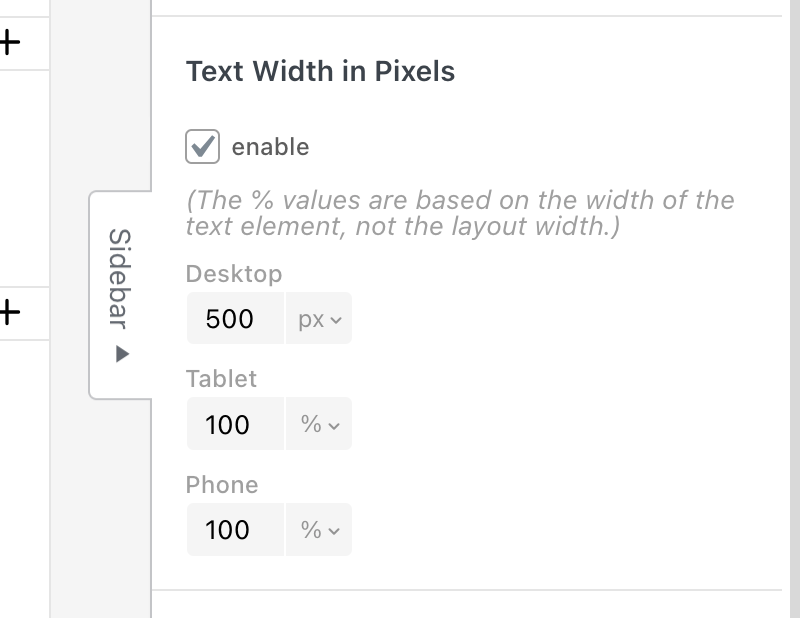
                      Is it just here, or the "Set width in Pixels" not working?

                      1 Reply Last reply
                      0
                      • arminunruhA
                        arminunruhA
                        arminunruh
                        Global Moderator
                        wrote on last edited by
                        #14

                        Screenshot 2025-12-23 at 08.22.46.png

                        you can set it in the sidebar.
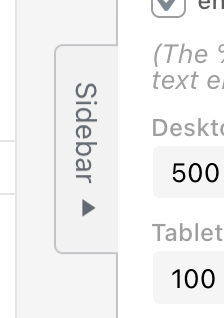
                        when you select a text, click here:
                        Screenshot 2025-12-23 at 08.23.13.png

                        yea seems like the context button does nothing, i will fix that

                        1 Reply Last reply
                        0
                        • mppM
                          mppM
                          mpp
                          wrote on last edited by
                          #15

                          Thank you!!!

                          1 Reply Last reply
                          0
                          • mppM
                            mppM
                            mpp
                            wrote on last edited by
                            #16

                            Hello, I have a question regarding the Thumbnail Grid logic.

                            I select a Thumbnail Grid and "Show Projects of Category"

                            for example Paintings (among other projects categories like printmaking, posters). Then I add Filter, Show Tag Filter and pick just two – portraits and self-portraits.

                            What it does is present all paintings (a selected category) and display tag filters above, but the initially it is showing the full category and not projects of selected category and filter.

                            Should this be solved with using a different category, not filters?
                            Displaying a category like Paintings > People with Tags Self-portraits, People portraits instead?

                            Best regards!

                            1 Reply Last reply
                            0
                            • arminunruhA
                              arminunruhA
                              arminunruh
                              Global Moderator
                              wrote on last edited by
                              #17

                              hey!

                              there is no setting for the default tag that is active by default.
                              only for a default filter that is active by default.

                              i think your idea with just putting everything you want shown first into one category, and selecting this as the default category is good

                              if i understood correctly

                              mppM 1 Reply Last reply
                              0
                              • arminunruhA arminunruh

                                hey!

                                there is no setting for the default tag that is active by default.
                                only for a default filter that is active by default.

                                i think your idea with just putting everything you want shown first into one category, and selecting this as the default category is good

                                if i understood correctly

                                mppM
                                mppM
                                mpp
                                wrote on last edited by
                                #18

                                @arminunruh

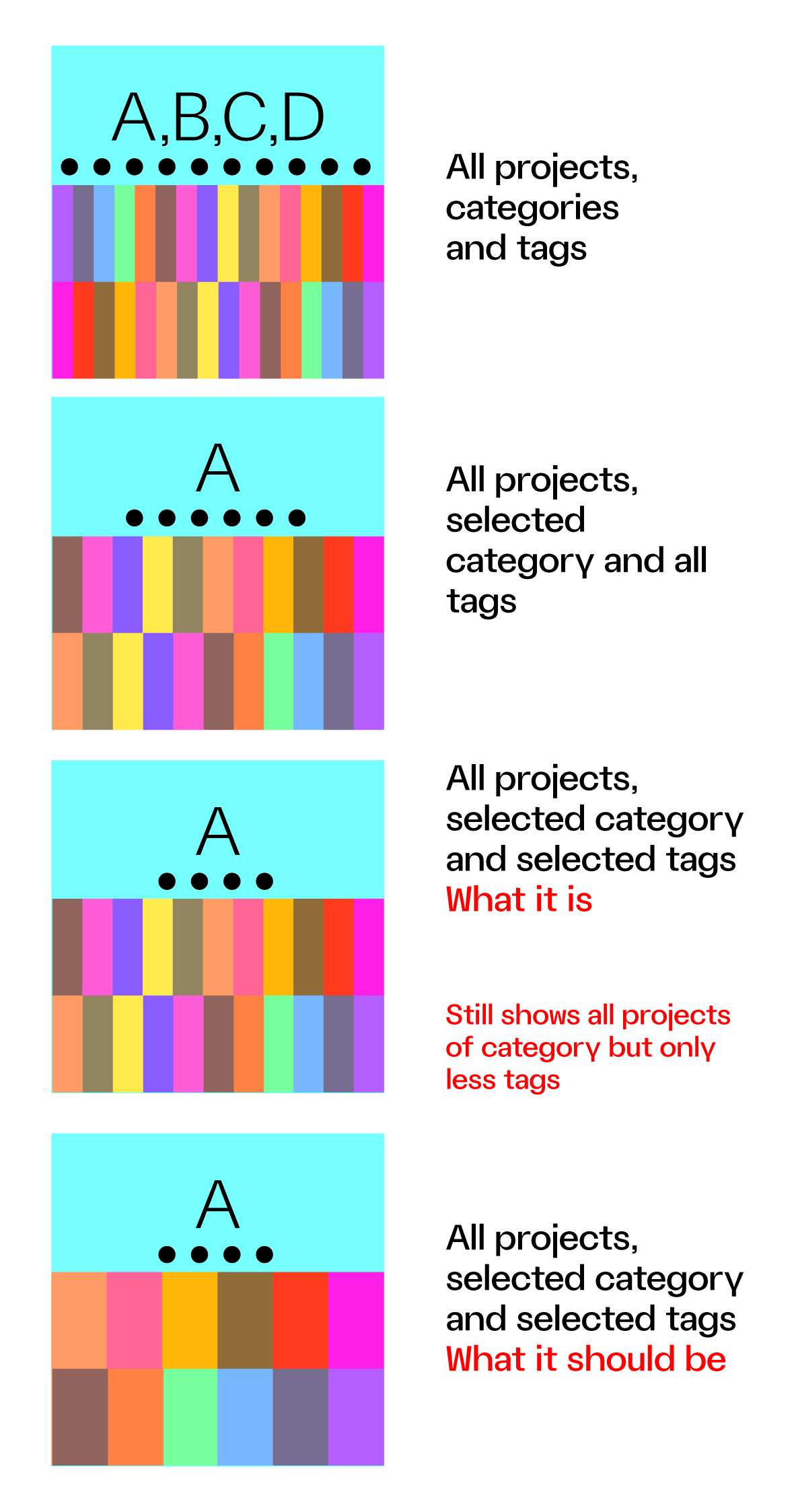
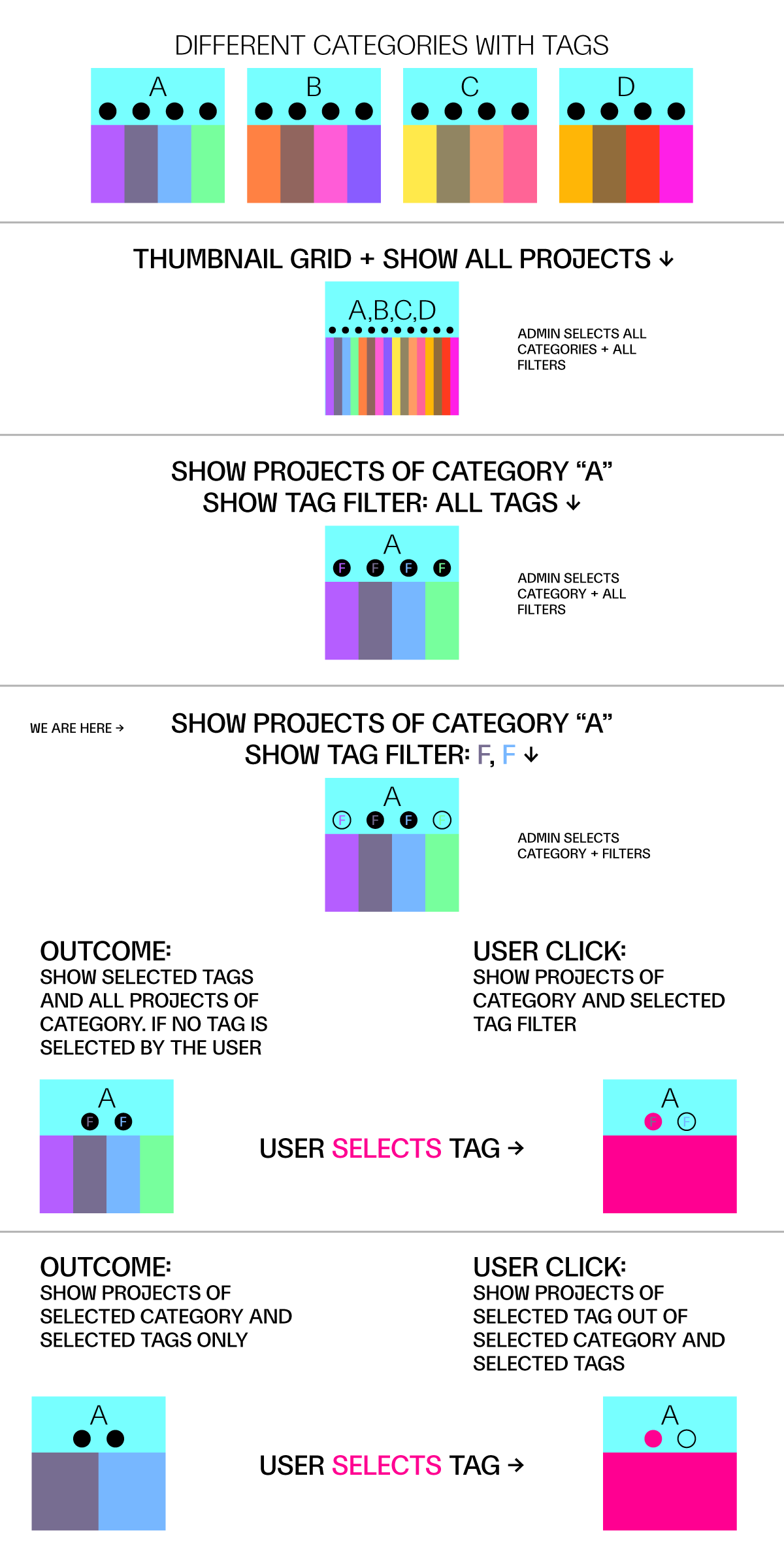
                                What I would expect from a select category + select tags (as admin) is to see all projects of selected category but only within the selected tags and not all projects of category + selected TAG BUBBLES.

                                Maybe this can show what I mean
                                category_tag_filter.png

                                1 Reply Last reply
                                0
                                • mppM
                                  mppM
                                  mpp
                                  wrote on last edited by
                                  #19

                                  Selecting category + filter tags still shows all projects of category but just less tags unless user select a tag, but maybe it should show all projects of category within selected tags and the tags to filer out

                                  cat_filter.png

                                  1 Reply Last reply
                                  0
                                  • mppM
                                    mppM
                                    mpp
                                    wrote on last edited by
                                    #20

                                    Like – hiding a filter (clicking on the eye icon) only hides a bubble tag, not the project of a category with that tag, but maybe that is the idea.

                                    1 Reply Last reply
                                    0
                                    • arminunruhA
                                      arminunruhA
                                      arminunruh
                                      Global Moderator
                                      wrote on last edited by
                                      #21

                                      thanks a lot for creating the explaining graphics!

                                      you can show and hide tags here:
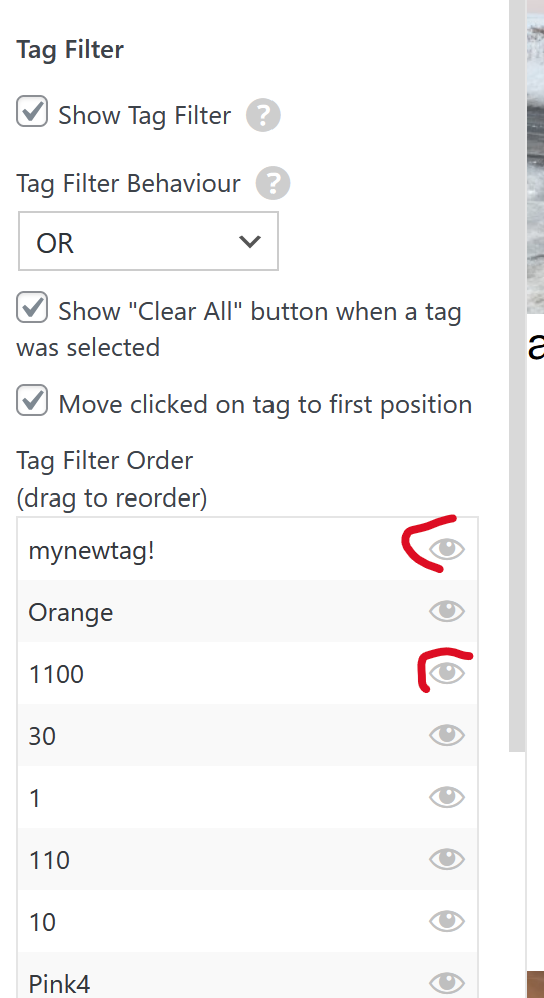
                                      image.png

                                      and when you hide a tag bubble here, then you want the projects of this tag to also not show. is that right?

                                      i think it would be best to have a call about this so I can understand the issue better, i sent you an email

                                      mppM 1 Reply Last reply
                                      0
                                      • arminunruhA arminunruh

                                        thanks a lot for creating the explaining graphics!

                                        you can show and hide tags here:

                                        image.png

                                        and when you hide a tag bubble here, then you want the projects of this tag to also not show. is that right?

                                        i think it would be best to have a call about this so I can understand the issue better, i sent you an email

                                        mppM
                                        mppM
                                        mpp
                                        wrote on last edited by mpp
                                        #22

                                        @arminunruh said in Thumbnail grid + tags:

                                        then you want the projects of this tag to also not show. is that right?

                                        yes, that is what I expected it will case – so that it is not only show or hide bubble tags, but also projects that are assigned to it – e-mailed you back!

                                        1 Reply Last reply
                                        0
                                        • arminunruhA
                                          arminunruhA
                                          arminunruh
                                          Global Moderator
                                          wrote on last edited by
                                          #23

                                          ok this is now included in the latest update:
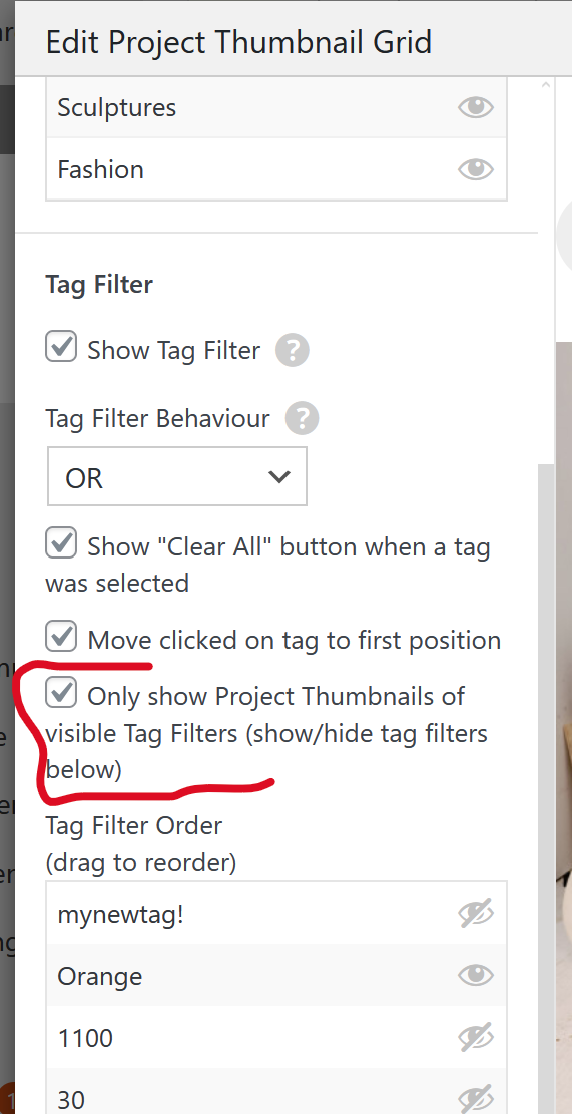
                                          image.png

                                          mppM 1 Reply Last reply
                                          0

                                          Hello! It looks like you're interested in this conversation, but you don't have an account yet.

                                          Getting fed up of having to scroll through the same posts each visit? When you register for an account, you'll always come back to exactly where you were before, and choose to be notified of new replies (either via email, or push notification). You'll also be able to save bookmarks and upvote posts to show your appreciation to other community members.

                                          With your input, this post could be even better 💗

                                          Register Login
                                          Reply
                                          • Reply as topic
                                          Log in to reply
                                          • Oldest to Newest
                                          • Newest to Oldest
                                          • Most Votes


                                          Online Users
                                          Forgot your key, lost your files, need a previous Lay Theme or Addon version? Go to www.laykeymanager.com
                                          laytheme.com
                                          • Login

                                          • Don't have an account? Register

                                          • Login or register to search.
                                          • First post
                                            Last post
                                          0
                                          • Recent
                                          • Tags
                                          • Popular
                                          • Users
                                          • Search