image scaling misalignment issues
-
From time to time we need to force some scaling rules on images or logos. This is because the page grid sometimes forces logos or images to become tiny when the browser is seized to narrow widths.
I can add custom css to force a minimum size to these images, but I am finding that they become misaligned as they scale. For example a centre aligned logo, will slowly drift off centre as the browser is resized. The drift happens because the image width is being overridden, but its positioning is still controlled by Lay’s grid. Is there a way to overcome this?
-
Please update to the latest Lay Theme version, then click on the row where you want your images to be sized in a custom way, not tied to the normal column grid
Now in the ROW sidebar, click Auto Layout.
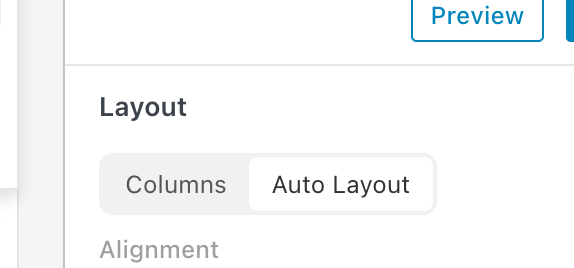
Underneath, you will find various settings for the alignment of the elements in that row.
And when you click on an element in the row, like an image in the row itself in the sidebar, you will see settings to set a fixed width or a fixed height.
-
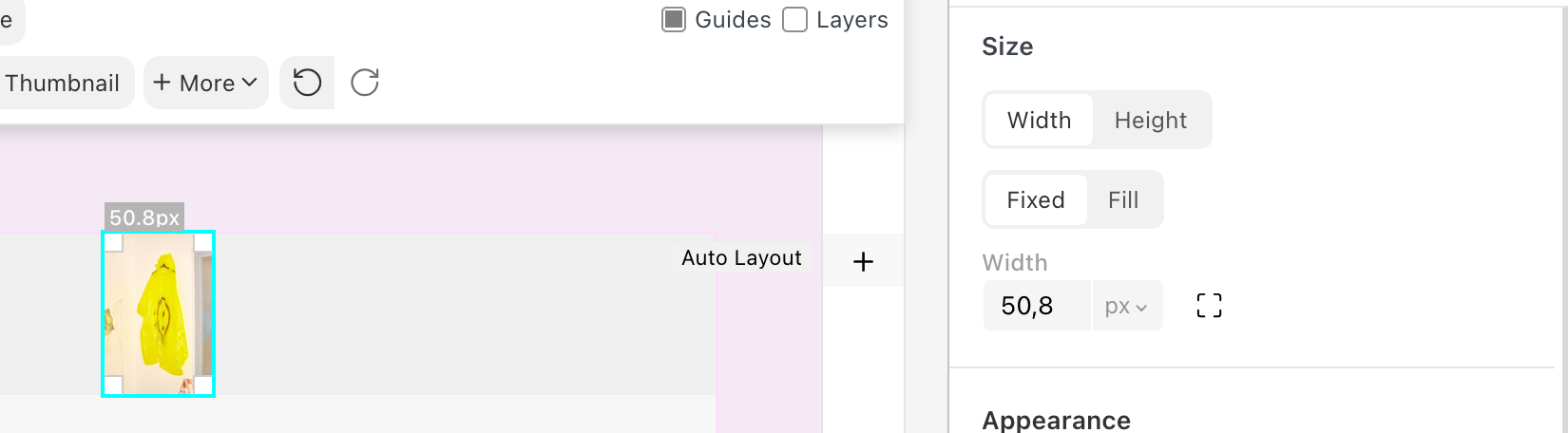
You see, you can either create a fixed width or a fixed height. It can be in percent or pixels.
-
 A arminunruh referenced this topic on
-
Thanks @arminunruh this was exactly what I needed. Solved. Always appreciate your prompt and thoughtful help.
Hello! It looks like you're interested in this conversation, but you don't have an account yet.
Getting fed up of having to scroll through the same posts each visit? When you register for an account, you'll always come back to exactly where you were before, and choose to be notified of new replies (either via email, or push notification). You'll also be able to save bookmarks and upvote posts to show your appreciation to other community members.
With your input, this post could be even better 💗
Register Login