Skip to content
  • Recent
  • Tags
  • Popular
  • Users
  • Search
Skins
  • Light
  • Brite
  • Cerulean
  • Cosmo
  • Flatly
  • Journal
  • Litera
  • Lumen
  • Lux
  • Materia
  • Minty
  • Morph
  • Pulse
  • Sandstone
  • Simplex
  • Sketchy
  • Spacelab
  • United
  • Yeti
  • Zephyr
  • Dark
  • Cyborg
  • Darkly
  • Quartz
  • Slate
  • Solar
  • Superhero
  • Vapor

  • Default (No Skin)
  • No Skin
Collapse

Lay Theme Forum

  1. Home
  2. Bug Reports
  3. Project Thumbnails

Project Thumbnails

Scheduled Pinned Locked Moved Bug Reports
15 Posts 4 Posters 4.6k Views 2 Watching
  • Oldest to Newest
  • Newest to Oldest
  • Most Votes
Reply
  • Reply as topic
Log in to reply
This topic has been deleted. Only users with topic management privileges can see it.
  • ondrejricicaO
    ondrejricicaO
    ondrejricica
    wrote on last edited by ondrejricica
    #1

    Hello.

    I really love the latest update. Big up!

    I'm not sure why, but can not use the new feature Project Thumbnails . I really wanted to customize arrow's appearance, but there's no Project Arrows option on my Customise panel. Tried in Firefox, Safari and Chrome (Mac).
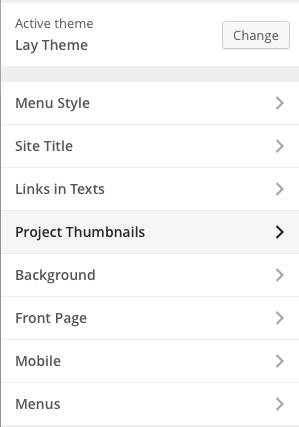
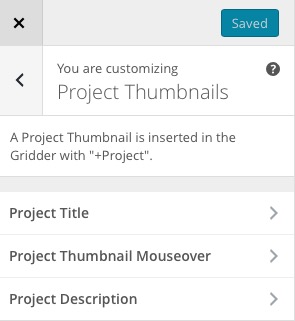
    Screen Shot 2015-10-23 at 17.18.50.jpg Screen Shot 2015-10-23 at 17.19.01.jpg

    Could you please suggest how to do so?

    Thank you,
    Ondrej

    1 Reply Last reply
    0
    • arminunruhA
      arminunruhA
      arminunruh
      Global Moderator
      wrote on last edited by
      #2

      Thx! Did you activate project arrows? You need to activate it first in "Lay Options" -> "Misc Options"

      1 Reply Last reply
      0
      • ondrejricicaO
        ondrejricicaO
        ondrejricica
        wrote on last edited by
        #3

        Yes, that was the first thing I did. I even cleared browser cache. Really wonder why it's not showing yet.

        1 Reply Last reply
        0
        • arminunruhA
          arminunruhA
          arminunruh
          Global Moderator
          wrote on last edited by
          #4

          They only show up when you go inside a project in the customizer. Can you try that?

          ondrejricicaO 1 Reply Last reply
          0
          • arminunruhA arminunruh

            They only show up when you go inside a project in the customizer. Can you try that?

            ondrejricicaO
            ondrejricicaO
            ondrejricica
            wrote on last edited by
            #5

            I just hit Customise while being in Project, and I can edit only Project Title and Project Thumbnail Mouseover. Is that what you mean?

            1 Reply Last reply
            0
            • arminunruhA
              arminunruhA
              arminunruh
              Global Moderator
              wrote on last edited by arminunruh
              #6

              I mean you can go to Customize. Then on the right side you see your website. There you can go inside a project and then voila, on the left side, the "project arrow" control should appear. Let me know if that works for you.

              1 Reply Last reply
              0
              • ondrejricicaO
                ondrejricicaO
                ondrejricica
                wrote on last edited by ondrejricica
                #7

                Just tried and not showing up for me, sorry.

                1 Reply Last reply
                0
                • arminunruhA
                  arminunruhA
                  arminunruh
                  Global Moderator
                  wrote on last edited by
                  #8

                  Ok, I don#t know why it doesn't work. Maybe you can send me your login over chat so I can take a look?

                  ondrejricicaO 1 Reply Last reply
                  0
                  • arminunruhA arminunruh

                    Ok, I don#t know why it doesn't work. Maybe you can send me your login over chat so I can take a look?

                    ondrejricicaO
                    ondrejricicaO
                    ondrejricica
                    wrote on last edited by ondrejricica
                    #9

                    I'm not sure why is that. I made a simple workaround with Project links on a bottom: http://ondrejricica.com/liam-hodges/ and I'm kinda happy with that.

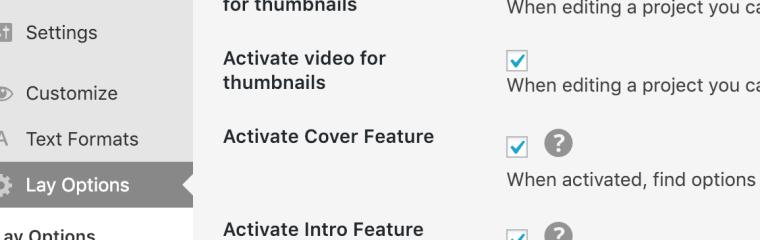
                    Is there any chance to use HTML5 Video as a Project thumbnail?

                    1 Reply Last reply
                    0
                    • arminunruhA
                      arminunruhA
                      arminunruh
                      Global Moderator
                      wrote on last edited by arminunruh
                      #10

                      No theres no way to use a html5 video as a project thumbnail, but thats a feature I want to code one day.

                      Also it seems you are looking for the project arrows within the project thumbnails panel in customizer. But project arrows has its own panel.
                      I think it would help a lot if I could go in your backend and then I could maybe see why it doesnt show up :D

                      ondrejricicaO 1 Reply Last reply
                      0
                      • arminunruhA arminunruh

                        No theres no way to use a html5 video as a project thumbnail, but thats a feature I want to code one day.

                        Also it seems you are looking for the project arrows within the project thumbnails panel in customizer. But project arrows has its own panel.
                        I think it would help a lot if I could go in your backend and then I could maybe see why it doesnt show up :D

                        ondrejricicaO
                        ondrejricicaO
                        ondrejricica
                        wrote on last edited by
                        #11

                        Great, it's working now. I clicked inside a Project and it showed up. Fireworks!

                        But real pitty about HTML5 Video thumbnail. I used gif once as a test but looked very pixelated.

                        1 Reply Last reply
                        0
                        • A
                          A
                          Anzcaaa
                          wrote on last edited by
                          #12

                          Hey everyone,
                          Is there a way of using HTML5 videos as thumbnails yet? Can't find it anywhere and gif's are just way to big and making the site load very slow.

                          thanks for the great theme, very happy with it!

                          cheers

                          1 Reply Last reply
                          0
                          • mariusjopenM
                            mariusjopenM
                            mariusjopen
                            Global Moderator
                            wrote on last edited by
                            #13

                            Dear @ondrejricica
                            you can!

                            Have a look here:

                            0_1549475875388_Bildschirmfoto 2019-02-06 um 15.57.45.png

                            Best!

                            Marius

                            www.mariusjopen.world

                            A 1 Reply Last reply
                            0
                            • mariusjopenM mariusjopen

                              Dear @ondrejricica
                              you can!

                              Have a look here:

                              0_1549475875388_Bildschirmfoto 2019-02-06 um 15.57.45.png

                              Best!

                              Marius

                              A
                              A
                              Anzcaaa
                              wrote on last edited by
                              #14

                              @mariusjopen Thanks a lot!

                              1 Reply Last reply
                              0
                              • mariusjopenM
                                mariusjopenM
                                mariusjopen
                                Global Moderator
                                wrote on last edited by
                                #15

                                No problem! :-)

                                www.mariusjopen.world

                                1 Reply Last reply
                                0

                                Hello! It looks like you're interested in this conversation, but you don't have an account yet.

                                Getting fed up of having to scroll through the same posts each visit? When you register for an account, you'll always come back to exactly where you were before, and choose to be notified of new replies (either via email, or push notification). You'll also be able to save bookmarks and upvote posts to show your appreciation to other community members.

                                With your input, this post could be even better 💗

                                Register Login
                                Reply
                                • Reply as topic
                                Log in to reply
                                • Oldest to Newest
                                • Newest to Oldest
                                • Most Votes


                                Online Users
                                Forgot your key, lost your files, need a previous Lay Theme or Addon version? Go to www.laykeymanager.com
                                laytheme.com
                                • Login

                                • Don't have an account? Register

                                • Login or register to search.
                                • First post
                                  Last post
                                0
                                • Recent
                                • Tags
                                • Popular
                                • Users
                                • Search