Skip to content
  • Recent
  • Tags
  • Popular
  • Users
  • Search
Skins
  • Light
  • Brite
  • Cerulean
  • Cosmo
  • Flatly
  • Journal
  • Litera
  • Lumen
  • Lux
  • Materia
  • Minty
  • Morph
  • Pulse
  • Sandstone
  • Simplex
  • Sketchy
  • Spacelab
  • United
  • Yeti
  • Zephyr
  • Dark
  • Cyborg
  • Darkly
  • Quartz
  • Slate
  • Solar
  • Superhero
  • Vapor

  • Default (No Skin)
  • No Skin
Collapse

Lay Theme Forum

  1. Home
  2. Addons
  3. Fullscreen Slider MoveTo function no longer works?

Fullscreen Slider MoveTo function no longer works?

Scheduled Pinned Locked Moved Addons
13 Posts 4 Posters 2.4k Views 2 Watching
  • Oldest to Newest
  • Newest to Oldest
  • Most Votes
Reply
  • Reply as topic
Log in to reply
This topic has been deleted. Only users with topic management privileges can see it.
  • mariusjopenM
    mariusjopenM
    mariusjopen
    Global Moderator
    wrote on last edited by
    #4

    Dear @DMB
    when you send us a link we can have a look.

    All the best!

    Marius

    www.mariusjopen.world

    1 Reply Last reply
    0
    • K
      K
      kubmin
      wrote on last edited by
      #5

      Hi there!

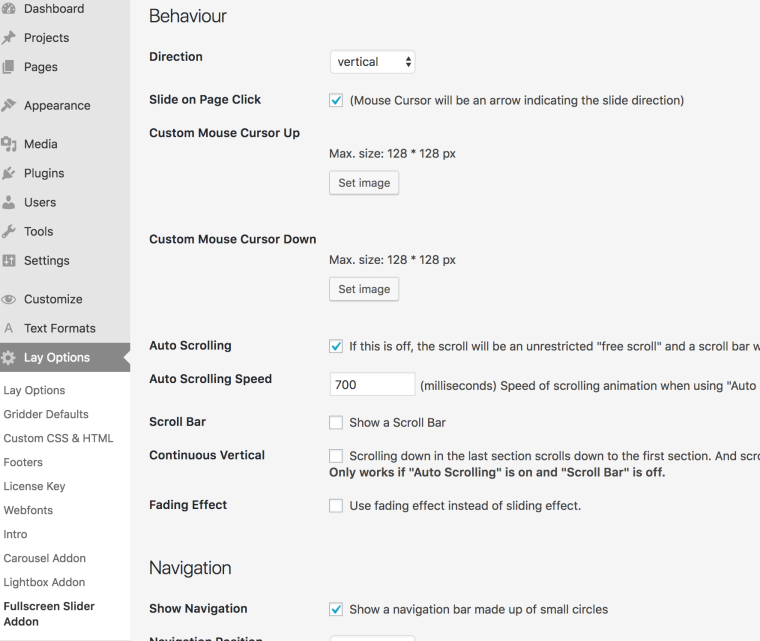
      Having the same problem, switching 'horizontal' to 'vertical' seems to work with my current code. Horizontal does not work.

      Custom HTML at body:

      <script>
      window.laytheme.on("newpageshown", function(layoutObj, type, obj){
      	if(type == "project"){
      		jQuery(function() {
                  var isDragging = false;
                  jQuery("p")
                  .mousedown(function() {
                      isDragging = false;
                  })
                  .mousemove(function() {
                      isDragging = true;
                  })
                  .mouseup(function() {
                      var wasDragging = isDragging;
                      isDragging = false;
                      if (wasDragging) {
                          console.log("MOVE yo");
                          jQuery.fn.fullpage.moveTo(1);
                      }
                  });
              });
      	}
      });
      </script>
      

      Any idea what could be causing this? Cheers!

      Best,
      Kubmin

      1 Reply Last reply
      0
      • mariusjopenM
        mariusjopenM
        mariusjopen
        Global Moderator
        wrote on last edited by
        #6

        Dear @kubmin
        what exactly is your goal?

        All the best!

        Marius

        www.mariusjopen.world

        1 Reply Last reply
        0
        • K
          K
          kubmin
          wrote on last edited by kubmin
          #7

          Hi Marius,

          Thanks for your response!
          This was just an example (I was trying to see if the user was selecting text, if so, cancel the slide tirgger), the issue is that the FullPage function jQuery.fn.fullpage.moveTo(); does not work anymore when the magnetic slides are set to horizontal. Vertically it seems to be working fine.

          Two examples I tried:

          <div class="test"></div>
          
          jQuery(".test").on("click", function(){
            jQuery.fn.fullpage.moveTo(1);
            console.log("clicked");
          });
          

          or:

          jQuery(document).on("click", ".test", function(event) {
          	jQuery.fn.fullpage.moveTo(1);
          	console.log("clicked");
          });
          

          Both of the codes above only works fine when setting the slides to vertically. when the slides are set to horizontal, it does not work anymore. Did something change in the new release or am I doing something wrong? It used to work before.

          Thanks again!
          Kubmin

          1 Reply Last reply
          0
          • mariusjopenM
            mariusjopenM
            mariusjopen
            Global Moderator
            wrote on last edited by
            #8

            Hi @kubmin

            Yes. I also tried it and the code you wrote does not work.
            I will check with Armin.

            .test {
                height: 100px;
                width: 100px;
                position: fixed;
                bottom: 0px;
                left: 0px;
                background: yellow;
                z-index: 1000000;
                cursor: pointer;
            }
            
            <script>
            jQuery(document).on("click", ".test", function(event) {
                jQuery.fn.fullpage.moveTo(1);
            });
            </script>
            
            <div class="test"></div>
            

            0_1523199321228_Bildschirmfoto 2018-04-08 um 16.55.14.png

            All the best!

            Marius

            www.mariusjopen.world

            1 Reply Last reply
            0
            • K
              K
              kubmin
              wrote on last edited by
              #9

              Thank you,
              Would love to hear a update on this :)

              1 Reply Last reply
              0
              • K
                K
                kubmin
                wrote on last edited by
                #10

                @mariusjopen any news?

                1 Reply Last reply
                0
                • mariusjopenM
                  mariusjopenM
                  mariusjopen
                  Global Moderator
                  wrote on last edited by
                  #11

                  Dear @kubmin
                  we are working on it and get back to you in a short time.

                  Best!

                  Marius

                  www.mariusjopen.world

                  1 Reply Last reply
                  0
                  • arminunruhA
                    arminunruhA
                    arminunruh
                    Global Moderator
                    wrote on last edited by arminunruh
                    #12

                    Hey I cannot reproduce it not working.

                    You might be on the first Slide and then jQuery.fn.fullpage.moveTo(1); does nothing because you are already on the first slide.

                    You might have to do jQuery.fn.fullpage.moveTo(2);

                    Maybe try jQuery.fn.fullpage.moveSectionDown();

                    Also please post a URL to your website to where you have the problem, so I can take a look there.

                    Have you also made sure to update all of your plugins and themes?
                    Also make sure to not include jquery by yourself with

                    <script src="https://cdnjs.cloudflare.com/ajax/libs/jquery/3.3.1/core.js"></script>
                    
                    1 Reply Last reply
                    0
                    • arminunruhA
                      arminunruhA
                      arminunruh
                      Global Moderator
                      wrote on last edited by arminunruh
                      #13

                      ok i know this is really old, but maybe try

                      jQuery.fn.fullpage.moveTo(0,1);
                      

                      the second parameter "1" is the horizontal number, the first number "0" is the vertical number.

                      1 Reply Last reply
                      0

                      Hello! It looks like you're interested in this conversation, but you don't have an account yet.

                      Getting fed up of having to scroll through the same posts each visit? When you register for an account, you'll always come back to exactly where you were before, and choose to be notified of new replies (either via email, or push notification). You'll also be able to save bookmarks and upvote posts to show your appreciation to other community members.

                      With your input, this post could be even better 💗

                      Register Login
                      Reply
                      • Reply as topic
                      Log in to reply
                      • Oldest to Newest
                      • Newest to Oldest
                      • Most Votes


                      Online Users
                      Forgot your key, lost your files, need a previous Lay Theme or Addon version? Go to www.laykeymanager.com
                      laytheme.com
                      • Login

                      • Don't have an account? Register

                      • Login or register to search.
                      • First post
                        Last post
                      0
                      • Recent
                      • Tags
                      • Popular
                      • Users
                      • Search