Skip to content
  • Recent
  • Tags
  • Popular
  • Users
  • Search
Skins
  • Light
  • Brite
  • Cerulean
  • Cosmo
  • Flatly
  • Journal
  • Litera
  • Lumen
  • Lux
  • Materia
  • Minty
  • Morph
  • Pulse
  • Sandstone
  • Simplex
  • Sketchy
  • Spacelab
  • United
  • Yeti
  • Zephyr
  • Dark
  • Cyborg
  • Darkly
  • Quartz
  • Slate
  • Solar
  • Superhero
  • Vapor

  • Default (No Skin)
  • No Skin
Collapse

Lay Theme Forum

  1. Home
  2. Addons
  3. Text in front of Carousel

Text in front of Carousel

Scheduled Pinned Locked Moved Addons
carousel
42 Posts 17 Posters 13.4k Views 4 Watching
  • Oldest to Newest
  • Newest to Oldest
  • Most Votes
Reply
  • Reply as topic
Log in to reply
This topic has been deleted. Only users with topic management privileges can see it.
  • J
    J
    julianmeisen
    wrote on last edited by
    #1

    Dear Armin,

    I'm using an fullscreen autoplay carousel as an Intro page. The carousel is supposed to be in the background while there is an Text in the foreground. Although there is apparently no direct way to place text in front the carousel, I still managed to do it by offsetting text, which I placed in a row below, upwards in front the carousel. However, as this is obviously not a clean solution (position of text is not always centered but dependent on screen sizes/row below is still visible when you scroll down) I was wondering if you can think of a better way to put text over a carousel?

    Here's the Link: http://julianmeisen.com/intro

    Many thanks in advance!

    Best,

    Julian

    1 Reply Last reply
    0
    • edgrbnzE
      edgrbnzE
      edgrbnz
      wrote on last edited by edgrbnz
      #2

      A video could be a solution for you. Not perfect in terms of maintainability but a similar kind of splashpage recently was discussed in this topic.

      ✦ ✦ ✦

      1 Reply Last reply
      0
      • mariusjopenM
        mariusjopenM
        mariusjopen
        Global Moderator
        wrote on last edited by
        #3

        Dear @julianmeisen
        you solution was not too bad. Even though it is a workaround…

        It will need some CSS magic of course. But possible.

        We will write down the feature to place text on to of a carousel now.

        Best!

        Marius

        www.mariusjopen.world

        1 Reply Last reply
        1
        • J
          J
          julianmeisen
          wrote on last edited by
          #4

          Dear @edgrbnz,

          many thanks, I will probably solve it as suggested with a video.

          Dear @mariusjopen,

          yes, that would be great—thanks!

          Best,

          Julian

          1 Reply Last reply
          1
          • edgrbnzE
            edgrbnzE
            edgrbnz
            wrote on last edited by
            #5

            @mariusjopen Text on top of a carousel would be a great feature!

            But how about going one step further and also allow the use of carousels as backgrounds?

            ✦ ✦ ✦

            1 Reply Last reply
            0
            • mariusjopenM
              mariusjopenM
              mariusjopen
              Global Moderator
              wrote on last edited by
              #6

              Dear @edgrbnz
              we again agree :-)

              Best!

              Marius

              www.mariusjopen.world

              1 Reply Last reply
              0
              • C
                C
                cyan_00FFF
                wrote on last edited by
                #7

                @mariusjopen Hi, has there been any solution to put text in front of a carousel yet?
                I am trying to use the carousel as a full width / height slider and it would be super nice to have some info in front of it on bottom left of my screen.
                thanks!
                robert

                1 Reply Last reply
                0
                • mariusjopenM
                  mariusjopenM
                  mariusjopen
                  Global Moderator
                  wrote on last edited by
                  #8

                  Dear @cyan_00FFF
                  not yet. Except you want to use CUSTOM CSS.

                  Best!

                  Marius

                  www.mariusjopen.world

                  C 1 Reply Last reply
                  0
                  • mariusjopenM mariusjopen

                    Dear @cyan_00FFF
                    not yet. Except you want to use CUSTOM CSS.

                    Best!

                    Marius

                    C
                    C
                    cyan_00FFF
                    wrote on last edited by
                    #9

                    @mariusjopen Thanks for the reply! I would totally use custom css but I can't figure out how to add a different z-index for example and then work in the lay interface to add content (means my page editor still won't allow adding a text in front of the slider then). sorry, I don't know how to describe the problem any better.

                    1 Reply Last reply
                    0
                    • mariusjopenM
                      mariusjopenM
                      mariusjopen
                      Global Moderator
                      wrote on last edited by
                      #10

                      Dear @cyan_00FFF
                      try position fixed and a ridiculous high z-index.

                      Best!

                      Marius

                      www.mariusjopen.world

                      1 Reply Last reply
                      0
                      • C
                        C
                        chuckbanal
                        wrote on last edited by
                        #11

                        hello @mariusjsopen
                        would you be so kind as to post a css snippet of how this could be done?
                        Ive tried this but text only disappears:

                        .free {
                        position: fixed;
                        z-index: 999999999;
                        }

                        1 Reply Last reply
                        0
                        • mariusjopenM
                          mariusjopenM
                          mariusjopen
                          Global Moderator
                          wrote on last edited by
                          #12

                          Dear @chuckbanal
                          can you post a link?

                          Best!

                          Marius

                          www.mariusjopen.world

                          1 Reply Last reply
                          0
                          • A
                            A
                            aaalex
                            wrote on last edited by
                            #13

                            Hello! I'd love to know how I can place text in front of a picture-carousel with CSS.

                            Thanks! :)

                            1 Reply Last reply
                            0
                            • mariusjopenM
                              mariusjopenM
                              mariusjopen
                              Global Moderator
                              wrote on last edited by
                              #14

                              Dear @aaalex
                              you can offset elements in the gridder that they move on top of each other.
                              You can also use CUSTOM CSS and z-index.
                              Best!
                              Marius

                              www.mariusjopen.world

                              T 1 Reply Last reply
                              0
                              • T
                                T
                                TE
                                wrote on last edited by
                                #15

                                hi @mariusjopen could you please advice on how to apply the CUSTOM CSS in this case?

                                Best

                                T

                                1 Reply Last reply
                                0
                                • mariusjopenM mariusjopen

                                  Dear @aaalex
                                  you can offset elements in the gridder that they move on top of each other.
                                  You can also use CUSTOM CSS and z-index.
                                  Best!
                                  Marius

                                  T
                                  T
                                  TE
                                  wrote on last edited by
                                  #16

                                  @mariusjopen Hi Again,

                                  I also tried the offset option however then I have still a scrollable chunk under the carousel which I dont want to have. How to tackle this?

                                  Thx

                                  T

                                  1 Reply Last reply
                                  0
                                  • RichardR
                                    RichardR
                                    Richard
                                    Global Moderator
                                    wrote on last edited by
                                    #17

                                    Dear @TE

                                    The goal is to have a carousel with an area of text that sits over the top? :)

                                    If so, i have created a simple example to get you in the right direction, i hope i can help.

                                    Let's create a carousel with a text block below it in the Gridder:
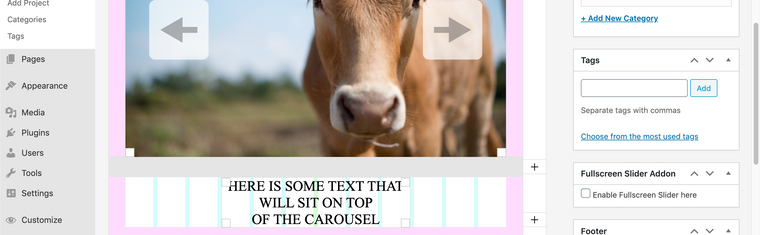
                                    Screen Shot 2020-11-13 at 5.20.49 PM.png

                                    Right click the text element to give it a Custom Class or ID - in my case i gave it a Class called "Special"
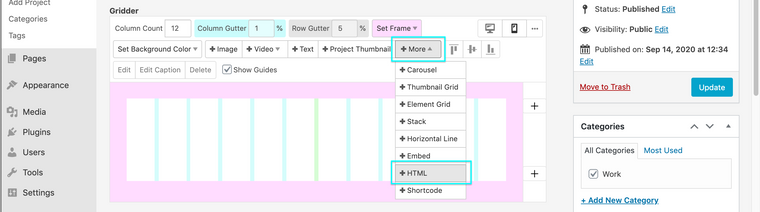
                                    Screen Shot 2020-09-14 at 2.50.29 PM.png

                                    Then we can target this Text element with Custom CSS using this 'special'

                                    In 'Lay Options - Custom CSS & HTML" We can add some Custom CSS to the Area at the top of the page:

                                    Screen Shot 2020-09-14 at 2.51.54 PM.png

                                    Adding some code like this:

                                    .special{
                                        margin-top: -140vh;
                                        z-index: 99;
                                    }
                                    

                                    And start to play around with some Basic CSS to suit your needs!

                                    Also something to help you:
                                    https://laytheme.com/documentation.html#custom-css-styling

                                    Have a wonderful day and Good Luck! all the basic CSS you need is just a google away :)

                                    Best
                                    Richard

                                    1 Reply Last reply
                                    0
                                    • T
                                      T
                                      TE
                                      wrote on last edited by
                                      #18

                                      Dear Richard

                                      Thanks for the help. I have tried your workaround and it did works however it didn't solve the problem of the blank space left below the carousel (where I have inserted the text block in the editor).

                                      1 Reply Last reply
                                      0
                                      • RichardR
                                        RichardR
                                        Richard
                                        Global Moderator
                                        wrote on last edited by
                                        #19

                                        Dear @TE

                                        Sorry for my answer, it didn't provide the correct solution.

                                        This code below should work without adding any extra length to your page:

                                        .special {
                                            transform: translateY(-40vh);
                                            z-index: 99;
                                        }
                                        

                                        Let me know how you go! :)
                                        Have a wonderful day & thank you for using Lay Theme

                                        T 1 Reply Last reply
                                        0
                                        • RichardR Richard

                                          Dear @TE

                                          Sorry for my answer, it didn't provide the correct solution.

                                          This code below should work without adding any extra length to your page:

                                          .special {
                                              transform: translateY(-40vh);
                                              z-index: 99;
                                          }
                                          

                                          Let me know how you go! :)
                                          Have a wonderful day & thank you for using Lay Theme

                                          T
                                          T
                                          TE
                                          wrote on last edited by
                                          #20

                                          @Richard-K Thanks for the help. However this didnt work and resulted in the text box not being translated to the top nor removing the gap.

                                          Are you certain this is the right fix?

                                          Note the I have written custom css to make the carousel full screen. Perhaps this interferes with the recent css code you wrote me?
                                          here is my current custom css (i renamed 'special' as 'text_overlay'):

                                          *img.carousel-lazy-img.h100.lazyloaded {
                                          height: 100vh;
                                          width: 100vw;
                                          object-fit: cover;
                                          }

                                          .carousel-full {
                                          height: 100vh;
                                          }

                                          .carousel-full .lay-carousel-wrap {
                                          height: 100% !important;
                                          }

                                          .carousel-full img.h100 {
                                          object-fit: cover;
                                          height: 100vh !important;
                                          width: 100%;
                                          }

                                          .text_overlay{
                                          margin-top: -120vh;
                                          z-index: 99;
                                          }*

                                          1 Reply Last reply
                                          0

                                          Hello! It looks like you're interested in this conversation, but you don't have an account yet.

                                          Getting fed up of having to scroll through the same posts each visit? When you register for an account, you'll always come back to exactly where you were before, and choose to be notified of new replies (either via email, or push notification). You'll also be able to save bookmarks and upvote posts to show your appreciation to other community members.

                                          With your input, this post could be even better 💗

                                          Register Login
                                          Reply
                                          • Reply as topic
                                          Log in to reply
                                          • Oldest to Newest
                                          • Newest to Oldest
                                          • Most Votes


                                          Online Users
                                          I
                                          itsbadjujuju
                                          Forgot your key, lost your files, need a previous Lay Theme or Addon version? Go to www.laykeymanager.com
                                          laytheme.com
                                          • Login

                                          • Don't have an account? Register

                                          • Login or register to search.
                                          • First post
                                            Last post
                                          0
                                          • Recent
                                          • Tags
                                          • Popular
                                          • Users
                                          • Search

