Skip to content
  • Recent
  • Tags
  • Popular
  • Users
  • Search
Skins
  • Light
  • Brite
  • Cerulean
  • Cosmo
  • Flatly
  • Journal
  • Litera
  • Lumen
  • Lux
  • Materia
  • Minty
  • Morph
  • Pulse
  • Sandstone
  • Simplex
  • Sketchy
  • Spacelab
  • United
  • Yeti
  • Zephyr
  • Dark
  • Cyborg
  • Darkly
  • Quartz
  • Slate
  • Solar
  • Superhero
  • Vapor

  • Default (No Skin)
  • No Skin
Collapse

Lay Theme Forum

  1. Home
  2. Feedback
  3. Second Footer Option

Second Footer Option

Scheduled Pinned Locked Moved Feedback
9 Posts 5 Posters 1.5k Views
  • Oldest to Newest
  • Newest to Oldest
  • Most Votes
Reply
  • Reply as topic
Log in to reply
This topic has been deleted. Only users with topic management privileges can see it.
  • B
    B
    bb_daniel
    wrote on last edited by
    #1

    Hey Armin,

    I was wondering if it would be possible to add a »Second-Footer« -Feature. So that you can load multiple pages inside a project.

    I played around a bit with the splitscreen solution using the footer, that's been a topic here before. It works out pretty well, but unfortunately, if I use the footer for building a split screen or other fancy stuff I can't add an actual footer at the bottom.

    Cheers, Daniel

    1 Reply Last reply
    0
    • mariusjopenM
      mariusjopenM
      mariusjopen
      Global Moderator
      wrote on last edited by
      #2

      Dear @bb_daniel
      we agree! Good idea!

      Best!

      Marius

      www.mariusjopen.world

      1 Reply Last reply
      0
      • B
        B
        billykioso
        wrote on last edited by
        #3

        I am trying to do this, but can't work out how. Has it been made possible?

        1 Reply Last reply
        0
        • RichardR
          RichardR
          Richard
          Global Moderator
          wrote on last edited by
          #4

          Dear @billykioso

          Currently a second footer option is not available,

          However if you wish to add simple content to a footer such as links and text etc you could create a custom Div Box using "More - HTML" within the Gridder options

          Then set it's width and height and fix it to the bottom of your page and style it's internal content within Using Custom CSS.

          Best
          Richard

          1 Reply Last reply
          0
          • B
            B
            billykioso
            wrote on last edited by
            #5

            Thank you for getting back. Can I please ask you to have a look at what I am working on and give me some feedback?

            https://fromwhereiamstanding.empathymuseum.com/home

            At the bottom of the page I have a footer with logos, etc. which works just fine. But the reason I needed a second footer is for the top of the page.

            At the top of the page I have a sentence "Empathy Museum presents" followed by the site title "from where I am standing" (a click on either of them always takes you to the homepage).

            I wanted the "Empathy Museum presents" sentence to be a footer/header floating above the site title, However, as I can't do this, I have made "Empathy Museum presents" into the site title and the actual site title is just a text box on each page. I know this is not ideal, but it is the only fix I found.

            If there is something simple I could do instead, it would be great to know. Many thanks!

            1 Reply Last reply
            0
            • RichardR
              RichardR
              Richard
              Global Moderator
              wrote on last edited by
              #6

              Dear @billykioso

              To set you off in the right direction you could try something like this :)

              In Your 'Footer' choose "+More - HTML" from the Options in the Gridder Menu:
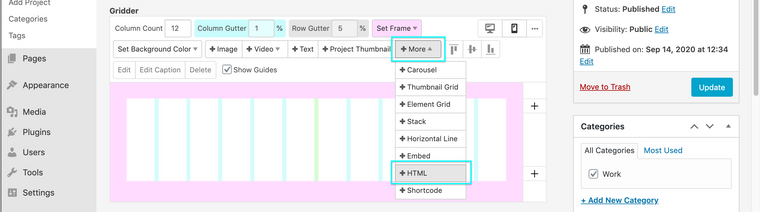
              Screen Shot 2020-09-14 at 2.50.29 PM.png

              Add some Code like this:

              <div class="custom-site-title">
                  <span>Empathy Museum presents</span>
              </div>
              

              And then in "Lay options - Custom CSS & HTML" in the Custom CSS area at the top of the page:

              Screen Shot 2020-09-14 at 2.51.54 PM.png

              Add some Code similar to this:

              .custom-site-title{
                  font-size:18px;
                  font-family: helvetica neue,sans-serif;
                  position:relative;
                  top:3px
              }
              

              And from there you can tweak the code to suit your needs.

              Also for some additional help:
              https://laytheme.com/documentation.html#custom-css-styling

              All the best and good luck!
              Best wishes and have a wonderful day

              Richard

              B 1 Reply Last reply
              0
              • RichardR Richard

                Dear @billykioso

                To set you off in the right direction you could try something like this :)

                In Your 'Footer' choose "+More - HTML" from the Options in the Gridder Menu:

                Screen Shot 2020-09-14 at 2.50.29 PM.png

                Add some Code like this:

                <div class="custom-site-title">
                    <span>Empathy Museum presents</span>
                </div>
                

                And then in "Lay options - Custom CSS & HTML" in the Custom CSS area at the top of the page:
                Screen Shot 2020-09-14 at 2.51.54 PM.png

                Add some Code similar to this:

                .custom-site-title{
                    font-size:18px;
                    font-family: helvetica neue,sans-serif;
                    position:relative;
                    top:3px
                }
                

                And from there you can tweak the code to suit your needs.

                Also for some additional help:
                https://laytheme.com/documentation.html#custom-css-styling

                All the best and good luck!
                Best wishes and have a wonderful day

                Richard

                B
                B
                billykioso
                wrote on last edited by
                #7

                @Richard-Keith thank you, it didn't work straight away, but I found a fix by putting the

                <div class="_runningheader">
                <span>Empathy Museum presents</span>
                </div>

                in the "Custom HTML at top" section instead.

                That seems to work fine!

                1 Reply Last reply
                0
                • RichardR
                  RichardR
                  Richard
                  Global Moderator
                  wrote on last edited by
                  #8

                  Dear @billykioso

                  Thanks for getting back! great idea ;)

                  Best
                  Richard

                  1 Reply Last reply
                  0
                  • S
                    S
                    suzyy
                    wrote on last edited by
                    #9

                    Would love this feature. There are a lot of possibilities for page construction with this option.

                    1 Reply Last reply
                    0

                    Hello! It looks like you're interested in this conversation, but you don't have an account yet.

                    Getting fed up of having to scroll through the same posts each visit? When you register for an account, you'll always come back to exactly where you were before, and choose to be notified of new replies (either via email, or push notification). You'll also be able to save bookmarks and upvote posts to show your appreciation to other community members.

                    With your input, this post could be even better 💗

                    Register Login
                    Reply
                    • Reply as topic
                    Log in to reply
                    • Oldest to Newest
                    • Newest to Oldest
                    • Most Votes


                    Online Users
                    I
                    itsbadjujuju
                    Forgot your key, lost your files, need a previous Lay Theme or Addon version? Go to www.laykeymanager.com
                    laytheme.com
                    • Login

                    • Don't have an account? Register

                    • Login or register to search.
                    • First post
                      Last post
                    0
                    • Recent
                    • Tags
                    • Popular
                    • Users
                    • Search

