Skip to content
  • Recent
  • Tags
  • Popular
  • Users
  • Search
Skins
  • Light
  • Brite
  • Cerulean
  • Cosmo
  • Flatly
  • Journal
  • Litera
  • Lumen
  • Lux
  • Materia
  • Minty
  • Morph
  • Pulse
  • Sandstone
  • Simplex
  • Sketchy
  • Spacelab
  • United
  • Yeti
  • Zephyr
  • Dark
  • Cyborg
  • Darkly
  • Quartz
  • Slate
  • Solar
  • Superhero
  • Vapor

  • Default (No Skin)
  • No Skin
Collapse

Lay Theme Forum

  1. Home
  2. Bug Reports
  3. Breaking point for Tablet
Breaking point for Tablet

Scheduled Pinned Locked Moved Bug Reports
6 Posts 2 Posters 1.4k Views 1 Watching
  • Oldest to Newest
  • Newest to Oldest
  • Most Votes
Reply
  • Reply as topic
Log in to reply
This topic has been deleted. Only users with topic management privileges can see it.
  • E
    E
    evey_k
    wrote on last edited by
    #1

    Hi there!

    I actually have finished my website sometime ago, and i remember i never had this problem with the breaking point on a tablet.

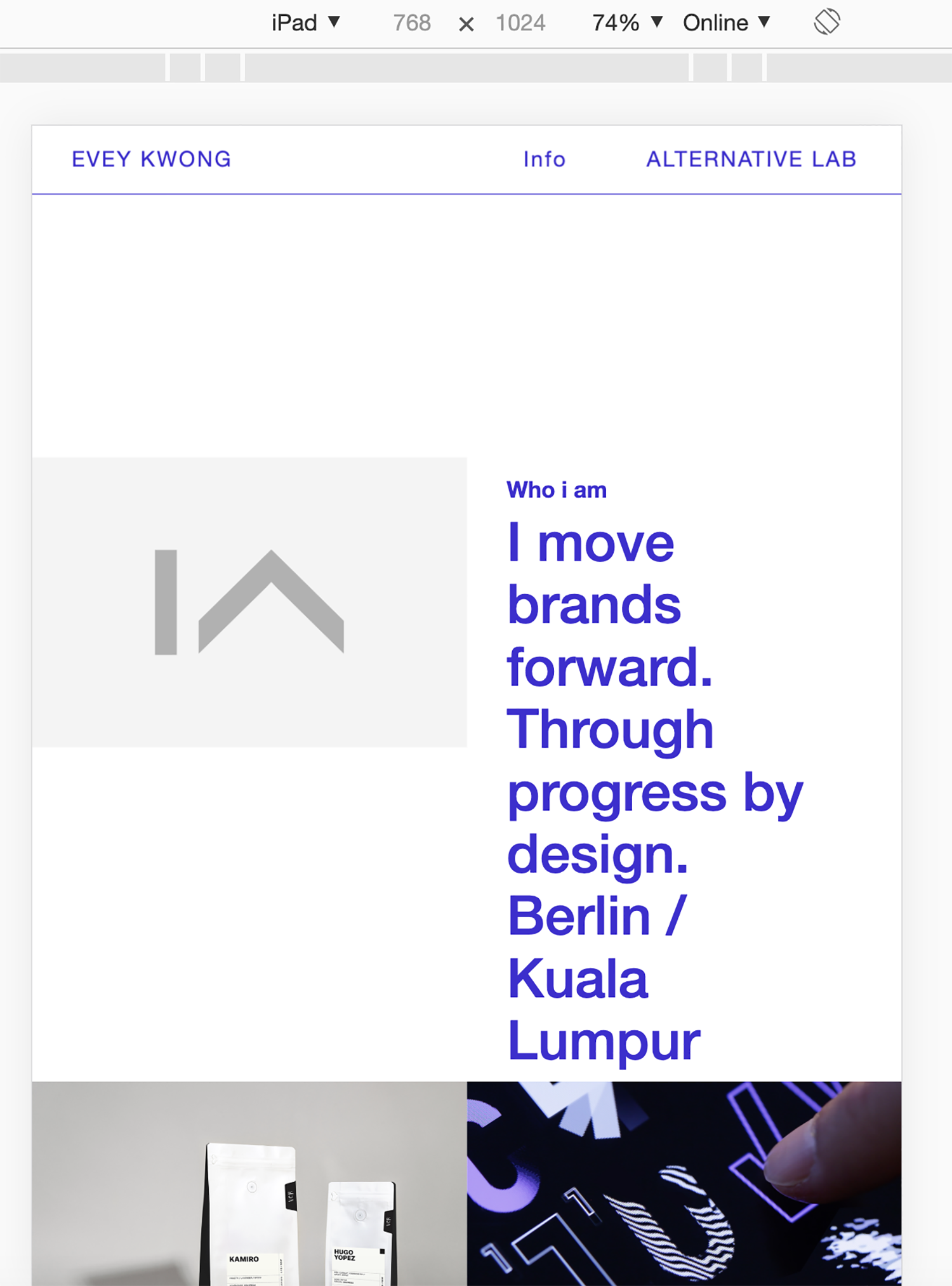
    Only recently, when i scale down my browser to tablet size, the layout disintegrated, and i have no idea what could be the problem.

    Could you please help?

    http://eveykwong.com/

    1_1573338295021_Screenshot 2019-11-09 at 23.23.34.png 0_1573338295021_Screenshot 2019-11-09 at 23.12.42.png

    1 Reply Last reply
    0
    • mariusjopenM
      mariusjopenM
      mariusjopen
      Global Moderator
      wrote on last edited by
      #2

      Dear @evey_k
      you can set a breakpoint for mobile and for phone.

      You tried this?

      Best!

      Marius

      www.mariusjopen.world

      1 Reply Last reply
      0
      • E
        E
        evey_k
        wrote on last edited by evey_k
        #3

        Yes it is already set by default for Tablet 1024px and iPhone 600px. But i think the problem lies that there's not really a tablet layout to arrange / organise my layout. Perhaps that explains why it breaks?

        And strangely i only have this problems on my main page. The content pages (with almost the same layout) are not affect.

        Could you please advise how i could resolve this? Thx in advanced!

        @mariusjopen

        1 Reply Last reply
        0
        • mariusjopenM
          mariusjopenM
          mariusjopen
          Global Moderator
          wrote on last edited by
          #4

          Dear @evey_k
          you could set your own breakpoint for this specific case with media query and CUSTOM CSS. I think that this is the fastest way.

          Best!

          Marius

          www.mariusjopen.world

          1 Reply Last reply
          0
          • E
            E
            evey_k
            wrote on last edited by
            #5

            I'm very sorry @mariusjopen, i really need your help on this. I'm not fit in media query.
            All i know is i have to put these on my CSS, but i don't know what should appear on the HTML content / head:

            @media only screen
            and (min-device-width : 768px) {
            }

            @media only screen
            and (min-device-width: 481px)
            and (max-device-width: 1024px)
            and (orientation:portrait) {
            }

            @media only screen
            and (min-device-width: 481px)
            and (max-device-width: 1024px)
            and (orientation:landscape) {
            }

            --
            Here is again screenshot when scaled down (tablet size):
            0_1574107227688_Screenshot 2019-11-18 at 20.59.40.png
            http://eveykwong.com/

            Please help, thank you so much!

            1 Reply Last reply
            0
            • mariusjopenM
              mariusjopenM
              mariusjopen
              Global Moderator
              wrote on last edited by
              #6
               @media only screen and (max-width: 700px) {
                     ._h5 {
                          font-size: 30px;
                      }   
               } 
              

              Try to add something like this into the CUSTOM CSS section.

              Best!

              Marius

              www.mariusjopen.world

              1 Reply Last reply
              0

              Hello! It looks like you're interested in this conversation, but you don't have an account yet.

              Getting fed up of having to scroll through the same posts each visit? When you register for an account, you'll always come back to exactly where you were before, and choose to be notified of new replies (either via email, or push notification). You'll also be able to save bookmarks and upvote posts to show your appreciation to other community members.

              With your input, this post could be even better 💗

              Register Login
              Reply
              • Reply as topic
              Log in to reply
              • Oldest to Newest
              • Newest to Oldest
              • Most Votes


              Online Users
              J
              j.varela
              A
              alasdair17
              Forgot your key, lost your files, need a previous Lay Theme or Addon version? Go to www.laykeymanager.com
              laytheme.com
              • Login

              • Don't have an account? Register

              • Login or register to search.
              • First post
                Last post
              0
              • Recent
              • Tags
              • Popular
              • Users
              • Search