Skip to content
  • Recent
  • Tags
  • Popular
  • Users
  • Search
Skins
  • Light
  • Brite
  • Cerulean
  • Cosmo
  • Flatly
  • Journal
  • Litera
  • Lumen
  • Lux
  • Materia
  • Minty
  • Morph
  • Pulse
  • Sandstone
  • Simplex
  • Sketchy
  • Spacelab
  • United
  • Yeti
  • Zephyr
  • Dark
  • Cyborg
  • Darkly
  • Quartz
  • Slate
  • Solar
  • Superhero
  • Vapor

  • Default (No Skin)
  • No Skin
Collapse

Lay Theme Forum

  1. Home
  2. Bug Reports
  3. Project Thumbnail Mouseover Image

Project Thumbnail Mouseover Image

Scheduled Pinned Locked Moved Bug Reports
11 Posts 3 Posters 1.3k Views 1 Watching
  • Oldest to Newest
  • Newest to Oldest
  • Most Votes
Reply
  • Reply as topic
Log in to reply
This topic has been deleted. Only users with topic management privileges can see it.
  • mariusjopenM
    mariusjopenM
    mariusjopen
    Global Moderator
    wrote on last edited by
    #2

    Dear @leotraversa

    Can you post a link to our website?
    Then we can have a look and inspect that.

    Do you have any third-party plugins installed or CUSTOM JS code? Is it possible to deactivate it for a moment to see if the problem remains?

    Marius

    www.mariusjopen.world

    L 1 Reply Last reply
    0
    • mariusjopenM mariusjopen

      Dear @leotraversa

      Can you post a link to our website?
      Then we can have a look and inspect that.

      Do you have any third-party plugins installed or CUSTOM JS code? Is it possible to deactivate it for a moment to see if the problem remains?

      Marius

      L
      L
      leotraversa
      wrote on last edited by
      #3

      @mariusjopen hello, I don't have any custom js code and only lay theme plugins.

      I see this problem only in the categories pages: http://www.biroarchitetti.it/b_uilding/

      1 Reply Last reply
      0
      • mariusjopenM
        mariusjopenM
        mariusjopen
        Global Moderator
        wrote on last edited by
        #4

        Dear @leotraversa
        ok, this happens when you link from one subpage of your page to another one of your page.
        When you load the website new, it does not happen.

        We will look into that!

        Best!

        Marius

        www.mariusjopen.world

        L 1 Reply Last reply
        0
        • mariusjopenM mariusjopen

          Dear @leotraversa
          ok, this happens when you link from one subpage of your page to another one of your page.
          When you load the website new, it does not happen.

          We will look into that!

          Best!

          Marius

          L
          L
          leotraversa
          wrote on last edited by
          #5

          @mariusjopen exactly! thank you. But it doesn’t exist a temporary solution? As a code that each time allow the page refresh?

          1 Reply Last reply
          0
          • arminunruhA
            arminunruhA
            arminunruh
            Global Moderator
            wrote on last edited by
            #6

            Hey guys I can't see the problem on the website and I'm not sure what this means @mariusjopen :
            "this happens when you link from one subpage of your page to another one of your page"

            Do you mean this?:
            There is a page that was created here:

            Screenshot 2020-03-27 at 09.55.13.png
            This page is a parent of another page. We call that page a sub-page. Now there is a link inside that sub-page that links to a different normal page.

            However, as far as I know you cannot create sub-pages of another page in lay theme.

            @leotraversa So I cannot recreate the problem on your website and I'm not sure if I understand the problem. Can you maybe create a video and show me exactly the steps you did to create the error?

            1 Reply Last reply
            0
            • mariusjopenM
              mariusjopenM
              mariusjopen
              Global Moderator
              wrote on last edited by
              #7

              Dear @arminunruh
              I meant when you enter the page from another internal page of the website.

              1. You go on the link: http://www.biroarchitetti.it/b_uilding/

              2. You click on about

              3. You hover on projects and click on b_uilding

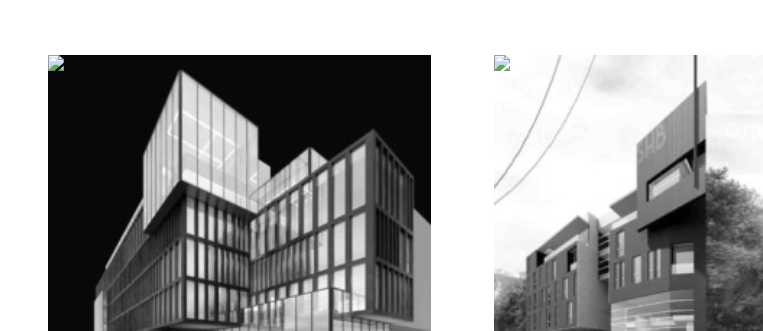
              4. Broken images

              Bildschirmfoto 2020-03-28 um 16.43.32.png

              Best!

              Marius

              www.mariusjopen.world

              1 Reply Last reply
              0
              • L
                L
                leotraversa
                wrote on last edited by
                #8

                Hello @arminunruh @mariusjopen , do you have a solution for thus bug? I have to release the website. Also a "temporary" solution for the moment.

                :) thanks a lot.

                1 Reply Last reply
                0
                • arminunruhA
                  arminunruhA
                  arminunruh
                  Global Moderator
                  wrote on last edited by
                  #9

                  Hey guys,

                  Thanks for your patience.
                  When I inspect the element I can see your alt tag contains html:
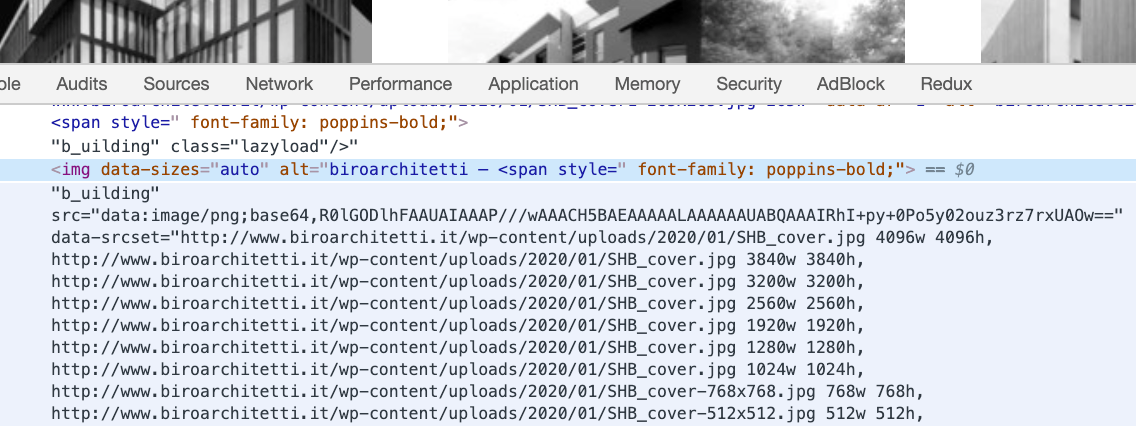
                  Screenshot 2020-04-04 at 13.44.54.png

                  Please remove that image from the gridder, then change the alt tag in your media library and re-insert the image.

                  1 Reply Last reply
                  0
                  • L
                    L
                    leotraversa
                    wrote on last edited by
                    #10

                    @arminunruh doesn't work. I think there's a bug with the mouseover thumbnail image.

                    But I have resolved changing the menu items. I have used custom link in place of the direct page link.

                    1 Reply Last reply
                    0
                    • mariusjopenM
                      mariusjopenM
                      mariusjopen
                      Global Moderator
                      wrote on last edited by
                      #11

                      Dear @leotraversa
                      Does the normal thumbnail image switch work on another page?
                      Many wishes!
                      Marius

                      www.mariusjopen.world

                      1 Reply Last reply
                      0

                      Hello! It looks like you're interested in this conversation, but you don't have an account yet.

                      Getting fed up of having to scroll through the same posts each visit? When you register for an account, you'll always come back to exactly where you were before, and choose to be notified of new replies (either via email, or push notification). You'll also be able to save bookmarks and upvote posts to show your appreciation to other community members.

                      With your input, this post could be even better đź’—

                      Register Login
                      Reply
                      • Reply as topic
                      Log in to reply
                      • Oldest to Newest
                      • Newest to Oldest
                      • Most Votes


                      Online Users
                      M
                      michael_vvc
                      G
                      gd_mrsn
                      A
                      Anna_S
                      Forgot your key, lost your files, need a previous Lay Theme or Addon version? Go to www.laykeymanager.com
                      laytheme.com
                      • Login

                      • Don't have an account? Register

                      • Login or register to search.
                      • First post
                        Last post
                      0
                      • Recent
                      • Tags
                      • Popular
                      • Users
                      • Search