Skip to content
  • Recent
  • Tags
  • Popular
  • Users
  • Search
Skins
  • Light
  • Brite
  • Cerulean
  • Cosmo
  • Flatly
  • Journal
  • Litera
  • Lumen
  • Lux
  • Materia
  • Minty
  • Morph
  • Pulse
  • Sandstone
  • Simplex
  • Sketchy
  • Spacelab
  • United
  • Yeti
  • Zephyr
  • Dark
  • Cyborg
  • Darkly
  • Quartz
  • Slate
  • Solar
  • Superhero
  • Vapor

  • Default (No Skin)
  • No Skin
Collapse

Lay Theme Forum

  1. Home
  2. Addons
  3. Customize Lightbox-plugin arrows

Customize Lightbox-plugin arrows

Scheduled Pinned Locked Moved Addons
19 Posts 6 Posters 5.2k Views 5 Watching
  • Oldest to Newest
  • Newest to Oldest
  • Most Votes
Reply
  • Reply as topic
Log in to reply
This topic has been deleted. Only users with topic management privileges can see it.
  • arminunruhA
    arminunruhA
    arminunruh
    Global Moderator
    wrote on last edited by arminunruh
    #2

    Hey Arne!
    Yeah I need to add that option. Try this css:

    #lightbox-region #lightbox-inner.cursor-left img {
        cursor: url("yourimageurl") 9 9, pointer !important;
    }
    
    #lightbox-region #lightbox-inner.cursor-right img {
        cursor: url("yourimageurl") 9 9, pointer !important;
    }
    

    The 9 9 are the x and y coordinates, they should be half of your cursor-image width and height

    1 Reply Last reply
    0
    • ArneRobotA
      ArneRobotA
      ArneRobot
      wrote on last edited by ArneRobot
      #3

      Great, it works like a charm! Thank you and cheers, Arne

      1 Reply Last reply
      0
      • L
        L
        louisdebelle
        wrote on last edited by
        #4

        works fine as long as the pointer is in the image area. any way to keep the new arrow also outside?

        1 Reply Last reply
        0
        • mariusjopenM
          mariusjopenM
          mariusjopen
          Global Moderator
          wrote on last edited by
          #5

          Hi Louis,

          possible but not really easy and probably not a clean solution.

          Can you make a screenshot of your page and mark the are which you want with another cursor?

          Best!

          Marius

          www.mariusjopen.world

          dustinD 1 Reply Last reply
          0
          • mariusjopenM mariusjopen

            Hi Louis,

            possible but not really easy and probably not a clean solution.

            Can you make a screenshot of your page and mark the are which you want with another cursor?

            Best!

            Marius

            dustinD
            dustinD
            dustin
            wrote on last edited by
            #6

            @mariusjopen I'm looking for the same solution as Louis.
            Is there a way you guys can show us how?
            I'm also looking for a way to adjust the coordinates of the "X" icon for Lightbox.
            Will there be any indication when you guys are going to apply these options?

            Cheers,

            Dustin
            www.dustinthierry.com

            1 Reply Last reply
            0
            • mariusjopenM
              mariusjopenM
              mariusjopen
              Global Moderator
              wrote on last edited by
              #7

              Hi you two,

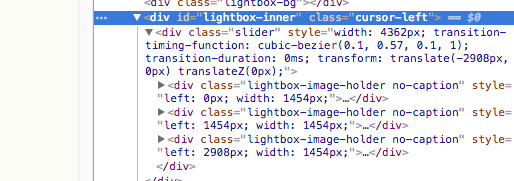
              this might be a way to use the arrows also outside:

              .cursor-left {
                  cursor: url("yourimageurl") 9 9, pointer !important;
              }
              
              .cursor-right {
                  cursor: url("yourimageurl") 9 9, pointer !important;
              }


              If you look here, the class is changing depending on the position of the cursor.
              So you can address it with the Custom CSS:
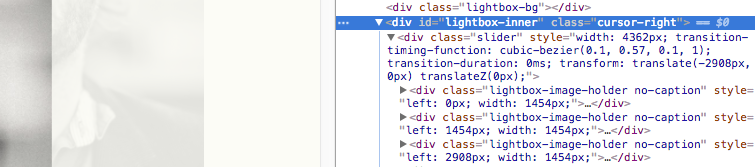
              0_1501057183438_Bildschirmfoto 2017-07-26 um 10.18.32.png

              0_1501057189103_Bildschirmfoto 2017-07-26 um 10.18.36.png

              About the X in the lightbox
              I just made a small test and you can hide the div which contains the X with Custom CSS and then put a new div box in to the <head> section and give it the same class like the X box had.
              Of course that new box needs to be positioned fixed etc.

              Let me know if you face trouble.

              Best!

              Marius

              www.mariusjopen.world

              1 Reply Last reply
              0
              • dustinD
                dustinD
                dustin
                wrote on last edited by dustin
                #8

                Hey Marius,

                Thanks, it works!

                I dont know how to work with div's and do all the wizardry.
                I only need the "X" to have the same top-right position as the the last letter of my menu bar.
                I would also like to know how I could change it to "Close". (if I wanted to.)

                And where can I change the maximum image size of the LightBox and have it perfectly centred?

                Any help would be appreciated.

                Cheers,

                Dustin

                1 Reply Last reply
                0
                • mariusjopenM
                  mariusjopenM
                  mariusjopen
                  Global Moderator
                  wrote on last edited by
                  #9

                  Hi Dustin,

                  I really recommend you to learn the basic of CSS and HTML.

                  What you need is super basic

                  You want to make this course for free, try again and let me know if you still got trouble?
                  https://www.codecademy.com/learn/web

                  Today it is really helpful to know at least the basics of coding.

                  You can position elements like this:

                  .element {
                     position: fixed;
                     top: 20px;
                     left: 20px;
                  }
                  

                  position fixed makes them not scrollable.

                  All very very basic CSS :-)

                  You can do it :-)

                  Marius

                  www.mariusjopen.world

                  dustinD 1 Reply Last reply
                  1
                  • mariusjopenM mariusjopen

                    Hi Dustin,

                    I really recommend you to learn the basic of CSS and HTML.

                    What you need is super basic

                    You want to make this course for free, try again and let me know if you still got trouble?
                    https://www.codecademy.com/learn/web

                    Today it is really helpful to know at least the basics of coding.

                    You can position elements like this:

                    .element {
                       position: fixed;
                       top: 20px;
                       left: 20px;
                    }
                    

                    position fixed makes them not scrollable.

                    All very very basic CSS :-)

                    You can do it :-)

                    Marius

                    dustinD
                    dustinD
                    dustin
                    wrote on last edited by
                    #10
                    This post is deleted!
                    1 Reply Last reply
                    0
                    • O
                      O
                      Olga V
                      wrote on last edited by
                      #11

                      Hi guys,

                      I know this topic already appeared quite often and I read your suggestions how to change the lightbox arrows. I tried it with CSS but it didn't work out. Could you please give me a hint, what I did wrong?

                      I placed this CSS code in Customize CSS:

                      #lightbox-region #lightbox-inner.cursor-left img {cursor: url("http://tihanavuk.com/wp-content/uploads/2020/01/cursor_left2.png") 9 9, pointer !important;
                      }

                      #lightbox-region #lightbox-inner.cursor-right img {cursor: url("http://tihanavuk.com/wp-content/uploads/2020/01/cursor_right2.png") 9 9, pointer !important;
                      }

                      Thank you!
                      Olga

                      1 Reply Last reply
                      0
                      • mariusjopenM
                        mariusjopenM
                        mariusjopen
                        Global Moderator
                        wrote on last edited by
                        #12

                        Dear @ArneRobot
                        Can you post a link to our website?
                        Then we can have a look and inspect that.

                        Marius

                        www.mariusjopen.world

                        O 1 Reply Last reply
                        0
                        • mariusjopenM mariusjopen

                          Dear @ArneRobot
                          Can you post a link to our website?
                          Then we can have a look and inspect that.

                          Marius

                          O
                          O
                          Olga V
                          wrote on last edited by
                          #13

                          Hi @mariusjopen ,

                          yes here it is:
                          www.tihanavuk.com

                          pw for viewing: Sonnenbrille

                          thank you!
                          O.

                          1 Reply Last reply
                          0
                          • mariusjopenM
                            mariusjopenM
                            mariusjopen
                            Global Moderator
                            wrote on last edited by
                            #14

                            Dear @Olga-V
                            there are no custom cursors for the lightbox. Just arrows for next and prev.

                            Best!

                            Marius

                            www.mariusjopen.world

                            O 1 Reply Last reply
                            0
                            • mariusjopenM mariusjopen

                              Dear @Olga-V
                              there are no custom cursors for the lightbox. Just arrows for next and prev.

                              Best!

                              Marius

                              O
                              O
                              Olga V
                              wrote on last edited by
                              #15

                              Hi @mariusjopen,

                              yeah, well. i wanted to change the arrows. is that possible?
                              if yes, which CSS code should I use?

                              thank you for caring!
                              best,
                              O.

                              1 Reply Last reply
                              0
                              • mariusjopenM
                                mariusjopenM
                                mariusjopen
                                Global Moderator
                                wrote on last edited by
                                #16

                                Dear @Olga-V

                                you can change the arrows in thew LayTheme settings or even in the plugin of Lay which you use.

                                Best!

                                Marius

                                www.mariusjopen.world

                                1 Reply Last reply
                                0
                                • O
                                  O
                                  Olga V
                                  wrote on last edited by
                                  #17

                                  Hi @mariusjopen,

                                  sorry, I really CAN'T find the setting option!
                                  I can see it in the carousel addon though, but not in lightbox.

                                  Here’s a screenshot from my interface.

                                  Screenshot_2020-01-23 Lightbox Addon ‹ Tihana Vukčević — WordPress.png

                                  Best,
                                  O.

                                  1 Reply Last reply
                                  0
                                  • mariusjopenM
                                    mariusjopenM
                                    mariusjopen
                                    Global Moderator
                                    wrote on last edited by
                                    #18

                                    Dear @Olga-V
                                    oh! My bad! Then you need to use CUSTOM CSS to do this :-)

                                    Best!

                                    Marius

                                    www.mariusjopen.world

                                    O 1 Reply Last reply
                                    0
                                    • mariusjopenM mariusjopen

                                      Dear @Olga-V
                                      oh! My bad! Then you need to use CUSTOM CSS to do this :-)

                                      Best!

                                      Marius

                                      O
                                      O
                                      Olga V
                                      wrote on last edited by
                                      #19

                                      @mariusjopen

                                      Yeah, well I already tried that code:

                                      #lightbox-region #lightbox-inner.cursor-left img {cursor: url("http://tihanavuk.com/wp-content/uploads/2020/01/cursor_left2.png") 9 9, pointer !important;
                                      }

                                      #lightbox-region #lightbox-inner.cursor-right img {cursor: url("http://tihanavuk.com/wp-content/uploads/2020/01/cursor_right2.png") 9 9, pointer !important;
                                      }

                                      I don't know why I didn't work. Is sth. wrong with it?

                                      Thanks,
                                      O.

                                      1 Reply Last reply
                                      0

                                      Hello! It looks like you're interested in this conversation, but you don't have an account yet.

                                      Getting fed up of having to scroll through the same posts each visit? When you register for an account, you'll always come back to exactly where you were before, and choose to be notified of new replies (either via email, or push notification). You'll also be able to save bookmarks and upvote posts to show your appreciation to other community members.

                                      With your input, this post could be even better 💗

                                      Register Login
                                      Reply
                                      • Reply as topic
                                      Log in to reply
                                      • Oldest to Newest
                                      • Newest to Oldest
                                      • Most Votes


                                      Online Users
                                      A
                                      Anna_S
                                      Forgot your key, lost your files, need a previous Lay Theme or Addon version? Go to www.laykeymanager.com
                                      laytheme.com
                                      • Login

                                      • Don't have an account? Register

                                      • Login or register to search.
                                      • First post
                                        Last post
                                      0
                                      • Recent
                                      • Tags
                                      • Popular
                                      • Users
                                      • Search