Carousel featured image change? (for a carousel of projects)
-
I have a front page consisting in a carousel of featured projects—each of them with a specific page containing multiple pictures.
The feaured image in this main carousel is the first of the project. How can I change it?
For example, setting it as the selected "thumbnail" of the project, or even, choosing a specific image?Thanks
-
Hey Jacopo, thanks for pointing this out. Yes this is something I haven't thought of and I should improve it one day. At the moment the project thumbnails inside a carousel don't update automatically when you change a project's title or its thumbnail. :/
At the moment the workaround for this is to edit your carousel and remove the project thumbnails that are inside.
So for example when editing my carousel, here I would click on "x" for all of them to remove them:
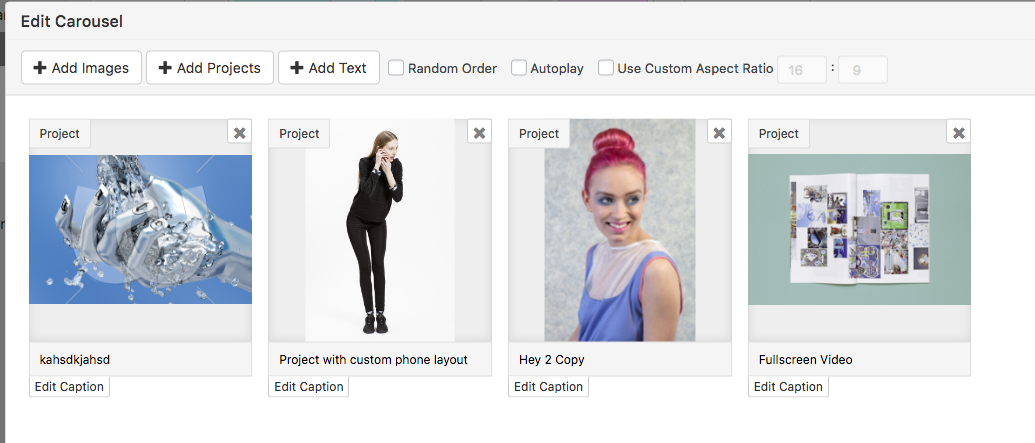
Then you would need to click on "+Add Projects" in the "Edit Carousel" modal and re-add all the projects.

Hello! It looks like you're interested in this conversation, but you don't have an account yet.
Getting fed up of having to scroll through the same posts each visit? When you register for an account, you'll always come back to exactly where you were before, and choose to be notified of new replies (either via email, or push notification). You'll also be able to save bookmarks and upvote posts to show your appreciation to other community members.
With your input, this post could be even better 💗
Register Login