Skip to content
  • Recent
  • Tags
  • Popular
  • Users
  • Search
Skins
  • Light
  • Brite
  • Cerulean
  • Cosmo
  • Flatly
  • Journal
  • Litera
  • Lumen
  • Lux
  • Materia
  • Minty
  • Morph
  • Pulse
  • Sandstone
  • Simplex
  • Sketchy
  • Spacelab
  • United
  • Yeti
  • Zephyr
  • Dark
  • Cyborg
  • Darkly
  • Quartz
  • Slate
  • Solar
  • Superhero
  • Vapor

  • Default (No Skin)
  • No Skin
Collapse

Lay Theme Forum

  1. Home
  2. Connect and find Help
  3. Custom cursor pointer for lightbox plugin

Custom cursor pointer for lightbox plugin

Scheduled Pinned Locked Moved Connect and find Help
5 Posts 2 Posters 1.1k Views 1 Watching
  • Oldest to Newest
  • Newest to Oldest
  • Most Votes
Reply
  • Reply as topic
Log in to reply
This topic has been deleted. Only users with topic management privileges can see it.
  • E
    E
    ErEs
    wrote on last edited by
    #1

    hey!

    i would love to change the default pointer for laytheme's lightbox plugin to my custom cursor.

    first i tried to style the pointer via css as a "normal" cursor and secondly tried to overwrite the code which activates the pointer on lightbox images by using a url to my custom cursor instead. neither of them worked.

    i guess it will be quite simple but for some reason i do not know how to get it to work.

    anybody knows a working solution?

    1 Reply Last reply
    0
    • RichardR
      RichardR
      Richard
      Global Moderator
      wrote on last edited by Richard
      #2

      Dear @ErEs

      What Custom Cursor functions are needed for your Lightbox?

      Custom next & previous cursors & close buttons are able through:

      Lay Options > Lightbox Addon >

      Just wish to understand better, talk soon & have a wonderful day 🌝


      Sincerely
      Richard
      1 Reply Last reply
      0
      • E
        E
        ErEs
        wrote on last edited by
        #3

        Dear @Richard

        on my website i have a pink circle as custom cursor which changes to another pink form when hovering over clickable items (a, img a). this works totally fine.
        however when i hover over images which will open in lightbox, my cursor will not be displayed. the default pointer hand will be displayed instead.

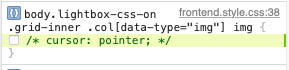
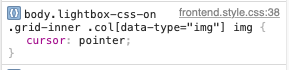
        i checked my site code and was able to detect the css which makes it happen (see images). however i am not able to fix it. Bildschirmfoto 2021-06-12 um 15.00.05.png Bildschirmfoto 2021-06-12 um 15.00.26.png
        here are some lines of code i already tried:

        #lightbox-region{
            cursor: url(herewouldbemyurl)
        }
        
        body.lightbox-css-on img{
          cursor: url(herewouldbemyurl)
        }
        

        i also tried

        .pointer{
        display:none
        }
        
        1 Reply Last reply
        0
        • E
          E
          ErEs
          wrote on last edited by
          #4

          Hello again,

          good news – i fixed it on my own.
          the use of "!important" was missing the whole time.
          I ll post the code i used down below in case anyone is struggling with a similar problem.

          .lightbox-css-on .grid-inner .col img{
              cursor: url(herewouldbemyurl) 40 40, auto !important;
          } 
          
          1 Reply Last reply
          2
          • RichardR
            RichardR
            Richard
            Global Moderator
            wrote on last edited by
            #5

            Dear @ErEs

            Great :) Thank you for updating

            Best
            Richard

            1 Reply Last reply
            0

            Hello! It looks like you're interested in this conversation, but you don't have an account yet.

            Getting fed up of having to scroll through the same posts each visit? When you register for an account, you'll always come back to exactly where you were before, and choose to be notified of new replies (either via email, or push notification). You'll also be able to save bookmarks and upvote posts to show your appreciation to other community members.

            With your input, this post could be even better 💗

            Register Login
            Reply
            • Reply as topic
            Log in to reply
            • Oldest to Newest
            • Newest to Oldest
            • Most Votes


            Online Users
            Forgot your key, lost your files, need a previous Lay Theme or Addon version? Go to www.laykeymanager.com
            laytheme.com
            • Login

            • Don't have an account? Register

            • Login or register to search.
            • First post
              Last post
            0
            • Recent
            • Tags
            • Popular
            • Users
            • Search