Skip to content
  • Recent
  • Tags
  • Popular
  • Users
  • Search
Skins
  • Light
  • Brite
  • Cerulean
  • Cosmo
  • Flatly
  • Journal
  • Litera
  • Lumen
  • Lux
  • Materia
  • Minty
  • Morph
  • Pulse
  • Sandstone
  • Simplex
  • Sketchy
  • Spacelab
  • United
  • Yeti
  • Zephyr
  • Dark
  • Cyborg
  • Darkly
  • Quartz
  • Slate
  • Solar
  • Superhero
  • Vapor

  • Default (No Skin)
  • No Skin
Collapse

Lay Theme Forum

  1. Home
  2. Addons
  3. Width of text slides / carousel

Width of text slides / carousel

Scheduled Pinned Locked Moved Addons
6 Posts 2 Posters 884 Views 1 Watching
  • Oldest to Newest
  • Newest to Oldest
  • Most Votes
Reply
  • Reply as topic
Log in to reply
This topic has been deleted. Only users with topic management privileges can see it.
  • M
    M
    marie3137
    wrote on last edited by
    #1

    Hello,

    I'm trying to make a carousel with vertical captions next to each images. Since it's not possible for now using captions, I used text slides.

    I can't figure out how to make the width of the text slides to match the width of each slides' content?
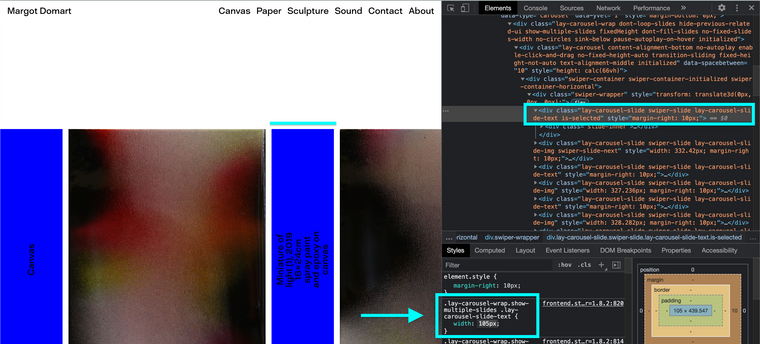
    I can see in the inspector that the width of the text slides is 400px, but I don't know where this value comes from.
    I've put a blue background color to the text slides to highlight the problem as you can see here:
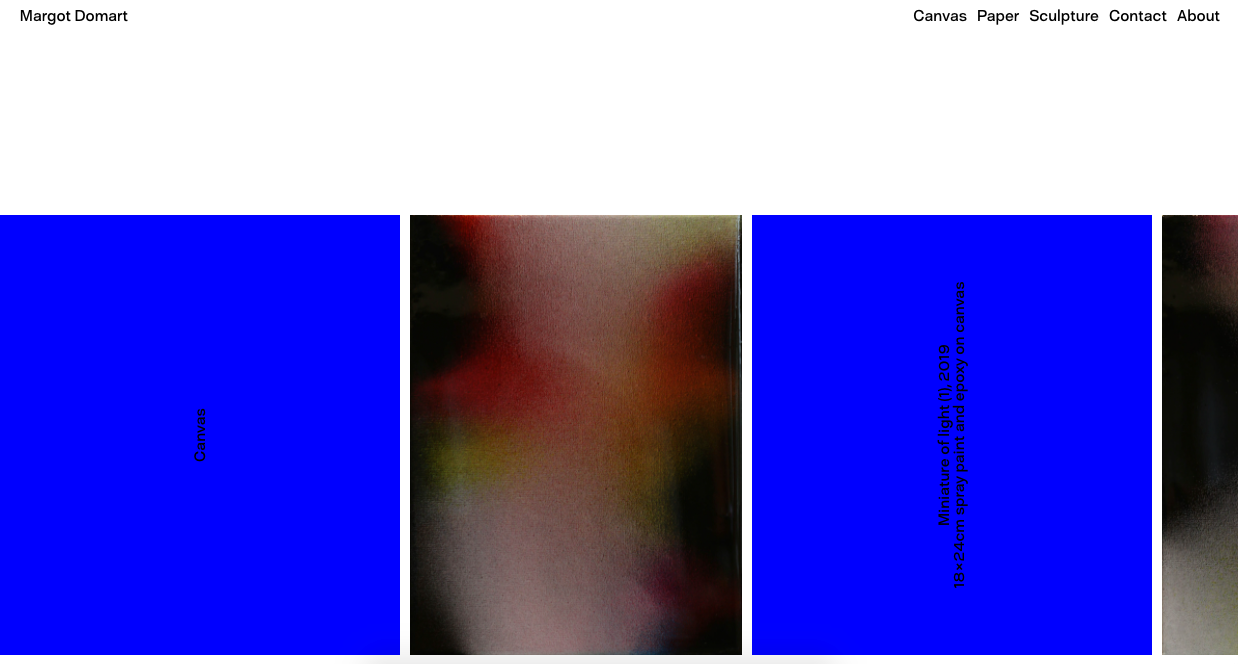
    Capture dโ€™eฬcran 2021-07-12 aฬ€ 16.19.03.png

    Here is the link to the website:
    https://margotdomart.com/index/

    I hope that my message is clear enough,
    Thanks!

    Marie

    1 Reply Last reply
    0
    • RichardR
      RichardR
      Richard
      Global Moderator
      wrote on last edited by Richard
      #2

      Dear Marie

      @marie3137

      " I can't figure out how to make the width of the text slides to match the width of each slides' content? "

      I need a little confirmation, 80% sure ๐ŸŒ
      Do you wish each slide was the exact same width
      Or, something like this:

      recut.jpg


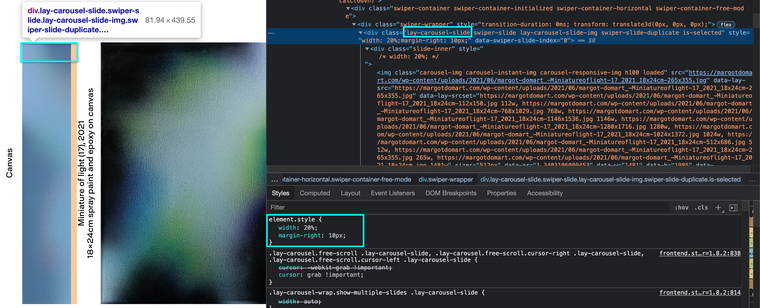
      Playing in the Inspector ๐Ÿ”like you said, changing the width:
      Screen Shot 2021-07-13 at 6.38.29 PM.png

      .lay-carousel-wrap.show-multiple-slides .lay-carousel-slide-text {
          width: 105px;
      }
      
      (NOTE: This is not a long-term solution)

      Talk soon and have a great day Marie ๐ŸŒผ
      Richard
      1 Reply Last reply
      0
      • M
        M
        marie3137
        wrote on last edited by
        #3
        This post is deleted!
        1 Reply Last reply
        0
        • M
          M
          marie3137
          wrote on last edited by
          #4

          Hi @Richard

          Thank you for you quick reply !

          This is exactly what I'd like to achieve:
          http://laythemeforum.com/assets/uploads/files/1626158177495-recut.jpg

          I'm not sure that every captions are going to have the same amount of words so I'm looking for a way to make the slides fit each captions.

          I've tried this in different classes but it never seems to work:
          width: max-content;

          Marie

          1 Reply Last reply
          0
          • M
            M
            marie3137
            wrote on last edited by
            #5

            Hello @Richard,
            I hope you're well.

            I wonder if you had some time to come back to this issue ?
            I've looked at it again but I can't get to this result.

            recut.jpg

            Thanks again,
            Marie

            1 Reply Last reply
            0
            • RichardR
              RichardR
              Richard
              Global Moderator
              wrote on last edited by
              #6

              Dear Marie

              @marie3137

              The Class lay-carousel-slide can be targeted with Custom CSS
              (located via) > Lay Options > Custom CSS & HTML >

              Width of slide has been altered:
              Screen Shot 2021-08-26 at 2.28.52 PM.png


              Best wishes ๐ŸŒ
              Richard
              1 Reply Last reply
              0

              Hello! It looks like you're interested in this conversation, but you don't have an account yet.

              Getting fed up of having to scroll through the same posts each visit? When you register for an account, you'll always come back to exactly where you were before, and choose to be notified of new replies (either via email, or push notification). You'll also be able to save bookmarks and upvote posts to show your appreciation to other community members.

              With your input, this post could be even better ๐Ÿ’—

              Register Login
              Reply
              • Reply as topic
              Log in to reply
              • Oldest to Newest
              • Newest to Oldest
              • Most Votes


              Online Users
              Forgot your key, lost your files, need a previous Lay Theme or Addon version? Go to www.laykeymanager.com
              laytheme.com
              • Login

              • Don't have an account? Register

              • Login or register to search.
              • First post
                Last post
              0
              • Recent
              • Tags
              • Popular
              • Users
              • Search