Skip to content
  • Recent
  • Tags
  • Popular
  • Users
  • Search
Skins
  • Light
  • Brite
  • Cerulean
  • Cosmo
  • Flatly
  • Journal
  • Litera
  • Lumen
  • Lux
  • Materia
  • Minty
  • Morph
  • Pulse
  • Sandstone
  • Simplex
  • Sketchy
  • Spacelab
  • United
  • Yeti
  • Zephyr
  • Dark
  • Cyborg
  • Darkly
  • Quartz
  • Slate
  • Solar
  • Superhero
  • Vapor

  • Default (No Skin)
  • No Skin
Collapse

Lay Theme Forum

  1. Home
  2. Bug Reports
  3. Webfonts, upload works but webfont doesn't work

Webfonts, upload works but webfont doesn't work

Scheduled Pinned Locked Moved Bug Reports
17 Posts 5 Posters 2.9k Views 2 Watching
  • Oldest to Newest
  • Newest to Oldest
  • Most Votes
Reply
  • Reply as topic
Log in to reply
This topic has been deleted. Only users with topic management privileges can see it.
  • arminunruhA arminunruh

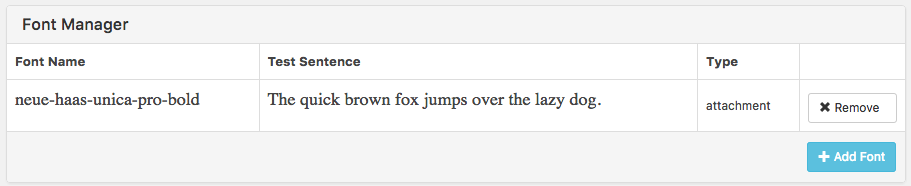
    hey on the website you can also download the woff directly instead of the ttf. I tried that and uploaded the webfont and it worked for me. here is the file: liant-regular.woff

    J
    J
    jjk
    wrote on last edited by
    #4
    This post is deleted!
    1 Reply Last reply
    0
    • arminunruhA
      arminunruhA
      arminunruh
      Global Moderator
      wrote on last edited by
      #5

      Hey can you please send me your wordpress admin panel login (website address, username, password) along with a link to this topic to armin.unruh@gmail.com ? Then I can take a look myself.

      1 Reply Last reply
      0
      • J
        J
        jjk
        wrote on last edited by
        #6

        thanks Armin, sent you via email.

        I also asked a friend of mine and he said that the bug is with the font...

        1 Reply Last reply
        0
        • arminunruhA
          arminunruhA
          arminunruh
          Global Moderator
          wrote on last edited by
          #7

          hey thanks for your login data.

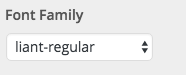
          I have tried setting the site title's font to "liant regular" and it seems to work.
          I did that in "Customize" -> "Site Title" -> "Site Title" -> "Font Family"

          Screen Shot 2016-10-14 at 17.20.02.png
          Screen Shot 2016-10-14 at 17.20.45.png

          J 1 Reply Last reply
          0
          • arminunruhA arminunruh

            hey thanks for your login data.

            I have tried setting the site title's font to "liant regular" and it seems to work.
            I did that in "Customize" -> "Site Title" -> "Site Title" -> "Font Family"

            Screen Shot 2016-10-14 at 17.20.02.png
            Screen Shot 2016-10-14 at 17.20.45.png

            J
            J
            jjk
            wrote on last edited by
            #8

            @arminunruh

            Hey, thanks for loging in.
            The site title doesn't display when I open my Website:
            Bildschirmfoto 2016-10-15 um 17.43.23.png

            So I had to switch back to my old font.

            Funny: When I add an underline, the font shows, but cut off.

            I don't understand why it doesn't work with me. :-(

            1 Reply Last reply
            0
            • arminunruhA
              arminunruhA
              arminunruh
              Global Moderator
              wrote on last edited by
              #9

              which browser and version do you use?

              J 1 Reply Last reply
              0
              • arminunruhA arminunruh

                which browser and version do you use?

                J
                J
                jjk
                wrote on last edited by
                #10

                @arminunruh
                laytheme: latest update
                wordpres: latest update
                browser: safari 9.0.3

                1 Reply Last reply
                0
                • M
                  M
                  MonaFluri
                  wrote on last edited by
                  #11

                  Hello
                  I am having the same issues with upload a font from myfonts. It does not work. maybe the bug is in the font it self.
                  Bildschirmfoto 2016-10-18 um 14.06.33.png

                  I can upload it but the font is not correctly shown. Its another font. What can i do?

                  1 Reply Last reply
                  0
                  • arminunruhA
                    arminunruhA
                    arminunruh
                    Global Moderator
                    wrote on last edited by
                    #12

                    hey mona can you please send me the font file to armin.unruh@gmail.com along with a link to this topic here?

                    1 Reply Last reply
                    0
                    • M
                      M
                      MonaFluri
                      wrote on last edited by
                      #13

                      deleted wordpress and Installed new. updated lay and now it works. thank you armin :)

                      1 Reply Last reply
                      1
                      • S
                        S
                        SHomb
                        wrote on last edited by
                        #14

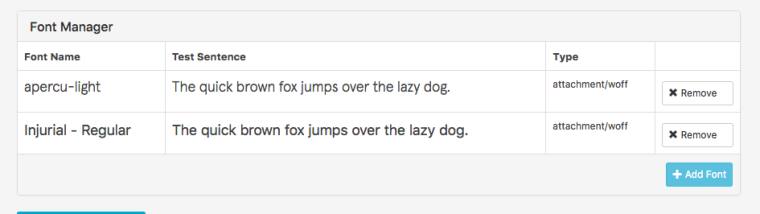
                        I'm having the same problem with the font Injurial:

                        0_1576752122106_Bildschirmfoto 2019-12-18 um 14.36.02.png

                        LayTheme and Wordpress are both the latest version. Any advice?

                        1 Reply Last reply
                        0
                        • mariusjopenM
                          mariusjopenM
                          mariusjopen
                          Global Moderator
                          wrote on last edited by
                          #15

                          Dear @SHomb
                          Best is if you write me a PM and include your username, password and a link to this conversation.

                          Marius

                          www.mariusjopen.world

                          S 1 Reply Last reply
                          0
                          • mariusjopenM mariusjopen

                            Dear @SHomb
                            Best is if you write me a PM and include your username, password and a link to this conversation.

                            Marius

                            S
                            S
                            SHomb
                            wrote on last edited by
                            #16

                            @mariusjopen I renamed the font file removing all the tabs and symbols, now it works :) thank you!

                            1 Reply Last reply
                            0
                            • mariusjopenM
                              mariusjopenM
                              mariusjopen
                              Global Moderator
                              wrote on last edited by
                              #17

                              Dear @jjk
                              great!
                              Thank you for letting us know!

                              Marius

                              www.mariusjopen.world

                              1 Reply Last reply
                              0

                              Hello! It looks like you're interested in this conversation, but you don't have an account yet.

                              Getting fed up of having to scroll through the same posts each visit? When you register for an account, you'll always come back to exactly where you were before, and choose to be notified of new replies (either via email, or push notification). You'll also be able to save bookmarks and upvote posts to show your appreciation to other community members.

                              With your input, this post could be even better 💗

                              Register Login
                              Reply
                              • Reply as topic
                              Log in to reply
                              • Oldest to Newest
                              • Newest to Oldest
                              • Most Votes


                              Online Users
                              Forgot your key, lost your files, need a previous Lay Theme or Addon version? Go to www.laykeymanager.com
                              laytheme.com
                              • Login

                              • Don't have an account? Register

                              • Login or register to search.
                              • First post
                                Last post
                              0
                              • Recent
                              • Tags
                              • Popular
                              • Users
                              • Search