Skip to content
  • Recent
  • Tags
  • Popular
  • Users
  • Search
Skins
  • Light
  • Brite
  • Cerulean
  • Cosmo
  • Flatly
  • Journal
  • Litera
  • Lumen
  • Lux
  • Materia
  • Minty
  • Morph
  • Pulse
  • Sandstone
  • Simplex
  • Sketchy
  • Spacelab
  • United
  • Yeti
  • Zephyr
  • Dark
  • Cyborg
  • Darkly
  • Quartz
  • Slate
  • Solar
  • Superhero
  • Vapor

  • Default (No Skin)
  • No Skin
Collapse

Lay Theme Forum

  1. Home
  2. Addons
  3. Fullscreen Slider not full width

Fullscreen Slider not full width

Scheduled Pinned Locked Moved Addons
8 Posts 2 Posters 868 Views 1 Watching
  • Oldest to Newest
  • Newest to Oldest
  • Most Votes
Reply
  • Reply as topic
Log in to reply
This topic has been deleted. Only users with topic management privileges can see it.
  • T
    T
    tim
    wrote on last edited by
    #1

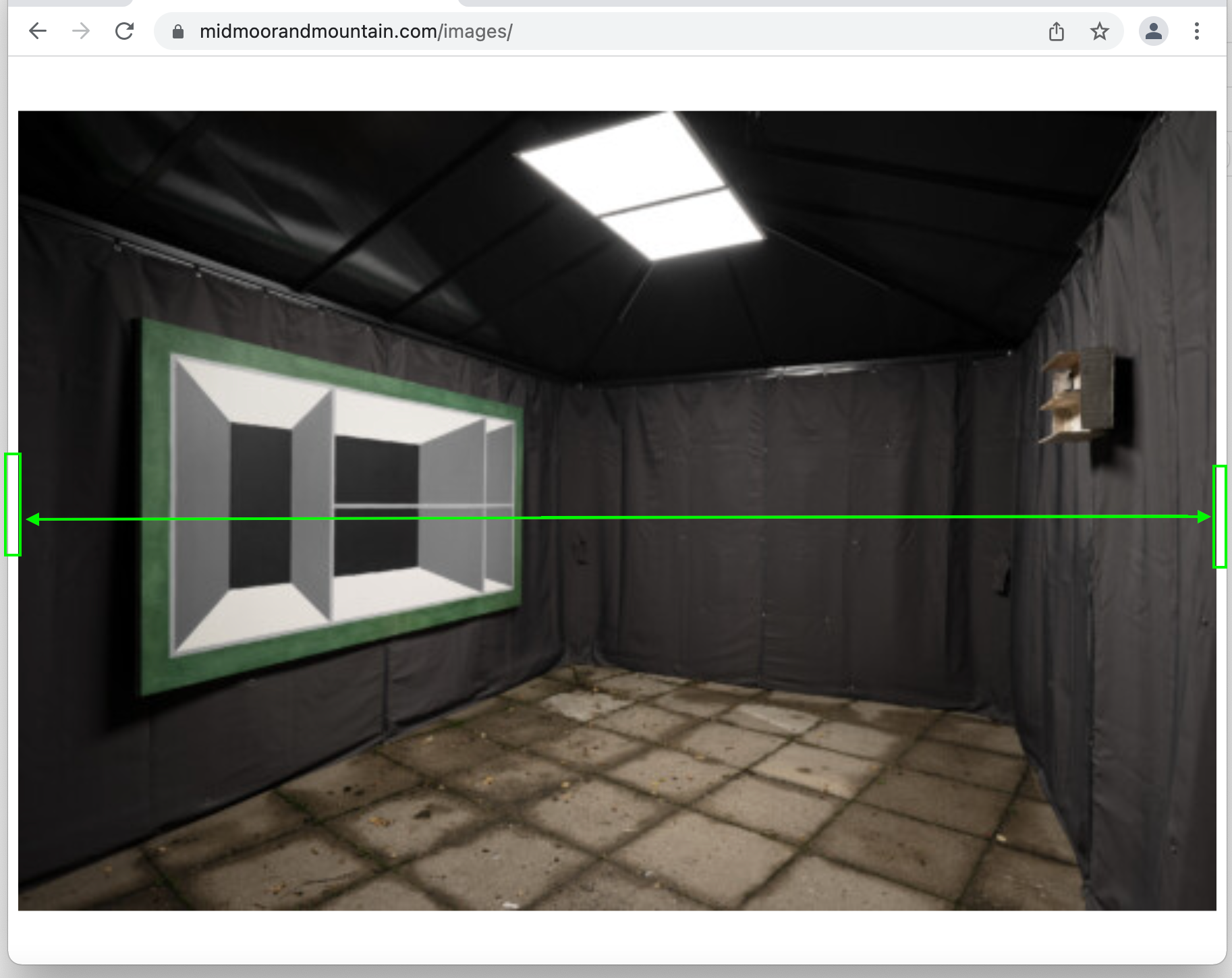
    The Fullscreen Slider is set to 100% width&height but shows a blank ∼5px border on the left&right depending on the viewport size. Upon browser resize, it scales to full width. (tested on Chrome and Safari)

    From the main page of the desktop version (https://lady-helen.com), „Images“ opens a page based on the Fullscreen Slider. The blank border gets visible, when the viewport size is around 1050x740px. (landscape images only)

    Many thanks for your help!

    1 Reply Last reply
    0
    • RichardR
      RichardR
      Richard
      Global Moderator
      wrote on last edited by
      #2

      Dear @tim

      When i test your webpage without Custom CSS i get a very different setup.
      Are you able to create a fullscreen slider test on a seperate page without the Custom CSS or JS applied to see if you get the correct Behaviour (testing in a vanilla Lay Theme environment)


      Best wishes
      Richard
      1 Reply Last reply
      0
      • T
        T
        tim
        wrote on last edited by
        #3

        Dear @Richard
        The border appears when using the mouse; caused by the missing scrollbar. The problem is that the main page is scrollable, and the page with the slider is not. I’ve created a test without the custom CSS/JS here. Thanks for a quick check!

        T 1 Reply Last reply
        0
        • T tim

          Dear @Richard
          The border appears when using the mouse; caused by the missing scrollbar. The problem is that the main page is scrollable, and the page with the slider is not. I’ve created a test without the custom CSS/JS here. Thanks for a quick check!

          T
          T
          tim
          wrote on last edited by
          #4

          Dear @Richard, were you able to reproduce the blank border? Thanks!

          1 Reply Last reply
          0
          • RichardR
            RichardR
            Richard
            Global Moderator
            wrote on last edited by
            #5

            Dear @tim

            This is the test page, sorry that i dont understand 🌝

            Screen Shot 2022-02-22 at 8.29.06 PM.png

            The scrollbar at the right?


            Best
            Richard
            T 1 Reply Last reply
            0
            • RichardR Richard

              Dear @tim

              This is the test page, sorry that i dont understand 🌝
              Screen Shot 2022-02-22 at 8.29.06 PM.png

              The scrollbar at the right?


              Best
              Richard
              T
              T
              tim
              wrote on last edited by
              #6

              Dear @Richard thanks for checking, this is the test page, correct!

              1. Please set your browser window to ∼1050x740px
              2. Use the mouse (visible scrollbars) and click on “images” to open the page with LayTheme fullscreen slider
              3. The photo appears not full width (Screenshot)

              border.png

              T 1 Reply Last reply
              0
              • T tim

                Dear @Richard thanks for checking, this is the test page, correct!

                1. Please set your browser window to ∼1050x740px
                2. Use the mouse (visible scrollbars) and click on “images” to open the page with LayTheme fullscreen slider
                3. The photo appears not full width (Screenshot)

                border.png

                T
                T
                tim
                wrote on last edited by
                #7

                Dear @Richard, were you able to reproduce the blank border? Thanks!

                1 Reply Last reply
                0
                • RichardR
                  RichardR
                  Richard
                  Global Moderator
                  wrote on last edited by
                  #8

                  Dear @tim !!! 💥

                  I do see that the image is not 100% the width of the page.
                  Is it possible to login and see what i can do to help with that?

                  Custom CSS is possible but shouldnt be needed. If the fullscreen slider is defined correctly it should be "Fullscreen". I see you issue and am sorry that my replies have not been prompt ⭐️

                  You are welcome to contact me via 'Chats' or email: licensekeys@laytheme.com I am happy to login and sort this issue out properly rather than adding custom code. It should be true "Fullscreen" 🌝


                  Talk soon and thanks for your patience Tim
                  Richard

                  1 Reply Last reply
                  0

                  Hello! It looks like you're interested in this conversation, but you don't have an account yet.

                  Getting fed up of having to scroll through the same posts each visit? When you register for an account, you'll always come back to exactly where you were before, and choose to be notified of new replies (either via email, or push notification). You'll also be able to save bookmarks and upvote posts to show your appreciation to other community members.

                  With your input, this post could be even better 💗

                  Register Login
                  Reply
                  • Reply as topic
                  Log in to reply
                  • Oldest to Newest
                  • Newest to Oldest
                  • Most Votes


                  Online Users
                  L
                  lukas123
                  Forgot your key, lost your files, need a previous Lay Theme or Addon version? Go to www.laykeymanager.com
                  laytheme.com
                  • Login

                  • Don't have an account? Register

                  • Login or register to search.
                  • First post
                    Last post
                  0
                  • Recent
                  • Tags
                  • Popular
                  • Users
                  • Search