Hover Image on project Index
-
Hi,
Another question on the project index and hover images links:
https://marcthomas.fr/index/I would like to put the image on top and not fixered and centered.
Then, to be on the same position than the first image of carousel on the project page.
https://marcthomas.fr/versace-spring-summer-22-watches-campaign/Thanks a lot,
Marc -
Dear Marc
@marc
The size of the image will need to change if you need it to fit above the text. However you can change the distance from the top by changing the
topvalue in the images code:img.lay-image-responsive.lazyautosizes.h100.lazyloaded { top: 50%; left: 50%; transform: translate(-50%, -50%); }Within the "image hover region' are all the images waiting and invisible until the hover make's them visible ( opacity ):
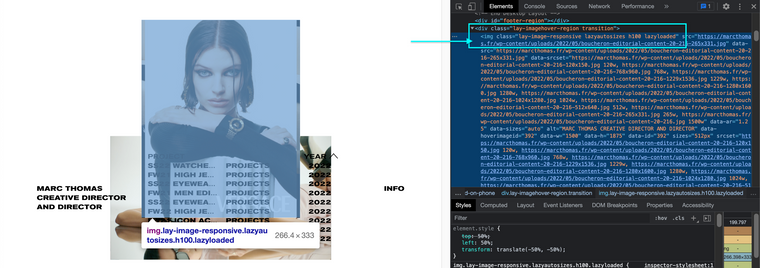
If you were to set the
topto 30% then the image will rise to where it is in this image.
Hope this helps and best wishes ✨
Richard
-

Hello! It looks like you're interested in this conversation, but you don't have an account yet.
Getting fed up of having to scroll through the same posts each visit? When you register for an account, you'll always come back to exactly where you were before, and choose to be notified of new replies (either via email, or push notification). You'll also be able to save bookmarks and upvote posts to show your appreciation to other community members.
With your input, this post could be even better 💗
Register Login