Adding Row Gutter after removing it ...
-
Hej @arminunruh
I have already created countless pages and I am very happy with the gridder. But unfortunately I have the same situation again and again, that I don't define a gutter for some rows and want to add one again at a later time.
Unfortunately, as far as I know, it's not possible to add a single row cutter to an existing row without a cutter, which means I have to change the row cutter for all rows at the top of the gridder. But that messes up all the other rows again ... can you possibly build something so that you can also assign individual rows a Gutter even if there was none assigned before ... because at the moment you can only click on it and change it, and if there is none, that's not possible.
Kiss, Fabi
-
hey fabi,
if you go to lay options → gridder defaults
there you can set the default row gutter
does that fix the issue?
Unfortunately, as far as I know, it's not possible to add a single row cutter to an existing row without a cutter
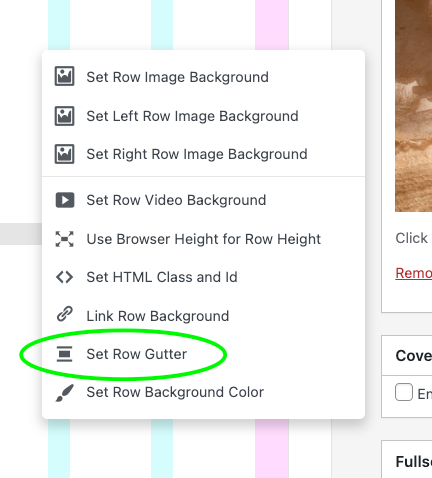
no, you can right click the row and click "set row gutter":
-
hey fabi,
if you go to lay options → gridder defaults
there you can set the default row gutter
does that fix the issue?
Unfortunately, as far as I know, it's not possible to add a single row cutter to an existing row without a cutter
no, you can right click the row and click "set row gutter":
Hey Armin, you are the best!
I don't know how I missed that in the right-click window, that solves the whole problem.
Thank you very much. 😘


Hello! It looks like you're interested in this conversation, but you don't have an account yet.
Getting fed up of having to scroll through the same posts each visit? When you register for an account, you'll always come back to exactly where you were before, and choose to be notified of new replies (either via email, or push notification). You'll also be able to save bookmarks and upvote posts to show your appreciation to other community members.
With your input, this post could be even better 💗
Register Login