split screen only on projects page with individual text
-
split screen just on project page with individual text to the content
how can I build a split screen which is only shown on the project page with the appropriate text for the content?
at the moment my website looks like this after I did the split screen tutorial and the code from @jacobtegel
-
hey sorry for the late answer
nice photos!
so you can enable splitscreen only for certain pages.
in chrome, press "option" + "command" + "i" on mac
or right click anything and click "inspect element" or "element untersuchen"now take a look at the body tag
it says "slug-xxx":
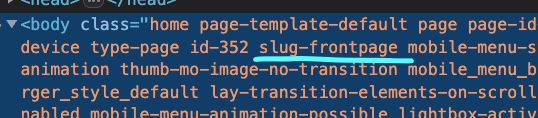
now to activate splitscreen only for this site, use that slug to target the css:
body.slug-frontpage #grid,
body.slug-frontpage #footer-region {
        height: 100%;
        position: fixed;
        top: 0;
        overflow-y: scroll;
        overflow: -moz-scrollbars-none;
        scrollbar-width: none;
        -webkit-overflow-scrolling: touch;
    }
    body.slug-frontpage #footer-region {
        left: 0;
        width: 50%;
    }
    body.slug-frontpage #footer{
        box-sizing: border-box;
        min-height: 100%;
    }
    body.slug-frontpage #grid {
        right: 0;
        width: 50%;
    }
    body.slug-frontpage #grid{
        box-sizing: border-box;
    }
now only for the page that has the body css class "slug-frontpage" the css will be used
i see on this page you have a text on the left side and content on the right side:
https://www.roxanejuhasz.de/test-again/i think its better if you dont use a splitscreen website, but do this instead:
- delete all "split screen css"
- in your project in the gridder click +more → +stack and insert the stack element. make it as big as the right side of your grid
- now add images into the stack element, many many images on top of each other! read this: https://laytheme.com/documentation/gridder-elements.html#stack-element
- on the left side put your text there. right click the text and click "make sticky"
this way you have a text on the left side that stays fixed and your content on the right side
doing a splitscreen website is only for this scenario:
the left side has links to your projects,
the right side has the content of your projectsif you want to have different project descriptions / texts on the left side and different content on the right side it won't work with this way of doing a splitscreen website!
-

Hello! It looks like you're interested in this conversation, but you don't have an account yet.
Getting fed up of having to scroll through the same posts each visit? When you register for an account, you'll always come back to exactly where you were before, and choose to be notified of new replies (either via email, or push notification). You'll also be able to save bookmarks and upvote posts to show your appreciation to other community members.
With your input, this post could be even better 💗
Register Login