custom phone grid not changing from opacity:0 on page load
-
hi! i'm not sure if this is a new bug, but on mobile view of the custom phone grid on this website, nothing is loading in as of recently.. everything is staying set at opacity:0 after page load
-
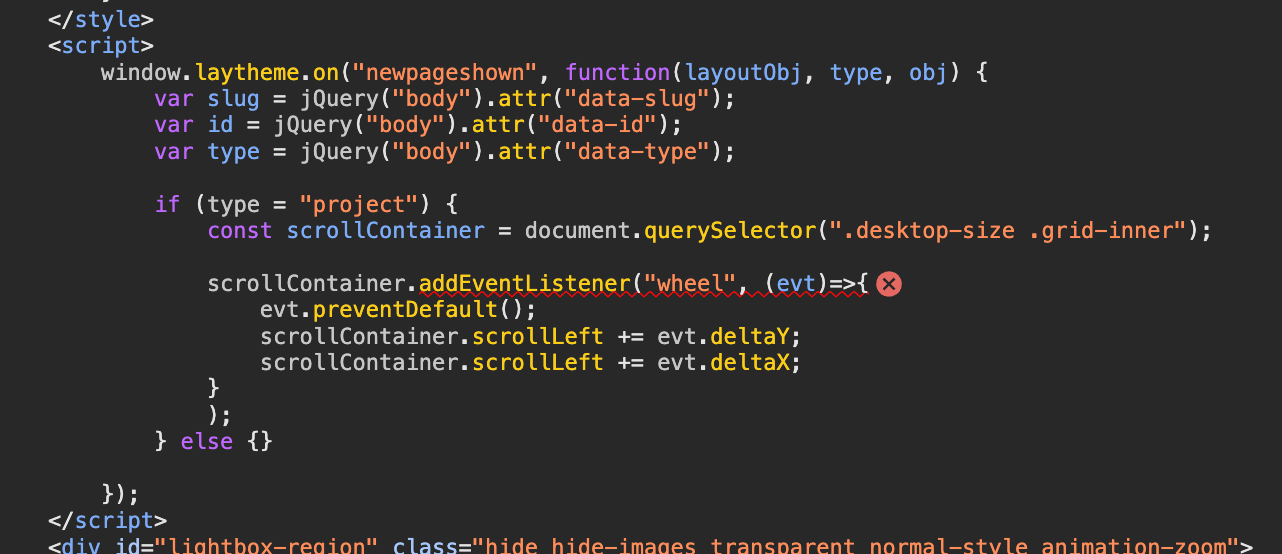
seems that your custom code creates an error
please always do the steps in the box to the right that say "before you post"
i'd change your code to this:
<script> window.laytheme.on("newpageshown", function(layoutObj, type, obj) { var slug = jQuery("body").attr("data-slug"); var id = jQuery("body").attr("data-id"); var type = jQuery("body").attr("data-type"); if (type = "project") { var scrollContainer = document.querySelector(".desktop-size .grid-inner"); if(scrollContainer){ scrollContainer.addEventListener("wheel", function(evt){ evt.preventDefault(); scrollContainer.scrollLeft += evt.deltaY; scrollContainer.scrollLeft += evt.deltaX; }) } } }); </script> -
seems that your custom code creates an error
please always do the steps in the box to the right that say "before you post"
i'd change your code to this:
<script> window.laytheme.on("newpageshown", function(layoutObj, type, obj) { var slug = jQuery("body").attr("data-slug"); var id = jQuery("body").attr("data-id"); var type = jQuery("body").attr("data-type"); if (type = "project") { var scrollContainer = document.querySelector(".desktop-size .grid-inner"); if(scrollContainer){ scrollContainer.addEventListener("wheel", function(evt){ evt.preventDefault(); scrollContainer.scrollLeft += evt.deltaY; scrollContainer.scrollLeft += evt.deltaX; }) } } }); </script>@arminunruh shoot I'm so sorry, i will definitely do this next time ;( the custom code was working until very recently, so didn't consider that angle but def should have. Thank you for taking the time on this <3
-
ah u dont have to be sorry! sure!

Hello! It looks like you're interested in this conversation, but you don't have an account yet.
Getting fed up of having to scroll through the same posts each visit? When you register for an account, you'll always come back to exactly where you were before, and choose to be notified of new replies (either via email, or push notification). You'll also be able to save bookmarks and upvote posts to show your appreciation to other community members.
With your input, this post could be even better 💗
Register Login