images disappearing. all images except for the title image on "concerts" are gone in all browsers except for Safari.
L
littlegestalt
@littlegestalt
Posts
-
collapse error after update -
collapse error after updateThanks a lot, this part is fixed. But I had to go back again because other stuff is broken. I will have the programmer look into this, first. Anyway, this bug is fixed, great!
-
collapse error after updateThanks, Armin! Updates are disabled, that's why the site is still on 6.9.5. ;-)
Will try again with the next update. -
collapse error after updateHello there,
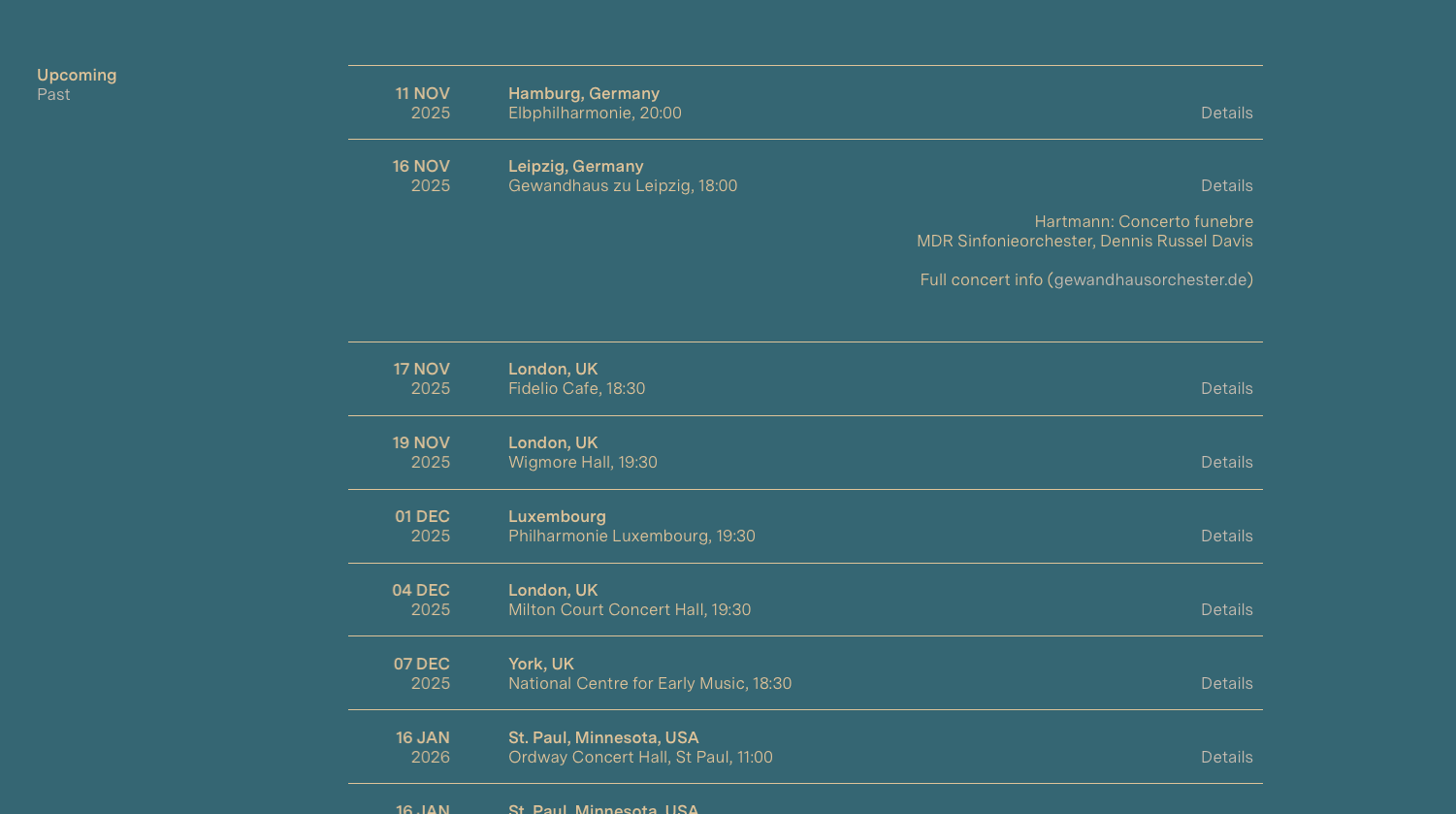
whenever I try to update my site it breaks a criticial feature. We use the news feature to display concert dates. Every news has a collapsed part that is expanded with click on the Details Link. After the Update all collapsed content is expanded and spreads over the rest of the news.
site: alinaibragimova.com
see screenshots for illustration. The 2ns screenshot shows restored version with LayTheme 6.9.5. I always restore the old version with a backup, but every new version stil has this bug. Thanks for looking into this.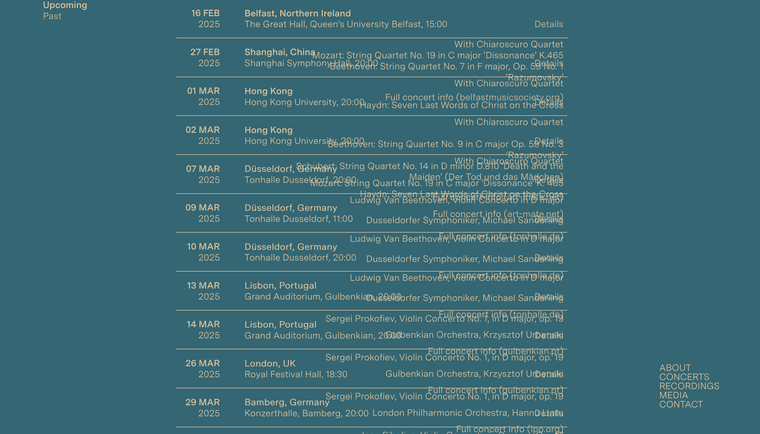
-
Content displayed twice in mobile viewThis should work: https://drive.google.com/file/d/1ZMTMxw_Z0khxYP9_26SNQwj2uac5WgZs/view?usp=sharing
website works now, but with LayTheme 6.9.5. This error occured with Laytheme 8.1.4 before i loaded a backup.
→ alinaibragimova.com -
Content displayed twice in mobile viewHello again,
in mobile view, the content that is normally placed under hero image is —as a badly formatted duplicate—also displayed above the image across all pages of my site. Below the hero image all is well. See Clip – . This happens in Version 8.1.3When I revert to an older version of LayTheme (6.9.5 is my newest backup) this is not the case. I wanted to check back before I update to 8.1.4.
-
Cover Feature glitch? first row re-appears at the endNo action required at the moment! There was a deactivated cache plugin, that somehow seemed to have frozen the cache? I must check as soon as I have an iPhone at hand. I'm a bit embarassed, sorry.
-
Cover Feature glitch? first row re-appears at the endThank you, but: no luck. i updated to the latest Lay Theme version and still inserted the code, first in CSS then in Mobile CSS. Deleted Safari iOS Cache and still the same. Here is a short clip, in case you want to see. (I wouldn't mind so much tbh, but my client does.)
-
Cover Feature glitch? first row re-appears at the endHello, this concerns display glitches on iPhones (11 & 15). When reaching the end of pages, the first row image (the one that gets covered) reappears / flares up. I attach 2 screenshots: Expected behaviour (works on android) and problematic behaviour (iPhone). I suspected this has to do with end part of the page being a footer, But tghe glitch is also there when I rebuild these elements on the page itself and deactivat the footer.
In case you want to test, the site is alinaibragimova.com


Workarounds or fixes are appreciated!
-
Rows not showing (cover feature)Thank you! That seemed to do the trick.
-
Rows not showing (cover feature)No, this happens on my Mac in Safari or Chrome Browsers.
-
Rows not showing (cover feature)Hello,
for the site alinaibragimova.com, there is a consistent use of the cover feature, that you will see working on some pages (like Recordings). With the new updates however, it stopped working for the About/Startpage and also the Concerts page. The rows under the first one just don't show. They may come back after a refresh, but can disappear again upon the next refresh. On Concerts which features a News Element in the second row, you see only a part of the news (the dates) scrolling over the cover image, but without background or the rest of the news elements. Some users say, that on mobil they have to scroll quite a lot without anything happening bevore the 2nd row pulls over the cover. This happens on MacOS in Safari or Chrome Browsers. All plugins are disabled, Cache has been cleared before (including DNS cache). I hope I don't overlook anything. Thanks for having a look. -
transparent PNG's in Element grid make the background color appearSolved it by deactivating the image placeholder color!
-
transparent PNG's in Element grid make the background color appearHi! With the latest update all of my element grids got screwed up: The transparent background of the png's now shows the background-color of the page: https://www.fivep.org
What can I do??!
Thank you...
-
Vertical Space between News ElementsSorry.
Sorting issue: https://alinaibragimova.com/test-upcoming-concerts/
→ use the left "menu" to switch between upcoming/past → sorting changes and is restored when refreshingSpacing Issue: https://alinaibragimova.com/test-news-spacing/
→ Should be the same vertical spacing as on the above mentioned pages, but when I added the second news item, there was this excessive vertical spaceOK, Spacing issue: https://alinaibragimova.com/test-news-spacing/
-
Vertical Space between News ElementsSorting issue temporarily fixed through adding
?refreshto all links to these pages within the website -
Vertical Space between News ElementsI also managed to recreate the bug: See https://alinaibragimova.com/test-news-spacing/
which is a duplicate from https://alinaibragimova.com/concerts-upcoming/
just with another row that has another news element in it.- Additional vertical spacing in both news lists
- The first news list has "Show line" unchecked, but still shows the line.
But the sorting issue is more pressing, shall I open a new bug report or is there anywhere I can learn about news sorting?
-
Vertical Space between News ElementsOK, strange I can't recreate the bug. You can see in my screenshot from yesterday that there was excessive space. It's working now. I can try again, if you want.
But now, I have another, more urgent problem with the news, it's the sorting.
Can you please visit: https://alinaibragimova.com/concerts-upcoming/
And then click on "past" / "upcoming", and then refresh after the page has loaded. You can see the sorting changes, only after refresh it is the way it should be. (It should be "next first" on upcoming concerts and "most recent first" on past concerts – I used the publication date of the news to give them an order: ) -
Vertical Space between News ElementsI just found out what the bug is:
Second News Element on same page creates excessive space (and possibly also the other problem → not being able to delete the line anymore.My settings are: show full content, no date, no title, no separator.
As the long as the bug persists, I will place the 2nd element on a different page. -
Vertical Space between News ElementsPS:
Disabling "show line" in "Edit News Element" → More
does not make the line disappear.PPS:
Same problem when I add the news element freshly.