Horizontal lines w different strokes on one page

-
Howdy!
Is there any chance to customise horizontal line strokes using css?
So that you have different strokes for every line on one page..This is my page rn:

Greets, Paul
-
Dear @Paul_Moxie
yes. You can right click on a line and give it an ID or a CLASS.
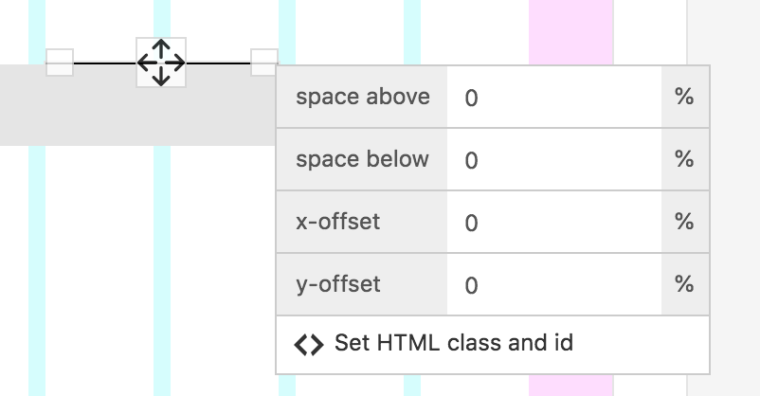
Then you can use the CUSTOM CSS to change it.
Hope I could help!
Best!
Marius
-
Hi @mariusjopen,
Many thanks for your quick reply!So i tried this css bit now:
.line{
stroke-width: 1px
}But it won't work... du you have any solutions for me?
Best, Paul
-
Hi @mariusjopen,
Many thanks for your quick reply!So i tried this css bit now:
.line{
stroke-width: 1px
}But it won't work... du you have any solutions for me?
Best, Paul
@paul_moxie to make your code valid you need a semicolon after 1px in your css:
.line {
stroke-width: 1px;
}
On the other hand I'm not quite sure if
stroke-widthwill work at all for an hr-element. I’d try something along these lines:.my-hr .lay-hr { height: 1px; }Then add the class
my-hr(call it whatever you fancy) to the hr-elements in the gridder. Unfortunately I can’t really explain why thelay-hrclass needs to be there – But it needs to be – It’s something about that CSS-parent-child-thing I never really wrapped my head around.Hope that helps!


Hello! It looks like you're interested in this conversation, but you don't have an account yet.
Getting fed up of having to scroll through the same posts each visit? When you register for an account, you'll always come back to exactly where you were before, and choose to be notified of new replies (either via email, or push notification). You'll also be able to save bookmarks and upvote posts to show your appreciation to other community members.
With your input, this post could be even better 💗
Register Login