Skip to content
  • Recent
  • Tags
  • Popular
  • Users
  • Search
Skins
  • Light
  • Brite
  • Cerulean
  • Cosmo
  • Flatly
  • Journal
  • Litera
  • Lumen
  • Lux
  • Materia
  • Minty
  • Morph
  • Pulse
  • Sandstone
  • Simplex
  • Sketchy
  • Spacelab
  • United
  • Yeti
  • Zephyr
  • Dark
  • Cyborg
  • Darkly
  • Quartz
  • Slate
  • Solar
  • Superhero
  • Vapor

  • Default (No Skin)
  • No Skin
Collapse

Lay Theme Forum

  1. Home
  2. Bug Reports
  3. png background not transparent (solved!)

png background not transparent (solved!)

Scheduled Pinned Locked Moved Bug Reports
9 Posts 3 Posters 2.0k Views 1 Watching
  • Oldest to Newest
  • Newest to Oldest
  • Most Votes
Reply
  • Reply as topic
Log in to reply
This topic has been deleted. Only users with topic management privileges can see it.
  • L
    L
    lortnok
    wrote on last edited by lortnok
    #1

    Re: Can't upload PNG (transparent background)

    Hey Guys,

    I have the same issue with pngs, that the backround in not transparent, I already disabled plugins.

    Thanks in advance for your quick response.

    1 Reply Last reply
    0
    • mariusjopenM
      mariusjopenM
      mariusjopen
      Global Moderator
      wrote on last edited by
      #2

      Dear @lortnok
      this is strange. Can you switch off in the settings section that wordpress uses resized images?

      Best!

      Marius

      www.mariusjopen.world

      1 Reply Last reply
      0
      • L
        L
        lortnok
        wrote on last edited by
        #3

        Dear Marius,

        Thanks for your reply!

        here is what I did:

        Thumbnail size Thumbnail sizeWidth
        0

        Height
        0
        Crop thumbnail to exact dimensions (normally thumbnails are proportional) not ticked
        Medium size Medium sizeMax Width
        0

        Max Height
        0
        Large size Large sizeMax Width
        0

        Max Height
        0

        After I saved the settings the medium size is 150x150 and not 0 0, it looks like I cannot change this somehow..
        Anyway is this what you meant?

        I still have the same issue with these settings. unfortunately.

        1 Reply Last reply
        0
        • edgrbnzE
          edgrbnzE
          edgrbnz
          wrote on last edited by
          #4

          Do you have an Image Placeholder Background Color defined in Lay Options?
          If so you need to clear this as the background color stays behind the images:
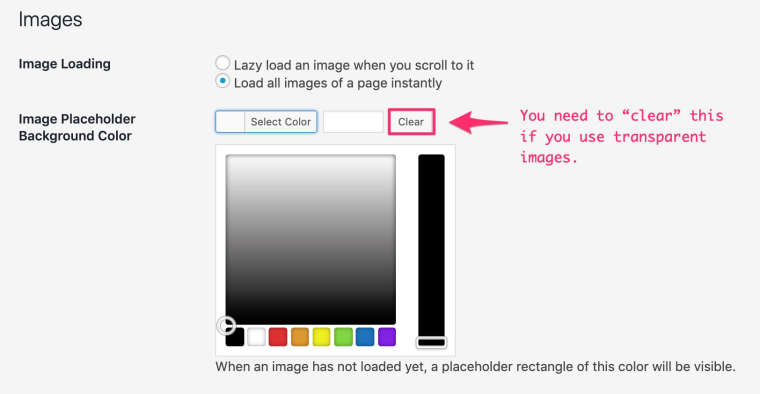
          0_1571163025149_Lay_Options_‹Moritz_Welker—_WordPress.jpg

          ✦ ✦ ✦

          L 1 Reply Last reply
          1
          • edgrbnzE edgrbnz

            Do you have an Image Placeholder Background Color defined in Lay Options?
            If so you need to clear this as the background color stays behind the images:

            0_1571163025149_Lay_Options_‹Moritz_Welker—_WordPress.jpg

            L
            L
            lortnok
            wrote on last edited by
            #5

            @edgrbnz all right this will solve the issue then, thanks. But if I set this to clear, that would mean I don't have placeholders right? that is no good. :S

            1 Reply Last reply
            0
            • L
              L
              lortnok
              wrote on last edited by
              #6

              It would be nice at least to have an option to set the placeholder/ image. So I could remove the placeholder only for the images which have transparent bg, is there a solution for this? Thanks in advance

              1 Reply Last reply
              0
              • edgrbnzE
                edgrbnzE
                edgrbnz
                wrote on last edited by edgrbnz
                #7

                Is using images with background an option?

                If you just replace said images with ones that do have the same background as your page these would also look like transparent and you can use placeholders → WIN✨WIN✨

                Otherwise there’s no solution for this. I had the same issue a while back and settled for no placeholders and heavily optimised images (to make them load really quick) – Works like a charm.

                ✦ ✦ ✦

                1 Reply Last reply
                0
                • L
                  L
                  lortnok
                  wrote on last edited by
                  #8

                  All right, thanks a lot for the explanation!

                  1 Reply Last reply
                  1
                  • edgrbnzE
                    edgrbnzE
                    edgrbnz
                    wrote on last edited by edgrbnz
                    #9

                    So I guess this is solved, isn’t it?

                    Would you mind editing the topic title to png background not transparent (solved!) or smeothing similar? This way users (with the same issues) can utilise the search function of the forum more easily.

                    Thanks! 💐

                    ✦ ✦ ✦

                    1 Reply Last reply
                    2

                    Hello! It looks like you're interested in this conversation, but you don't have an account yet.

                    Getting fed up of having to scroll through the same posts each visit? When you register for an account, you'll always come back to exactly where you were before, and choose to be notified of new replies (either via email, or push notification). You'll also be able to save bookmarks and upvote posts to show your appreciation to other community members.

                    With your input, this post could be even better 💗

                    Register Login
                    Reply
                    • Reply as topic
                    Log in to reply
                    • Oldest to Newest
                    • Newest to Oldest
                    • Most Votes


                    Online Users
                    Forgot your key, lost your files, need a previous Lay Theme or Addon version? Go to www.laykeymanager.com
                    laytheme.com
                    • Login

                    • Don't have an account? Register

                    • Login or register to search.
                    • First post
                      Last post
                    0
                    • Recent
                    • Tags
                    • Popular
                    • Users
                    • Search

