full screen slider: image and text on the same slide
-
Hey wonder if there is a quick way of doing this that I am missing:
I am trying to simply my portfolio website.
My idea was to use the full screen slider add on to allow my images to take centre stage. However I want small text captions to go with each image in the bottom left corner of the browser, the text would have to change for each slide to describe each project. I can't figure out a way of doing this, can anyone point me in the right direction? I have attached a screenshot of the current design, I haver annotated some blue lines where I want the caption to go in each image?


-
-
Oh ok, i will give that a go. Thanks
-
With the full screen slider you can easily add elements to each row.
Use browser height as row height and just add text where you need it, et voilà!@edgrbnz thank you so much! = so I gave this ago, it works pretty well. however some of my images overlap the text.
When I combined for images using a element grid it doesn't seem to happen overlap the text, but some single images do. any idea on how to avoid this the images overlapping with the caption text?


-
Well… that kinda is the resposive nature of the internet 🙂It’s kinda weird it’s happening, since the elements placed in the gridder usually don’t overlap each other… ( @arminunruh ?) Would you mind sharing some screenshots to see how you placed the emelents in the gridder?
Five ways I imagine you could go about this:
- Make the images smaller in the gridder / give them less Columns — That way you could at least make sure they don’t overlap in the resolutions you care for. (It might overlap in higher resolutions though)
- Use the Stack feature so Elements are stacked on top and the overlap won’t happen.
- Use Captions instead of text blocks.
- Create a Custom CSS class for centered max-width and assign that to the image — This way you could at least stop the images from scaling up at a certain width.
- Make the text Element full width and assign a class — that way you could style it with Custom CSS, give it a background color. The overlap would still be there but the text-box has a background so you won’t see it → not ideal.
All in all I think this looks very cool though and I personally would leave it this way! 🙃
-
hmm ok il have a play around. heres some screen shots. I have the images aligned to the centre and text to bottom.


-
I don't actually mind the overlap too much, but I think it might be problematic when it comes to darker imagery.
-
-
@edgrbnz My coding knowledge Is pretty bad, so I would rather not dive into that option aha.
-
Ok, I understand.
The mentioned thing shouldn’t be that complicated to do though.
So if you try you could always post your code here if something isn’t workin as expected. Also Armin did a decent job explaining how Custom CSS works with LayTheme.Anyhow, let us know how this goes & good luck!
-
Hehe wow thanks a lot for the help @edgrbnz
Well there is only this option that limits an image's dimensions, but it only works if there is just one image per row
(in lay options → fullscreen slider)
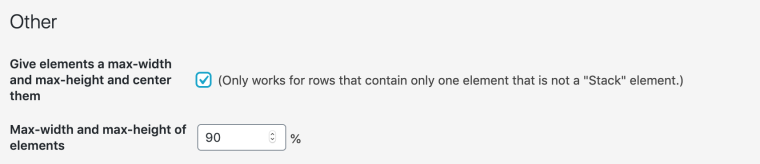
you could also use white text on the slides where you fear the text won't be readable
good luck


Hello! It looks like you're interested in this conversation, but you don't have an account yet.
Getting fed up of having to scroll through the same posts each visit? When you register for an account, you'll always come back to exactly where you were before, and choose to be notified of new replies (either via email, or push notification). You'll also be able to save bookmarks and upvote posts to show your appreciation to other community members.
With your input, this post could be even better 💗
Register Login