Skip to content
  • Recent
  • Tags
  • Popular
  • Users
  • Search
Skins
  • Light
  • Brite
  • Cerulean
  • Cosmo
  • Flatly
  • Journal
  • Litera
  • Lumen
  • Lux
  • Materia
  • Minty
  • Morph
  • Pulse
  • Sandstone
  • Simplex
  • Sketchy
  • Spacelab
  • United
  • Yeti
  • Zephyr
  • Dark
  • Cyborg
  • Darkly
  • Quartz
  • Slate
  • Solar
  • Superhero
  • Vapor

  • Default (No Skin)
  • No Skin
Collapse

Lay Theme Forum

  1. Home
  2. General Discussion
  3. White Blank Page after newest Update. Now total error! Please help.
White Blank Page after newest Update. Now total error! Please help.

Scheduled Pinned Locked Moved General Discussion
19 Posts 3 Posters 1.9k Views 1 Watching
  • Oldest to Newest
  • Newest to Oldest
  • Most Votes
Reply
  • Reply as topic
Log in to reply
This topic has been deleted. Only users with topic management privileges can see it.
  • arminunruhA
    arminunruhA
    arminunruh
    Global Moderator
    wrote on last edited by arminunruh
    #4

    Yeah that's weird.

    If you like you can send me your FTP details, server, username, password to info@laytheme.com
    and your /wp-admin/ details and website address and a link to this topic

    and then i'll take a look as to why this happens

    1 Reply Last reply
    0
    • V
      V
      vonMatthias
      wrote on last edited by
      #5

      ok, I did. thanks in advance!

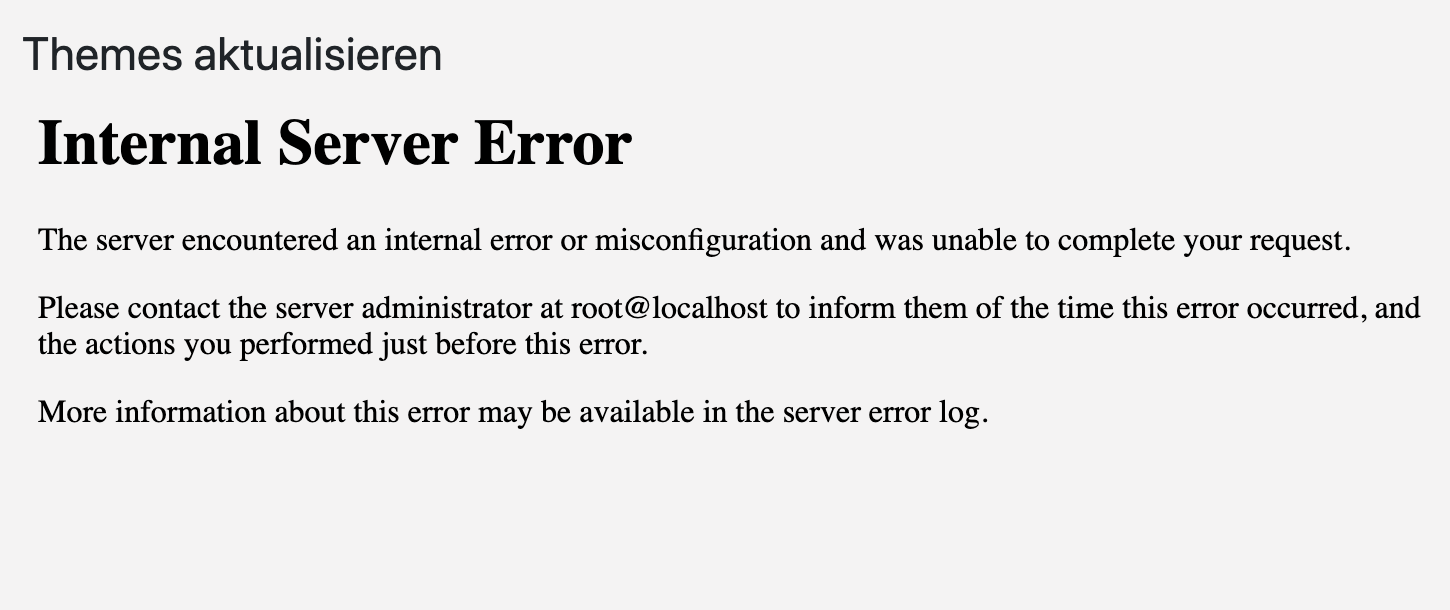
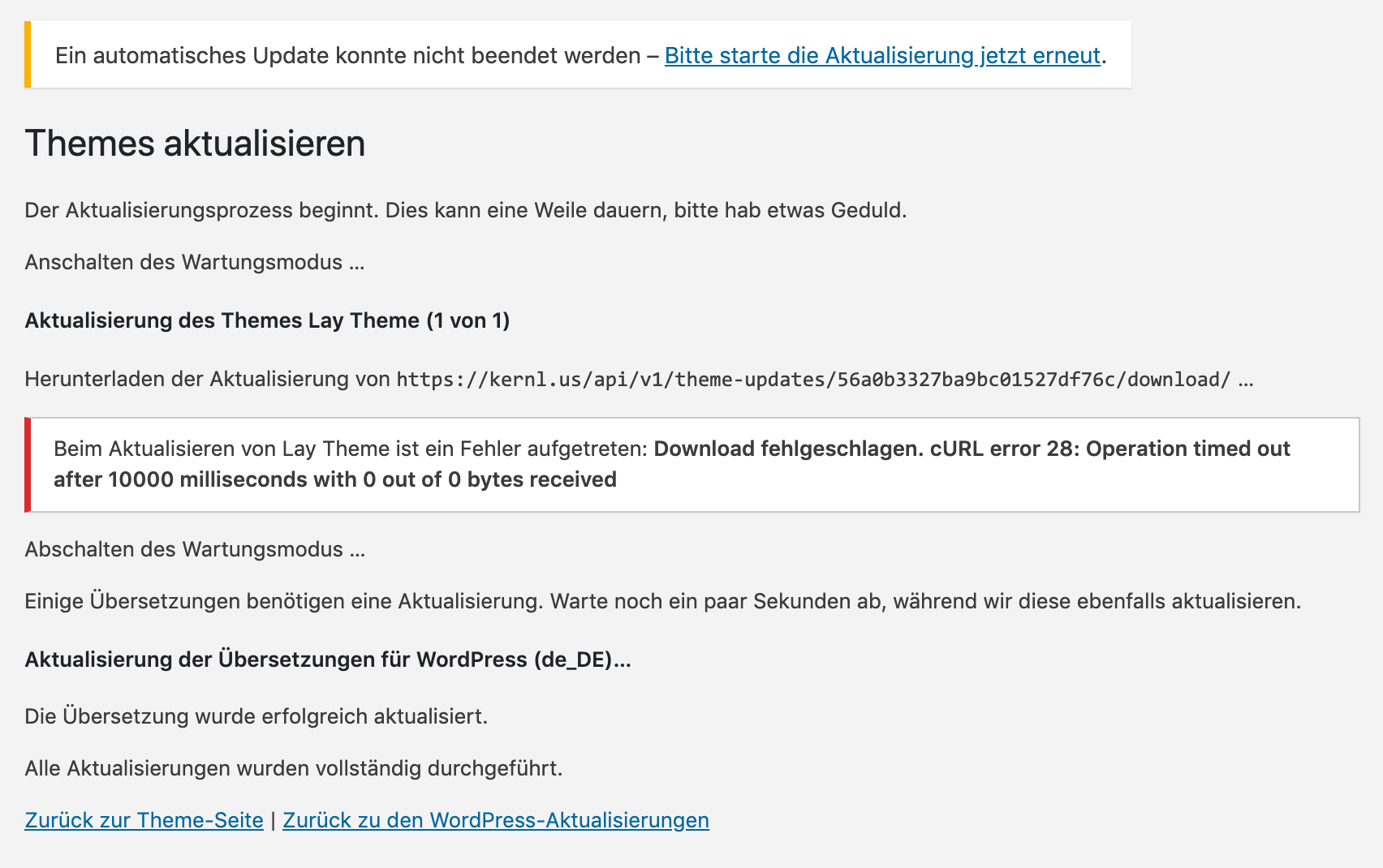
      I found out that I have not updated correctly, since it breaks up.
      some how I cant update..
      53638db8-6781-4ab7-88e1-d4c04b02c3f8-image.png

      1 Reply Last reply
      0
      • arminunruhA
        arminunruhA
        arminunruh
        Global Moderator
        wrote on last edited by
        #6

        there might be an issue with your webserver not sure maybe contact your webhost?
        i sent the latest version of lay theme to your email address that you registered on the forum with

        1 Reply Last reply
        0
        • V
          V
          vonMatthias
          wrote on last edited by
          #7

          I got the mail,thanks, so can I just exchange a file with another one in my ftp account or would I need to install the whole thing new?
          I mean it just worked fine yesterday before the update.. so what would I ask my provider?

          1 Reply Last reply
          0
          • V
            V
            vonMatthias
            wrote on last edited by
            #8

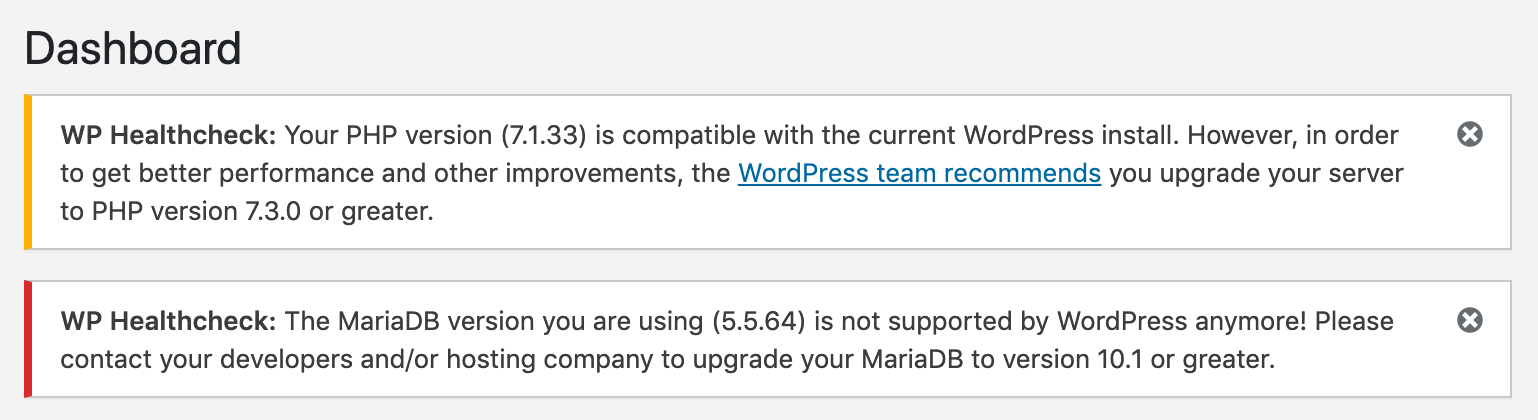
            I wrote my provider to check about those issues..
            b2e11b2d-638b-4358-b0c3-99b10c17adaf-image.png

            1 Reply Last reply
            0
            • arminunruhA
              arminunruhA
              arminunruh
              Global Moderator
              wrote on last edited by
              #9

              you can activate a different theme, then click on lay theme and click delete, then upload the new version

              1 Reply Last reply
              0
              • arminunruhA
                arminunruhA
                arminunruh
                Global Moderator
                wrote on last edited by
                #10

                ah yea you need to set a different php version when you login to your webhost control panel u can do it there

                1 Reply Last reply
                0
                • V
                  V
                  vonMatthias
                  wrote on last edited by
                  #11

                  Ok, I am slowly fixing it myself.
                  Still, thumbnail grid will only make 1x1 full page thumbnails, no 2 or 3 in a row.. but I will recheck in 30 min..

                  1 Reply Last reply
                  0
                  • V
                    V
                    vonMatthias
                    wrote on last edited by
                    #12

                    If you have time, maybe you can re-check why I can only see ( in any project-Footer) my Thumnails full-page-size, even though I selected 2 thumbs a row.. ? I don't make to fix it : (

                    1 Reply Last reply
                    0
                    • V
                      V
                      vonMatthias
                      wrote on last edited by
                      #13

                      Also all the videos don't LoOP anymore, but make a "one-second-stop" by the end of the video.. ..

                      1 Reply Last reply
                      0
                      • V
                        V
                        vonMatthias
                        wrote on last edited by
                        #14

                        Loops Solved. Or at least there is almost no delay anymore. Maybe it was my machine or something else. LAST one: the Thumbnail-Grid

                        1 Reply Last reply
                        0
                        • arminunruhA
                          arminunruhA
                          arminunruh
                          Global Moderator
                          wrote on last edited by
                          #15

                          i think the thumbnail grid in footers should work
                          make sure u use the latest lay theme versions and clear your cache in your wordpress cache plugin

                          if that doesnt help please post a link to where u see the problem

                          1 Reply Last reply
                          0
                          • V
                            V
                            vonMatthias
                            wrote on last edited by
                            #16

                            https://studio.vonmatthias.de/tommy-cash
                            The last 5 fullscreen-pics are a thumbnail-grid.. and they should be 2 in a row, not 1.
                            Its basically on every project.

                            if I use a browser I never viewed the site before, it still will show 1 pic per line.

                            Also after emtying the cache for sure.

                            Do you see it in two rows?..

                            strangely, in case I just open the footer as site > https://studio.vonmatthias.de/footer

                            it works..
                            but scrolling down on any project..
                            https://studio.vonmatthias.de/if-i-was-me/

                            it won't..

                            do you see it?

                            1 Reply Last reply
                            0
                            • V
                              V
                              vonMatthias
                              wrote on last edited by
                              #17

                              So yes. Even adding it manually beneath every project would show it in the right way. But having it in the footer and putting this footer with the grid unterneath a project, wond show it right! ..

                              1 Reply Last reply
                              0
                              • V
                                V
                                vonMatthias
                                wrote on last edited by
                                #18

                                after installing the update > EVERYTHING WORKS !!!
                                THANK YOU SO MUCH, ARMIN !

                                1 Reply Last reply
                                1
                                • Sascha BenteS
                                  Sascha BenteS
                                  Sascha Bente
                                  wrote on last edited by
                                  #19
                                  This post is deleted!
                                  1 Reply Last reply
                                  0

                                  Hello! It looks like you're interested in this conversation, but you don't have an account yet.

                                  Getting fed up of having to scroll through the same posts each visit? When you register for an account, you'll always come back to exactly where you were before, and choose to be notified of new replies (either via email, or push notification). You'll also be able to save bookmarks and upvote posts to show your appreciation to other community members.

                                  With your input, this post could be even better 💗

                                  Register Login
                                  Reply
                                  • Reply as topic
                                  Log in to reply
                                  • Oldest to Newest
                                  • Newest to Oldest
                                  • Most Votes


                                  Online Users
                                  Forgot your key, lost your files, need a previous Lay Theme or Addon version? Go to www.laykeymanager.com
                                  laytheme.com
                                  • Login

                                  • Don't have an account? Register

                                  • Login or register to search.
                                  • First post
                                    Last post
                                  0
                                  • Recent
                                  • Tags
                                  • Popular
                                  • Users
                                  • Search