Project thumbnails - disable links on specific elements
-
Hi there!
I'm building the projects index page of my portfolio. There'll be a collection of project thumbnails, with titles always visibile and the images showing on rollover.
Since there'll be also a few work in progress projects, the idea is to make these thumbnails not clickable (so you just see them among the work list as a little preview, but you can't reach the specific project page as it will be empty).
I've tried this on the .thumb elements:
.thumb  {
    pointer-events: none;
}
It pretty much does the job, but of course now every thumbnail link gets disabled.
Is there a way to point out to specific .thumb elements?
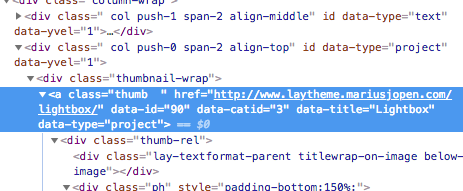
I've noticed that .thumb elements also have these tags, maybe is there a way to use them in the css selector?
data-id="73" data-catid="1" data-title="Title here"Thanks!
F -
Dear @fabiofrl
no, this is not possible yet.I assume you are talking about the Thumbnail-Grid.
I will write it down for the future.
Best!
Marius
-
Dear @mariusjopen
thank you!No I'm not using the Thumbnail-Grid.
I prefer to use one-by-one single Project-Thumbnail to make it easier for me to customize the layout as I wish (eg. make a specifc project-thumbnail bigger or smaller to control hierarchy...).Thanks anyway!
F
-
-
Hello Marius, I try to do the same but maybe my code is wrong it dident' work :
body[data-type="page"][data-id="1984"] .thumb {
pointer-events: none;
}I use the single Project-Thumbnail.
I have also try to put some id but it didn't work either:.no .thumb {
pointer-events: none;
}Could you help me ? thanks.
Sophie -
Dear @Sophie
you can give those elements a class by using jQuery. In jQuery you can use those [data-type="page"][data-id="1984"] to select the elenemt.Once the element has a custom class, you can change it with CSS.
Not very intuitive, but the way to go :-DBest!
Marius -
@mariusjopen said in Project thumbnails - disable links on specific elements:
jQuery
Dear @mariusjopen
Thank you very much, I didn't receive notification of your answer !!
Unfortunately I dont' know well JQuery so I am note really sure to understand.here is what I tried but it didn't seem good, it's not working...
jQuery:
<script>
jQuery( "a[data-type="project"][data-id="2632"]" ).thumb .addClass("future");
</script>CSS:
.future .thumb {
pointer-events: none;
}sorry to bother you with this, and thank you for your answer !
Sophie
-
-
-
Dear @Sophie
If you haven't already you need to look into adding Custom Javascript to Lay Theme
http://laytheme.com/documentation.html#custom-javascript
Your Code Must first go within the surrounding code.
window.laytheme.on("newpageshown", function(layoutObj, type, obj){


});
Hope this helps
Sincerely
Richard


Hello! It looks like you're interested in this conversation, but you don't have an account yet.
Getting fed up of having to scroll through the same posts each visit? When you register for an account, you'll always come back to exactly where you were before, and choose to be notified of new replies (either via email, or push notification). You'll also be able to save bookmarks and upvote posts to show your appreciation to other community members.
With your input, this post could be even better 💗
Register Login